● Check SSID and security settings of the AP. Refer to the appropriate
documentation for SSID and security settings of the AP.
● Invalid settings of network devices (wired/wireless line sharer, hub) can cause
the TV to operate slowly or not operate properly. Install the devices correctly
according to the appropriate manual and network.
● The connection method may differ depending on the AP manufacturer.
● To solve a problem related to this function, please go to:
/ / Connection / Network Connection Settings / Wired Connection
(Ethernet)
- or -
/ / Connection / Network Connection Settings / Wi-Fi Connection /
Advanced Wi-Fi Settings
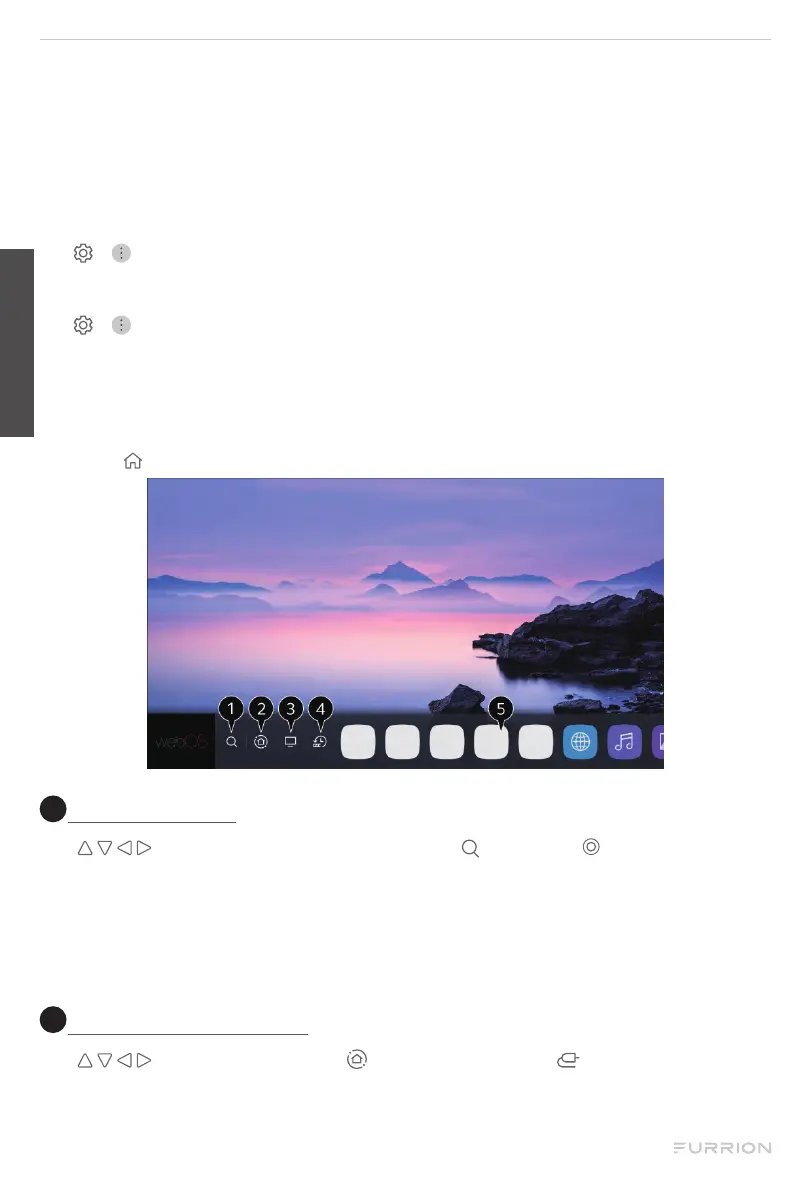
Using the Home Feature of the webOS TV
The home screen will be displayed automatically when the TV is turned on. If not,
press the button on the remote control to pop it up.
1
Launch search
Use buttons to navigate to and highlight , then press to start searching.
You can search for a variety of content and information using the desired search
terms.
NOTE: You must connect to the network to use the search feature. The search results
may vary depending on the channel, region, network settings, and whether you have
agreed to the terms and conditions.
2
Use home dashboard
Use buttons to navigate to or press and hold the button to select home
dashboard. You can select or control a device (mobile, external device, Home IoT
Devices, etc.) connected to the TV.
English
CCD-0005519 Rev: 03-22-22
- 21 -


 To Next Page