INSTALLATION
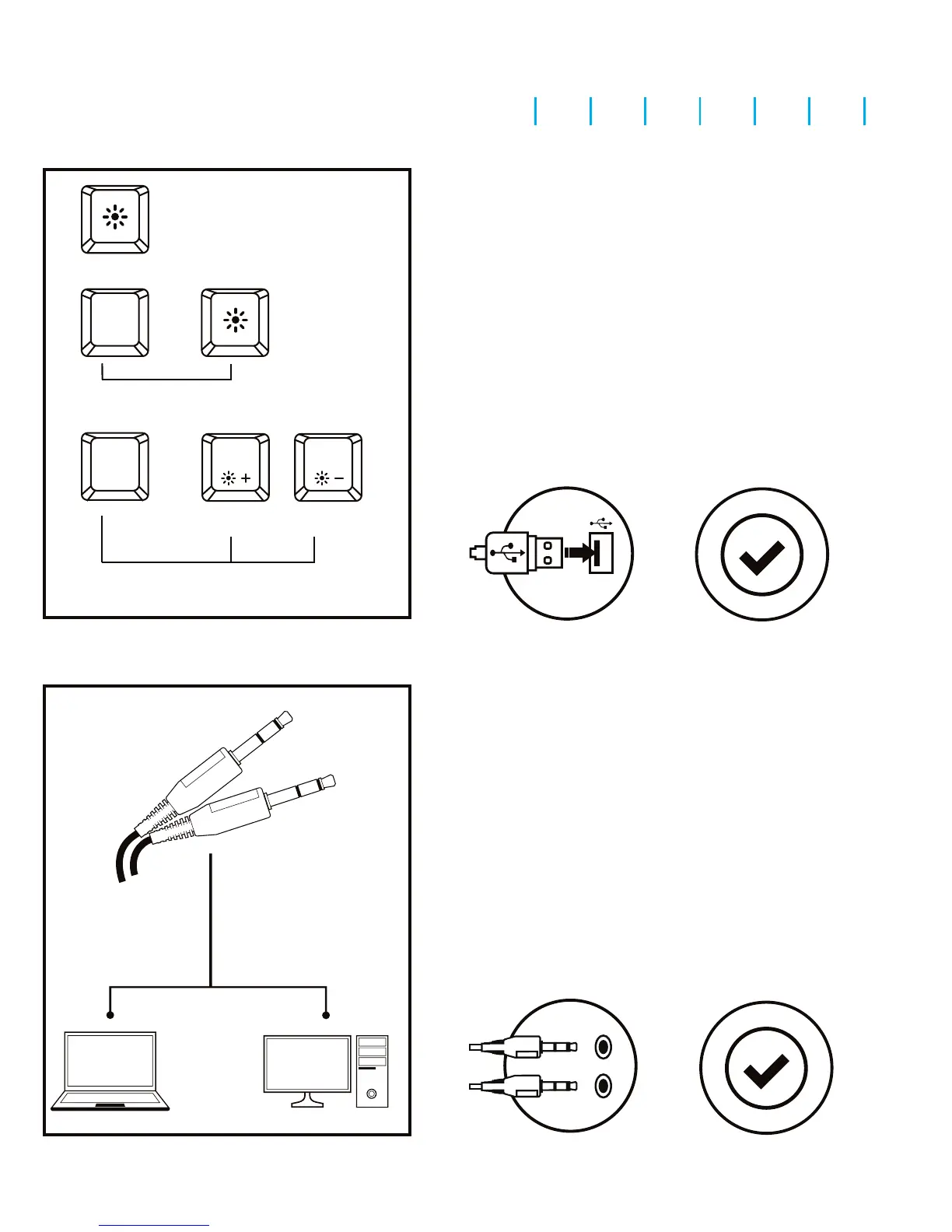
• Connect the device to the USB port in your computer
• System will install driver automatically
Press the LED key to turn ON/OFF
the backlight.
Press the keys Fn + LED to change backlight
between permanent and breathing mode.
To change the keyboard backlight mode
press keys Fn + Pg Up/Pg Dn.
EN PL CZ SK DE RO RS BG
led
FN
+
FN
+
page up
Page
Up
page down
Page
Down
1. 2.
SPECIFICATION
• Keyboard size
• Keyboard weight
• Connector
• Number of key
• Number of multimedia keys
480x225x30 mm
880g
USB
104
12
INSTALLATION
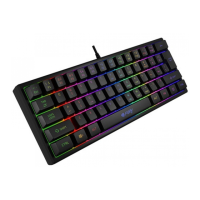
• Connect the device to the mini jack port in your computer
• Operating system will detects the device automatically
1. 2.
SPECIFICATION
• Sound pressure level
• Headphones frequency response
• Impedance
• Microphone sensitivity
• Connector
• Cable length
108 dB
20 – 20 000 Hz
32 Ohm
-56 dB
2 x 3,5mm mini jack
1,8m
KEYBOARD USER MANUAL
HEADSET USER MANUAL



 To Next Page