After installation and testing of this product it is essential that the INSTRUCTION LEAFLET is available for reference
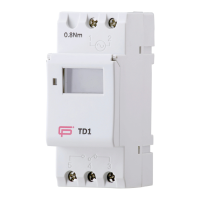
TD1 Time Switch
Instruction Leaflet DOCTD12021
5 Pulse (“P” displayed at left hand side of LCD)
Programming ON memory location
Enter pulse setting (“P” will display LHS)
Set pulse time range: 1sec to 59min 59sec
To confirm pulse time range (“P” flashes)
Into setting 1 ON time (display 1 ON)
DEFAULT IS EVERY DAY OF THE WEEK or you can select one of
the following options by pressing the D+ button
OPTIONS: MO-FR,MO-SA,SA SU,MO-WE,TH-SA,MO WE FR,TU
TH SA
Set 2-18 ON PULSE programs (OFF programs not required!)
End (“P” will continue to flash when PULSE program is set)
6 Countdown (“d” displays in bottom LHC)
This is a manual operation only initiated by pressing the “MANUAL” button on the TD1
Programming COUNTDOWN function
Enter COUNTDOWN setting (“d” displays in bottom LHC)
Set COUNTDOWN time range: 1sec to 99min 59sec
Return to start of COUNTDOWN
End COUNTDOWN (“d” no longer displayed in bottom LHC)
Programming PAUSE function
Press and MANUAL for 3s
Permanent “AUTO OFF” state(“┌” flashes in bottom LHC)
Press and MANUAL for 3s
To restore “AUTO” settings
PAUSE function can only be accessed when “AUTO ON” or “AUTO OFF” is displayed on the LCD
8 Auto time correction (“7d” displayed at left hand side of LCD)
Programming ON memory location
5 Testing
5a On completion of the installation, it must be tested in accordance with the latest edition of the IET Wiring
Regulations for Electrical Installations (BS 7671).
Environment
WASTE ELECTRICAL PRODUCTS SHOULD NOT BE DISPOSED OF IN HOUSEHOLD WASTE. CONTACT YOUR RETAILER OR LOCAL
AUTHORITY FOR RECYCLING INFORMATION.
FuseBox
www.fusebox.co.uk


 To Previous Page
 Loading...