006
CONNECTIONS
A CABLE
DESCRIPTION COLOUR
Battery +12VDC Yellow
Ignition +12V switched Red
Negative Ground Black
Remote Amplifier Turn On Blue/White
DIM +12V switched Brown
Mute / Tele-Interupt -12V switched Brown/White
DIM
Connect to vessel lighting sytem to dim LCD and
button illumination when vessel lights are turned on.
2 WIRE REMOTE
Connect to FUSION 2 Wire Remote (not included).
TELE MUTE / INTERUPT
Connect to handsfree kit to either mute the stereo or
switch to AUX to hear call.
Note: If ‘turn on’ from ignition is not required, the
+12V ignition (Red) and +12V battery (Yellow) can be
connected together.
CONNECTIONS
005
WIRING DIAGRAM
WIRING DIAGRAM
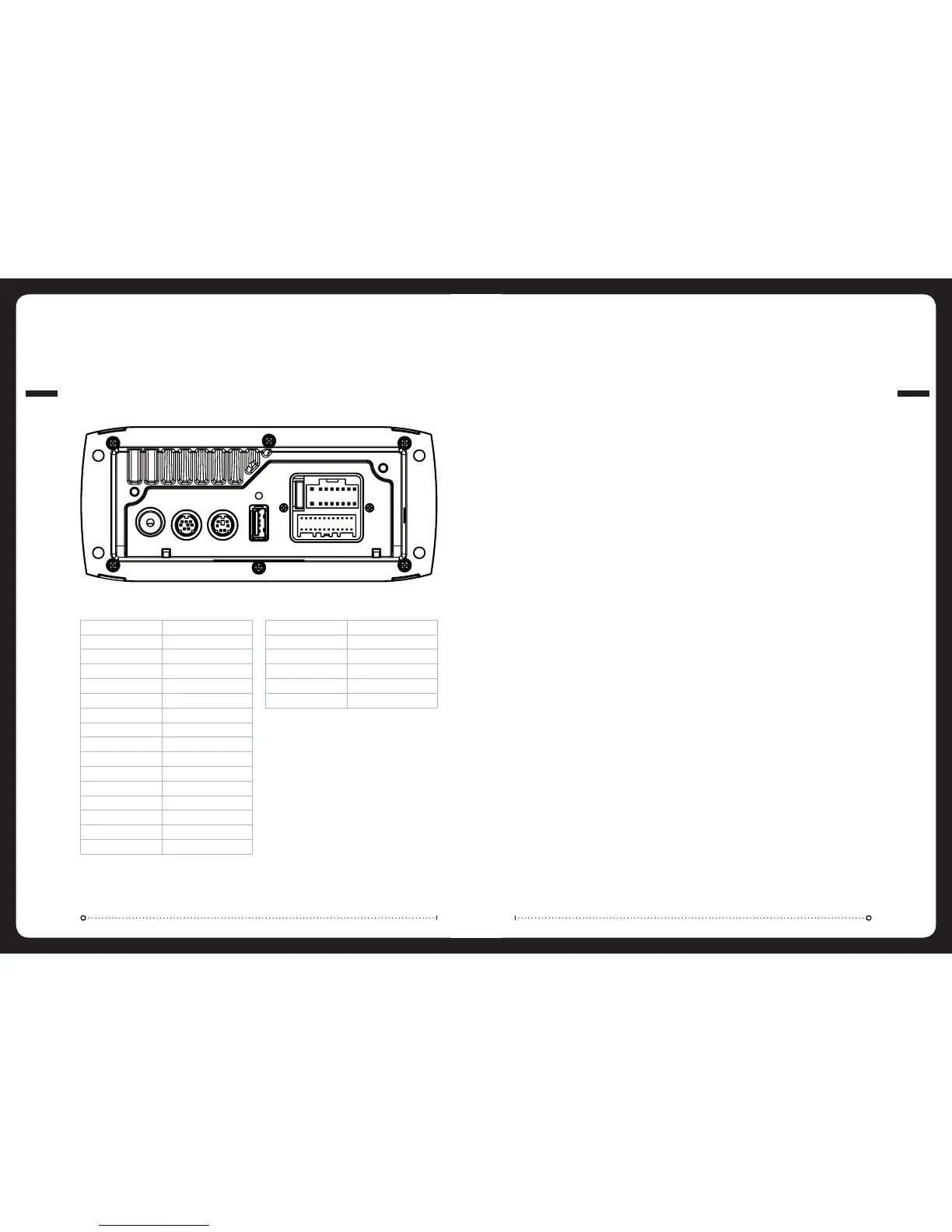
SIRIUS REMOTEAERIAL USB
B CABLE
WHITE RCA (Grey wire) AUX-IN (L)
RED RCA (Grey wire) AUX-IN (R)
ORANGE RCA (Black wire) SUB-OUT
ORANGE RCA (Black wire) SUB-OUT
WHITE RCA (Black wire) LINE-OUT ZONE 1 ( L)
RED RCA (Black wire) LINE-OUT ZONE 1 (R)
A CABLE
YELLOW POWER (+)
RED IGNITION (+12V switched)
BLACK GROUND (-)
WHITE SPEAKER ZONE 1 L (+)
WHITE/BLACK STRIPE SPEAKER ZONE 1 L (-)
GREY SPEAKER ZONE 1 R (+)
GREY/BLACK STRIPE SPEAKER ZONE 1 R (-)
GREEN SPEAKER ZONE 2 L (+)
GREEN/BLACK STRIPE SPEAKER ZONE 2 L (-)
PURPLE SPEAKER ZONE 2 R (+)
PURPLE/BLACK STRIPE SPEAKER ZONE 2 R (-)
ORANGE 2 WIRE REMOTE
ORANGE/WHITE STRIPE 2 WIRE REMOTE
BROWN DIM (+12V switched)
BLUE/WHITE STRIPE AMPLIFIER ON
BROWN/WHITE STRIPE TEL MUTE / INTERUPT
Note: Sub + Lineout volume control is linked to Zone 1.
A
B
B CABLE
AUX INPUT
Connect an Auxiliary source to the left and right RCA
(White = L, Red = R).
SUBWOOFER OUT (DUAL MONO)
Connect to an amplifier, volume control linked to
Zone 1. (Orange + Orange)
LINEOUT ZONE 1
Connect to an amplifier, volume control linked to
Zone 1. (White = L, Red = R).
AERIAL CONNECTION
Connect an AM/FM marine antenna or FM/VHF splitter.
USB/iPod CONNECTION
Connect a USB storage device (not included) or the
MS-DKIP / MS-DKIPUSB Marine Docks for iPod (not
included) or a certified Apple iPod lead (not included).
SIRIUS SATELLITE RADIO (For use in USA only)
Connect to SiriusConnect™ tuner (not included)
WIRED REMOTE (MS-WR600)
Connect a marine wired remote to the CANbus system
connector.
Up to 3 remotes can be connected to the system.


 To Next Page