110
< Linkagemenu >
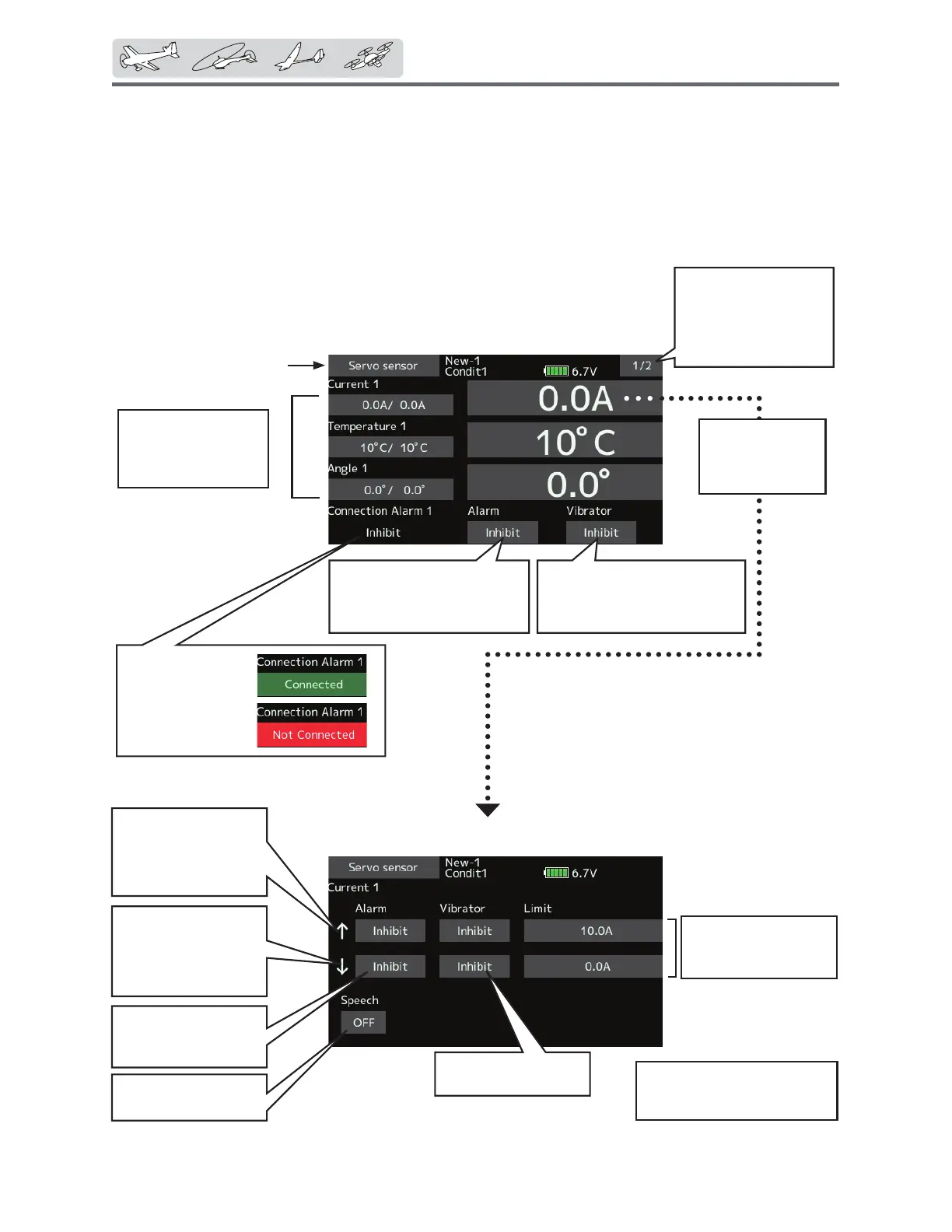
Taphereandgotothe
Servo2settingspage.
(Displayandsettings
contentisthesameas
Servo1.)
WhentheAlarmor
Vibratoroptionsare
activated,theservo
connectionwill
display.
*ThisalarmanddisplayislimitedtotheS.BUS
servosconnectedtotheservosensors.
Tappingthiswill
takeyoutothe
settingsscreenfor
thecurrentalarm
Telemetry:Servosensor[Current]
7KH6%66FDQPRQLWRUDQGGLVSOD\WKH
in-flight current, operating angle, and internal
WHPSHUDWXUHRIXSWRWZR6%86VHUYRV
If you forget to connect the servo wiring during
fuselage assembly, or the servo was disconnected,
an alarm can be activated at the transmitter.
*Servosensormustbeinstalledintheaircraft.
ŏ6HOHFW>6HUYRVHQVRU@LQWKH7HOHPHWU\
VFUHHQDQGDFFHVVWKHVHWXSVFUHHQ
VKRZQEHORZ
Max.andmin.values
sincethepower
wasturnedONwill
display.
Setsthecurrenton
whichthealarm
operates.
Alarmischosenfrom
Buzzer,Voice,and
Inhibit.
AllowsSpeechtobe
turnedONorOFF.
Vibratorischoicesare
type1-3,andInhibit.
↑Anupwardarrow
indicatesthealarm
willsoundwhenthe
currentreachesabove
yoursetvalue.
↓Adownwardarrow
indicatesthealarm
willsoundwhenthe
currentreachesbelow
yoursetvalue.
Initialvalue:↑ 10.0A↓ 0.0A
Adjustmentrange0.0A~10.0A
( ↑ Limit≧↓ Limit)
ŏ5HWXUQWR/LQNDJHPHQX
Tappingthisandselecting
"Buzzer"willcausethedevice
tosoundanalarmwhen
servosarenotconnected.
Tappingthisandselecting
"Eachtype"willcausethe
devicetovibratewhenservos
arenotconnected.


 To Next Page
 Loading...











