67
< Linkagemenu >
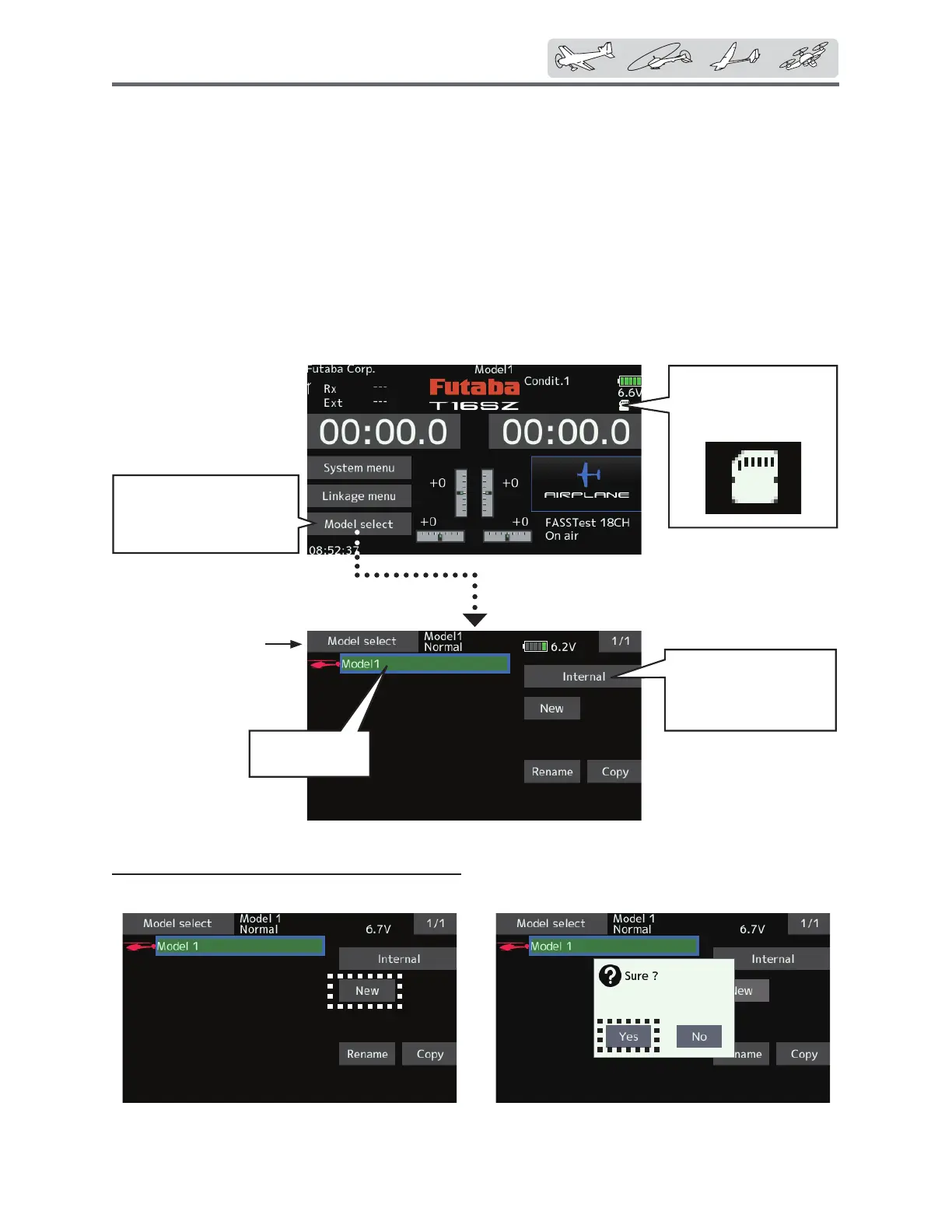
●Tapthe[Modelselect]
buttonintheHome
screentocallthesetup
screenshownbelow.
<or>
Currentmodelis
green.
Modelselect
7KH0RGHOVHOHFWLRQIXQFWLRQSHUIRUPVPRGHODGGLWLRQFDOO
GHOHWLRQFRS\DQGPRGHOQDPHVHWWLQJ
This function is used to load the settings of the
GHVLUHGPRGHOLQWRWKH76=¶VPHPRU\
The settings may be selected from either the
WUDQVPLWWHU¶VEXLOWLQPHPRU\RUDQ6'FDUG
0%*%5HPHPEHUWKDWXSWRPRGHO
memories are available in the transmitter.
The name of the model stored in the transmitter
and the SD card may be changed. This can be very
useful to tell different models settings apart. Each
PRGHOQDPHFDQEHDVORQJDVFKDUDFWHUVDQG
the model name always appears in the display
screen.
The Copy function is used to copy one set
of model data into a second memory within the
transmitter and the SD card. It may be used for
getting a head-start on setting up models with
DOPRVWWKHVDPHVHWWLQJVRQO\GLIIHUHQFHVQHHGWR
EHPRGL¿HGLQVWHDGRIHQWHULQJWKHFRPSOHWHPRGHO
IURPVFUDWFK$OVRWKLVIXQFWLRQPD\EHXVHGWR
make a backup copy of a model setup before any
changes are made.
ŏ6HOHFW>0RGHOVHOHFW@DW
WKHOLQNDJHPHQXDQG
FDOOWKHVHWXSVFUHHQ
VKRZQEHORZ
Model addition
7DSWKH>1HZ@EXWWRQ
7DS><HV@WRDGGWKHPRGHO:KHQ\RXZDQW
WRFDQFHOPRGHODGGLWLRQWDS>1R@
*The added model is displayed in the model list.
*When a model is added, a receiver link is required.
● "Saveto"
[Internal]:transmitter
memory
[SDcard]:SDcard
ŏ5HWXUQWR+RPHRU
/LQNDJHPHQX
● Whenmodeldataon
aSDcardisused,this
iconappears.


 To Next Page
 Loading...











