95
< Linkagemenu >
Display Sensors
Default display sensors can only be used by
connecting the sensors to the receiver. For display
of other sensors or to use the same type of sensor in
multiple cases, either register them via the "Sensor"
option on the Linkage menu or allocate the sensors
to empty slots to have them display on the Telemetry
VFUHHQ5HIHUWRWKHSUHYLRXV6HQVRUH[SODQDWLRQ
pages for how to do this.
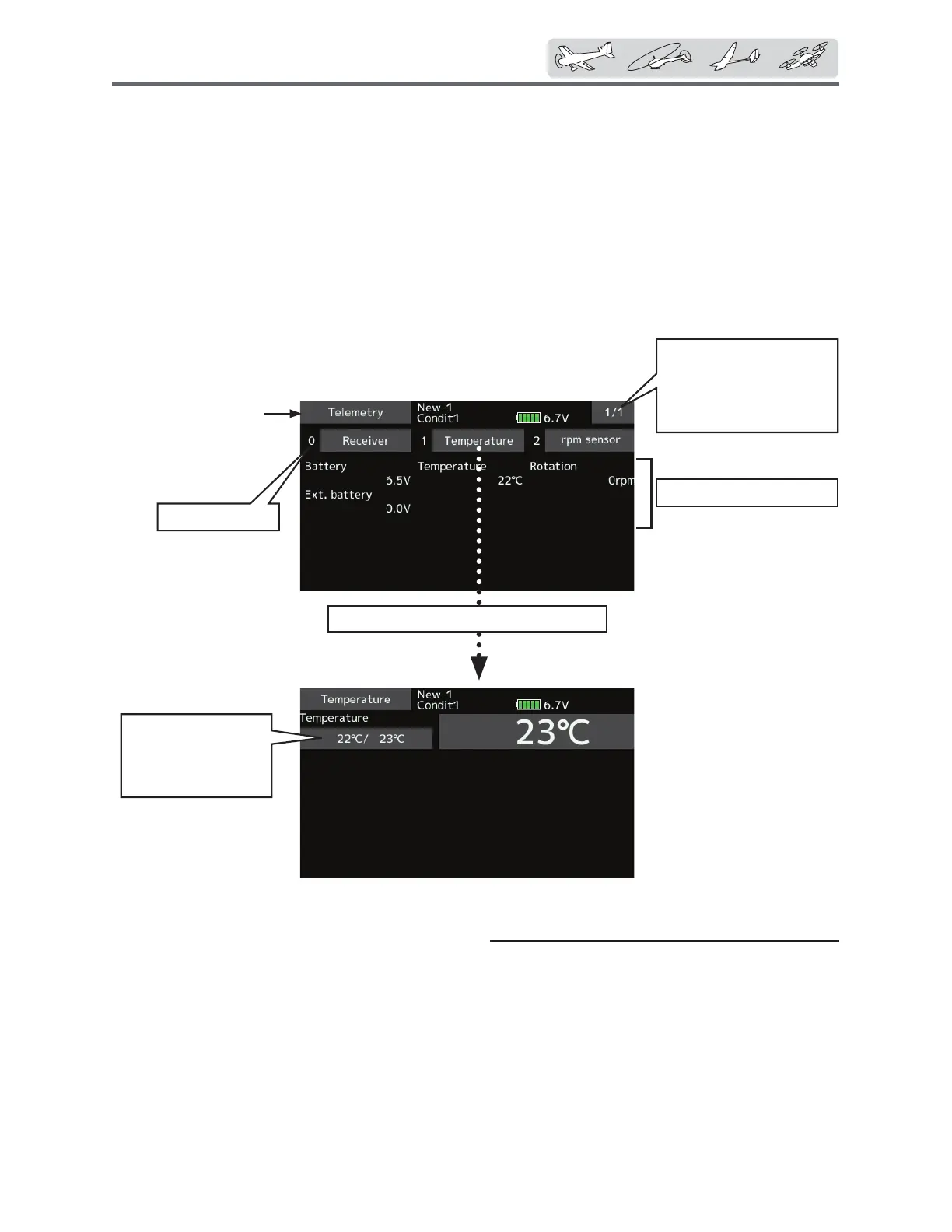
Varioustelemetrydata
Choosethedesiredsensorandtap.
Startslotnumber
Telemetry
'LVSOD\LQJGDWDIURPWKHUHFHLYHU
This screen displays your choice of data from the
receiver.
Also warnings can be activated regarding the
GDWD)RUH[DPSOHLIWKHUHFHLYHUYROWDJHGURSVWKH
XVHUFDQEHZDUQHGE\DQDODUPDQGYLEUDWLRQ
ŏ7DSWKH>7HOHPHWU\@EXWWRQLQWKH/LQNDJHPHQXWR
FDOOWKHVHWXSVFUHHQVKRZQEHORZ
Tappagebuttonto
advancetonextpage.
(Thenumberofpages
changeswiththenumber
ofsensorregistration.)
Max.andmin.values
sincethepower
wasturnedONwill
display.
ŏ5HWXUQWR/LQNDJHPHQX


 To Next Page
 Loading...











