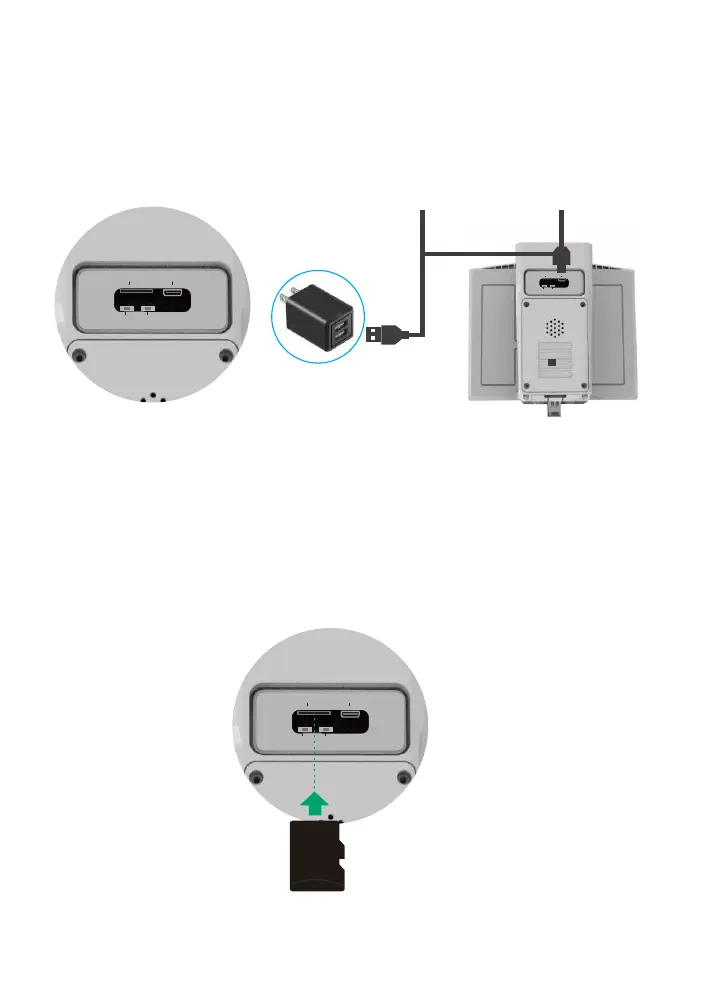
Charging
lnsert SD card
Please charge the camera about 10-12 hours by plugging it
into a power source using the provided USB cable. After
connecting the camera with App, the App will indicate the
battery status.
Please format the SD card to FAT32 format (Application to
Windows system ONLY), then install the micro-SD card when
the camera is off. The camera only supports class 10 SD cards
with at least an 8GB capacity and a maximum capacity of 64GB
(There's no indicator to show charging status
from the camera)
SD Card
TF
DC/5V
APP/WIFI
RST
TF DC/5V
APP/WIFI RST
TF
DC/5V
APP/WIFI
RST


 To Next Page