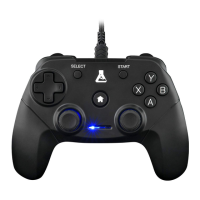
This document describes the K-PAD THORIUM-SW, a wireless and PC gaming controller.
Function Description
The K-PAD THORIUM-SW is a versatile gaming controller designed for use with Nintendo Switch and PC. It offers both wireless and wired connectivity options. The controller features a standard gamepad layout with two analog sticks, a D-pad, face buttons (A, B, X, Y), shoulder buttons (L, R, ZL, ZR), and additional function buttons like Screenshot, Home, and Turbo. It supports both X-Input and D-Input modes, allowing compatibility with a wide range of games and platforms.
A key feature of this controller is its "Turbo Mode," which allows users to assign a rapid-fire function to specific buttons (A, B, X, Y, L, R, ZL, ZR). This can be set as a standard Turbo, requiring the button to be held down for rapid firing, or an "Auto Turbo," which continuously fires without needing to hold the button. The Turbo speed is adjustable with three levels: Minimum (5 shots per second), Moderate (12 shots per second), and Maximum (20 shots per second). The controller also includes vibration feedback, enhancing the gaming experience.
For connectivity, the controller supports wireless pairing with the Nintendo Switch and PC. For wired connection, it uses a Type-C port on the controller and a USB port to connect to the Switch dock or PC. The manual outlines specific steps for pairing and connecting, including switching between D-Input and X-Input modes for PC compatibility.
The device also has a sleep mode to conserve battery, activating after 5 minutes of inactivity when connected. It can be woken up by pressing the Home button. A reset function is available by holding the Home button for 10 seconds.
Important Technical Specifications
- Dimensions: 154mm * 110mm * 54mm
- Weight: 185g ± 10g
- Compatibility: Switch/PC
- Input: 5V 300mA
- Output: 3V 130mA
- Battery: 600mAh
- Box content: Gamepad (1 pc), charging cable (1 pc)
- Number of buttons: 14 buttons + 2 joysticks + 1 D-pad
- Turbo: Yes
- Vibrations: Two vibrations
- Wired/Wireless: Wireless
- Jack input: Type-C port
- Autonomy: 8-10 hours
- Charging time: 2-3 hours
- Transmitting power (Puissance d'émission | Potencia de transmisión | PIRE [dBm]/EIRP[dBm]): Maxi: -30 dBm, Mini: -54 dBm
- Frequency band (Bande de fréquences | Banda de frecuencia): Maxi: 12.75 GHz, Mini: 30 MHz
Usage Features
Pairing and Connecting (Wireless):
- Switch Setup:
- Press the Sync button on the controller for 5 seconds. The LEDs will flash in turn.
- On the Nintendo Switch, navigate to "Controllers" and select "Change Grip/Order."
- For initial pairing, continue holding the Sync button until all 4 LEDs flash for 3 seconds, then wait for the connection to complete.
- For reconnecting a previously paired controller, simply press the Home button.
- PC Setup:
- The controller is compatible with Windows.
- To switch between X-Input and D-Input modes, press the Home button for 5 seconds. X-Input is generally preferred for modern PC games, while D-Input offers broader compatibility with older titles.
Wired Connection (Switch Mode):
- Enable "PRO Controller Wired Communication" in the Nintendo Switch System Settings.
- Place the Nintendo Switch console in its dock.
- Connect the Type-C cable to the controller and the USB port to the Switch dock. The channel LED will remain lit, indicating a successful wired connection.
Turbo Mode:
- Setting Turbo: Simultaneously press the TURBO button and the desired function button (A, B, X, Y, L, R, ZL, ZR).
- Setting Auto Turbo:
- If a button already has Turbo enabled: Press the already set Turbo button, then press the function button to complete Auto Turbo setting.
- If a button does not have Turbo enabled: Press the desired function button, then press the TURBO button twice continuously to set Auto Turbo.
- Adjusting Turbo Speed: There are three levels: Minimum (5 shots/sec), Moderate (12 shots/sec), and Maximum (20 shots/sec). To adjust, when the Turbo function is active, press the right joystick while pressing the TURBO button for 5 seconds.
- Clearing Turbo:
- Single button:
- For a Turbo-enabled button: Press the Turbo-enabled button, then press the TURBO button twice continuously.
- For an Auto Turbo-enabled button: Press the Auto Turbo-enabled button, then press the TURBO button once.
- Multiple buttons:
- Method 1: Press the Home button.
- Method 2: Press the TURBO button and the "-" button.
Sleep Mode:
- The controller enters sleep mode after 5 minutes of inactivity when connected.
- To wake up the controller, press the Home button.
Reset Function:
- To reset the controller's function, press and hold the Home button for 10 seconds.
Maintenance Features
- Charging: The controller has a 600mAh battery with an autonomy of 8-10 hours and a charging time of 2-3 hours. It uses a Type-C port for charging.
- Firmware Updates: The manual mentions "Update Controllers" in the System Settings, indicating that the controller's firmware might be updatable.
- Calibration: "Calibrate Control Sticks" is also listed in the System Settings, suggesting that users can recalibrate the analog sticks if drift or inaccuracy occurs.
- Environmental Responsibility: The manual includes a symbol indicating that the product should not be disposed of with household waste but taken to a designated collection point for recycling of waste electrical and electronic equipment. This promotes responsible disposal and environmental protection.
The manual also provides contact information for "THE G-LAB" for further support and compliance declarations, indicating adherence to EU directives for radio equipment.

 Need help?
 General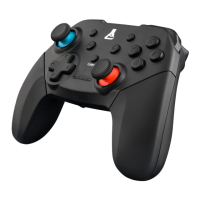

 To Next Page