
 Need help?
Do you have a question about the G2 Gogen DAB 700 BTC and is the answer not in the manual?
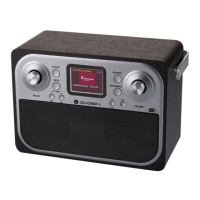
Details the functions of buttons, knobs, and display elements for operation.
Select the desired radio source (DAB, FM, Bluetooth, AUX) via the SOURCE button.
Control the audio output level using the dedicated VOLUME knob.
Customize the display content for digital and FM radio stations.
Scan for and select available digital radio stations using the SOURCE button.
Tune into FM stations via automatic scanning or manual tuning.
Save favorite DAB and FM stations for quick access using preset buttons.
Access stored radio stations using numbered preset buttons or the preset list.
Automatically scan for new digital radio stations and remove inactive ones.
Manually tune to specific DAB stations by selecting the channel.
Remove stations marked as invalid from the DAB station list.
Configure FM scanning to stop at strong signal stations or all stations.
Select between Stereo Allowed or Forced Mono for FM reception quality.
Connect and play audio from external devices via the Aux In socket.
Stream audio wirelessly from a paired Bluetooth-enabled device.
Connect your mobile phone or tablet to the DAB 700 BTC via Bluetooth.
Steps to disconnect an active Bluetooth connection from the unit.
Configure alarm settings including wake-up time, source, and volume.
Temporarily silence a sounding alarm and set a snooze duration.
Stop a sounding alarm or timer by pressing the POWER or SOURCE button.
Set a timer to automatically turn off the radio after a specified period.
Manually set the clock and calendar if automatic updates fail.
Configure automatic clock updates from radio signals or disable them.
Select between 12-hour and 24-hour formats for displaying time.
Choose the preferred format for displaying the date (e.g., DD-MM-YYYY).
Customize menu theme, audio equalization, and loudness settings.
Adjust screen backlight timeout, brightness level, and dim level.
Select the preferred language for the device menus and options.
Restore the device to default settings, erasing all custom configurations.

 To Next Page
 General