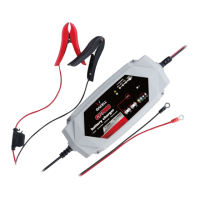
The GACELL CT-15000 is a versatile battery charger designed for various types of 12V and 24V lead-acid batteries, as well as 12V lithium-ion batteries. It features an intelligent microprocessor for faster, easier, and safer charging. The charger is equipped with several safety features, including spark proofing, protection against reverse polarity, short circuits, overcurrent, overcharge, and overheat. It also has an auto-memory function that returns to the last selected mode when restarted (except Standby Mode).
Function Description:
The primary function of the CT-15000 is to charge and maintain batteries. It offers an 8-step, full-automatic charging cycle, ensuring optimal battery health and longevity. The charger can recover old, idle, stratified, or sulfated lead-acid batteries through its REPAIR mode. It can also function as a DC power supply for 12V DC devices or as a memory retainer when replacing a battery, using the 13.6V SUPPLY mode. For quick battery starts, it provides a 12V JUMP CHARGE mode. Once a battery is fully charged, the CT-15000 automatically switches to a maintenance status to prevent overcharging during prolonged storage.
Important Technical Specifications:
- Model: CT-15000
- AC Input: 220-240VAC, 50-60Hz, 2.5A
- DC Output:
- 12VDC, 15A
- 24VDC, 7.5A
- 12VDC, 20A (for 300 seconds in JUMP CHARGE mode)
- Temperature Controlled: Yes
- Charger Type: 8 steps, Full-automatic Charging Cycle
- Start Voltage: > 1V
- Housing Protection: IP33
- Battery Type Compatibility: All types of 12V & 24V Lead-acid Batteries (WET, GEL, MF, EFB, AGM, AGM+), and 12V Lithium Ion Batteries (including LiFePO4).
- Battery Capacity:
- 50-200Ah (24V)
- 50-400Ah (12V)
- Maintains All Battery Sizes
- Accessories Included: Clamp Connectors, Ring Connectors
- Ambient Temperature: 0℃ ~ +40℃
Usage Features:
The CT-15000 offers nine distinct charging modes:
- Standby: Not charging or providing power (Green LED).
- 12V NORM: Charges 12V WET/GEL/MF/EFB batteries (Green LED).
- 12V COLD/AGM: Charges 12V batteries below 10℃ (50°F) or 12V AGM batteries (Green LED).
- 24V NORM: Charges 24V WET/GEL/MF/EFB batteries (Blue LED).
- 24V COLD/AGM: Charges 24V batteries below 10°C (50°F) or 24V AGM batteries (Blue LED).
- 12V AGM+ (Hold): Charges 12V advanced AGM batteries requiring a higher than normal charging voltage (Blue LED). This mode is specifically for start-stop micro-hybrid vehicles and not suitable for traditional AGM batteries.
- 12V LITHIUM (Hold & Press): Charges 12V lithium-ion batteries only, including LiFePO4 (White LED). Users should consult the lithium battery manufacturer for recommended charging voltage and current.
- REPAIR (Hold & Press): An advanced battery recovery mode for repairing old, idle, stratified, or sulfated lead-acid batteries (Yellow LED + 12V/24 mode LEDs). A full charge cycle is recommended before using this mode. One REPAIR cycle can take up to eight hours and uses a high charging voltage, which may cause water loss in WET cell batteries. Disconnecting the battery from the vehicle is advised to minimize risks.
- 13.6V SUPPLY (Hold & Press): Converts the charger to a constant voltage, constant current DC power supply (Yellow LED). It provides 13.6V at 9.5A with overload protection at 10A (Max). This mode disables spark proof and reverse polarity protection, so caution is advised to prevent clamps from touching.
- 12V JUMP CHARGE (Press): Delivers 15A for five minutes to jump charge 12-volt LEAD-ACID batteries (RED LED). The charger automatically enters Standby Mode after five minutes. If unsuccessful, allow the battery to rest for 15 minutes before trying again. Do not use more than two jump charges within a 24-hour period.
Connecting to the Battery:
- Identify battery post polarity (POS, P, + for positive; NEG, N, - for negative).
- Avoid connections to the carburetor, fuel lines, or thin metal parts.
- Determine if the vehicle is negative or positive grounded.
- For negative grounded vehicles: Connect the RED POSITIVE clamp to the positive battery terminal first, then the BLACK NEGATIVE clamp to the negative battery terminal or vehicle chassis.
- For positive grounded vehicles (uncommon): Connect the BLACK NEGATIVE clamp to the negative battery terminal first, then the RED POSITIVE clamp to the positive battery terminal or vehicle chassis.
- When disconnecting, reverse the sequence (negative first for negative ground systems, positive first for positive ground systems).
- When using a 12V accessory plug: Connect the charger to the plug, then insert the plug into the vehicle's 12V outlet. Turn the ignition key on if necessary, without starting the engine.
- Marine batteries should be removed and charged on shore unless specific marine-designed equipment is used.
Charging Steps (8-step automatic cycle):
- DIAGNOSIS: Checks battery connection and voltage.
- DESULPHATION: Generates pulsing current to remove sulfate if battery voltage is too low (up to 5 hours).
- ANALYSE: Checks if battery voltage reaches the threshold after desulphation; charging begins if OK.
- SOFT START: Charges with echelon constant current.
- BULK: Charges with constant maximum current until battery voltage reaches the threshold.
- ABSORPTION: Provides gradually declining current charge for maximum battery voltage.
- ANALYSE: Tests if the battery can hold a charge.
- MAINTENANCE: Continuously monitors the battery, adapting charging current to variable battery voltage.
LED Communication of Abnormal Results:
The charger provides visual feedback through LEDs for various conditions:
- Solid Red Warning! LED: Indicates reverse polarity. Solution: Exchange clamps to correct battery posts.
- Flashing Red Warning! LED: Indicates open-circuit, dirty battery posts, or a dead battery. Solutions: Connect clamps properly, clean posts, or replace the battery.
- Slow flashing Red: Indicates charging in 12V. Please do manually.
- Warning! LED + Corresponding charging mode LED (for 24V battery): Indicates an incorrect mode selected for a 24V battery. Caution: Selecting 12V Mode(s) for a 24V battery will damage the 12V battery. Solution: Press Mode button to choose the correct charge mode.
- Only charging mode LED is on, four battery level indicator LEDs are flashing: Indicates overheat protection. Current reduces when the charger's temperature is too high. Charging will resume after cooling down.
- Solid yellow REPAIR LED + 12V corresponding charging mode LED: Indicates being in 12V REPAIR mode.
- Solid Red Warning! LED + Solid yellow SUPPLY LED: Indicates overload in SUPPLY Mode. The charger will automatically shut down for 30 seconds as protection. Solution: Disconnect the external device.
- Quick flashing Red Warning! LED + Corresponding charging mode LED: Indicates the battery cannot store electric charge during the charging process. Solution: Replace the battery with a new one immediately.
- Only corresponding charging mode LED + Four battery level indicator LEDs are all OFF: Indicates being in Desulphation Process.
- Red Warning! LED light flashes 2x stop for 3secs, 2x stop for 3 secs...: Indicates the battery cannot be recovered through Desulphation Process or Repair Mode. Solutions: Replace with a new battery, or try REPAIR Mode for recovery if not recovered through Desulphation.
- Flashing Yellow Warning! LED (ONLY for 12V lead-acid batteries): Indicates a heavily corroded battery (voltage less than 3V). Solution: Replace with a new battery or try REPAIR Mode for recovery.
Battery Level Indicator:
The charger uses a series of LEDs (25%, 50%, 75%, 100%) to indicate the battery's charge level.
- 25% (Red LED): Slowly flashes when below 25%, solid when 25% is reached.
- 50% (Red LED): Slowly flashes when below 50%, solid when 50% is reached.
- 75% (Red LED): Slowly flashes when below 75%, solid when 75% is reached.
- 100% (Green LED): Slowly flashes when below 100%, solid when 100% is reached. The 25%, 50%, and 75% Charge LEDs turn off when 100% is solid.
Maintenance Features:
The CT-15000 automatically switches to a maintenance status after full charge to prevent overcharging during prolonged storage. The REPAIR mode is a dedicated feature for recovering old or sulfated lead-acid batteries.
Warranty:
The product comes with a two (2) year warranty from the original shipping date, covering defects in material and workmanship. A defective product will be replaced with a new one, and the replacement product will be covered for the balance of the original warranty period. The warranty is void if the product is damaged by accident, unreasonable use, misuse, neglect, improper service, commercial use, unauthorized repairs, or other non-material/workmanship defects.
Important Safety Instructions:
- Use in a well-ventilated area, as batteries generate explosive gases.
- Avoid smoking, sparks, or flames near batteries.
- Remove personal jewelry when working with vehicle batteries to prevent short-circuits and burns.
- Be cautious to avoid dropping metal tools onto the battery.
- Wear complete eye, hand, and clothing protection.
- Follow battery manufacturer's specific precautions.
- Clean battery terminals before connecting the charger.
- When removing a battery from a vehicle, always remove the grounded terminal first.
- Do NOT supply power to extra-low-voltage electrical systems or charge dry-cell batteries.
- NEVER charge frozen, damaged, leaking, or non-rechargeable batteries.
- In case of electrolyte contact, wash skin/clothing with soap and water; for eye contact, flood with clean cold water for at least 15 minutes and seek medical attention.
- Do NOT place the charger in the engine compartment, near moving parts, or directly above the battery.
- Do NOT cover the charger while charging.
- Do NOT expose to rain or wet conditions.
- Connect/disconnect DC output only after setting the AC cord from the electric outlet.
- Use only manufacturer-recommended attachments.
- Do not overcharge batteries by selecting the wrong mode.
- Pull by the plug, not the cord, when disconnecting.
- Unplug the charger from the outlet before maintenance or cleaning.
- If the charger is damaged, have it checked and repaired by an authorized agent.
- If the supply cord is damaged, it must be replaced by the manufacturer or a qualified person.
- The battery terminal not connected to the chassis must be connected first. The other connection is to be made to the chassis, remote from the battery and fuel line.
- During charging, the battery must be placed in a well-ventilated area.
Nameplate Icon Description:
- Square within a square: Class II
- House icon: For indoor use only
- Open book icon: Before charging, read the instructions
- T5A: Fuse
Disposal:
This product should not be disposed of with household waste. Recycle it responsibly to promote sustainable reuse of material resources. Contact return and collection systems or the retailer for environmentally safe recycling.

 Need help?
 General

 To Next Page