
 Need help?
Do you have a question about the Gaide Intelligent Technology GD06 and is the answer not in the manual?
Specifies materials for casing, cover, buttons, and LCD window.
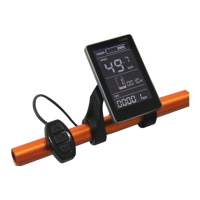
Provides dimensions for the display unit and mounting bracket.
Details dimensions for the press button unit and its mounting.
Instructions for installing the display and press button on the handlebar.
Mentions the use of independent press buttons with UART protocol.
Real-time speed display functionality.
Speed unit can be displayed in km/h or MPH.
Indicates the battery level in real time.
Press button controls power on/off for the headlight.
Backlight can be adjusted in 3 levels.
Assist level can be changed from 0 to 5.
Displays ODO, Trip, and Driving duration.
Refers to appendix table 1 for error code definitions.
Details the 6km mode function.
Allows setting parameters like wheel size and speed limit.
Battery level shown in 5 levels; voltage interval is customizable.
Displays current speed in real-time.
Allows selection between Km/h and MPH units.
Displays 'WALK' on screen when in 6km mode.
Shows the current assist level from 0 to 5.
Icon indicates status of headlight and backlight.
Displays trip distance and odometer.
Shows the total driving time.
Displays 'ERROR' and a code when an error occurs.
Instructions for turning the display and controller on/off via long press.
How to switch between ODO, TRIP, SPEED, MAX SPEED, AVG SPEED.
How to switch between ODO, TRIP, Driving Time, and Error Code.
How to change the assist level using short presses.
How to turn the headlight on/off with a long press.
How to enter and exit the 6km/h mode.
Adjusts backlight brightness across 3 levels.
Switches between km/h and MPH speed units.
Selects working voltage among 24V, 36V, 48V.
Sets auto shutdown time from 0 to 60 minutes.
Configures the number of assist levels (3, 5, or 9).
Selects wheel size from various options.
Sets the number of magnets for the speed sensor (1-15).
Sets the speed limit from 10 to 41 km/h.
Adjusts assist sensitivity from 1 to 24.
Configures assist starting power from 0 to 3.
Selects assist magnetic disc types based on magnet count.
Sets current limit for the controller from 1 to 20A.
Resets the ODO distance by long pressing a button for 5 seconds.
Sets booster sensor signal direction (Booster or Power negative).
Configures gear shifting functionality (0 for no shift, 1 for shift).
Controls the 6KM throttle function (normal or throttle 6Km).
Specifies compatible power supply voltages.
Indicates the rated and maximum current draw.
Defines the leakage current when powered off.
Shows the current supplied to the controller.
Lists the operating and storage temperature ranges.
Advises a minimum interval for power on/off and cautions against frequent button presses.
Describes screen behavior at low temperatures and recovery.
Check connection between display and controller if power off fails.
Suggests finding a nearest shop for repair when an error code is displayed.
One year warranty for quality issues, excluding frame damage.
Universal manual for GD06, customizable per client. Confirm details before purchase.
 General
| Brand | Gaide Intelligent Technology |
|---|---|
| Model | GD06 |
| Connectivity | Bluetooth |
| Compatibility | iOS, Android |
| Charging Time | 2 hours |
| App Support | Yes |
| Type | Smart Skipping Rope |
| Display | LED |
| Rope Length | 3m (adjustable) |
| Material | PVC |
| Functions | Jump Counting, Time Recording, Calorie Tracking |

 To Next Page