
 Need help?
Do you have a question about the Galactic RG57A2/BGEF and is the answer not in the manual?
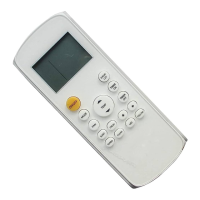
Turns the air conditioner unit on or off.
Scrolls through operation modes: AUTO, COOL, DRY, HEAT, FAN.
Selects fan speeds: AUTO, LOW, MED, HIGH.
Saves energy during sleeping hours.
Activates ionizer/plasma dust collector for air purification.
Enables unit to reach preset temperature quickly.
Starts and stops the self-clean feature.
Turns the indoor unit's LED display on and off.
Enters the energy efficient mode.
Increases temperature in 1°C increments.
Decreases temperature in 1°C increments.
Sets timer to turn the unit on.
Sets timer to turn the unit off.
Starts and stops louver movement.
Enables temperature sensing and room temperature display.
Instructions for installing and changing batteries in the remote control.
Guidance on optimal remote control usage and signal reception.
Important notes regarding battery usage for optimal performance.
Instructions for proper disposal of used batteries.
Lights up when remote sends signal to indoor unit.
Displays the current operating mode (AUTO, COOL, DRY, HEAT, FAN).
Appears when the unit is turned on and disappears when off.
Displays when TIMER ON function is set.
Displays when TIMER OFF function is set.
Displays when ECO function is activated.
Indicates low battery status.
Shows when the SLEEP function is activated.
Indicates that the FOLLOW ME function is active.
Indicates FRESH function status (not available for all units).
Indicates SILENT mode status (not available for this unit).
Shows selected fan speed (HIGH, MED, LOW, AUTO).
Shows set temperature or timer setting.
Adjusting the desired operating temperature within the range.
Using the AUTO mode for automatic cooling, fan, heat, or dry selection.
Operating the air conditioner in COOL mode.
Using the DRY mode for dehumidification.
Operating the air conditioner in FAN mode.
Operating the air conditioner in HEAT mode.
Sets a period of time after which the unit will automatically turn on.
Sets a period of time after which the unit will automatically turn off.
Makes the unit work hard to reach temperature quickly.
Automatically cleans the unit by evaporating moisture.
Measures ambient temperature from the remote control for comfort.
Enters the energy efficient mode, adjusting temp and fan speed.
Restores or resumes previous settings.
Controls vertical and horizontal louver movement.
Decreases energy use during sleep by adjusting temperature.
 General
| Brand | Galactic |
|---|---|
| Model | RG57A2/BGEF |
| Category | Remote Control |
| Language | English |

 To Next Page