Pan Switch Continued
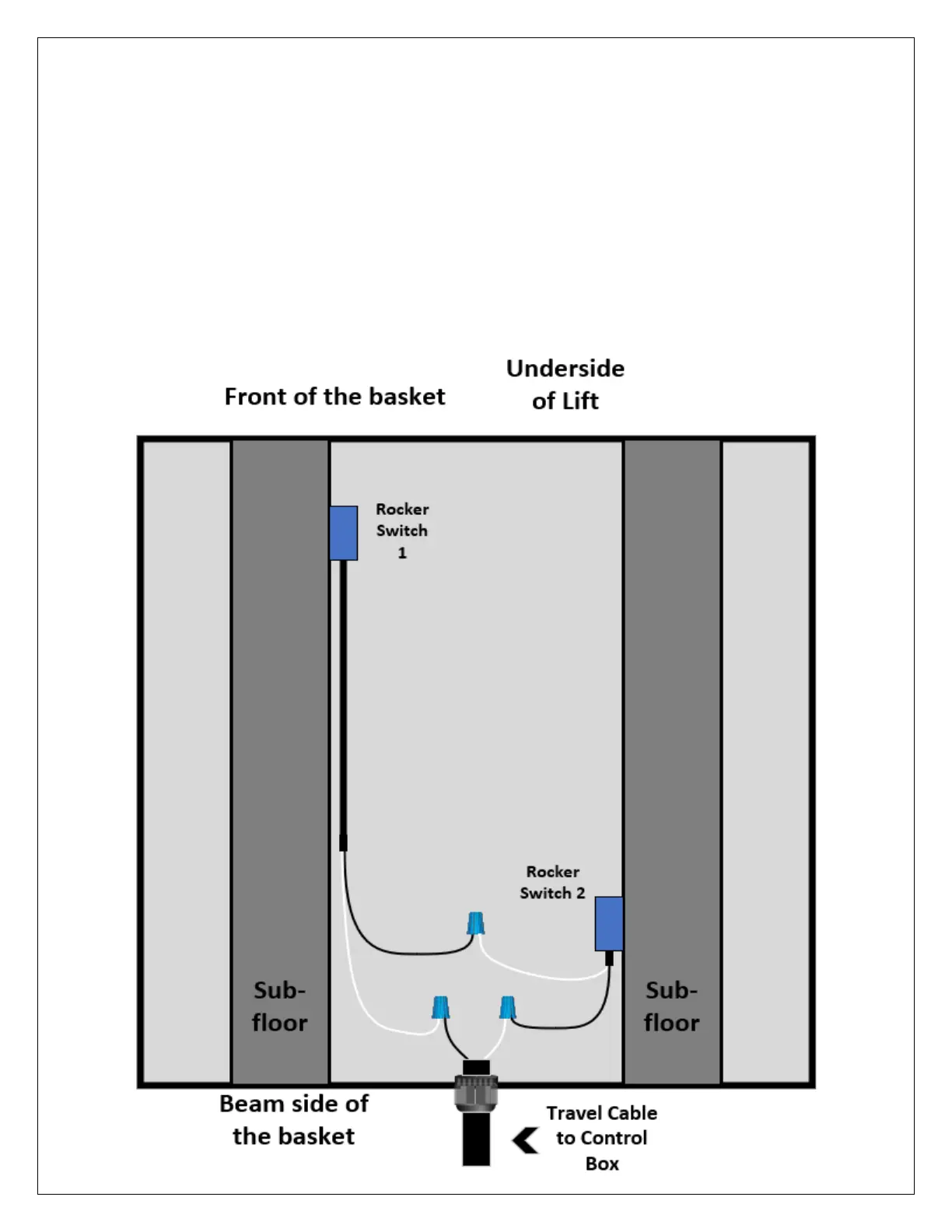
1. Install the two rocker switches on the inner most side of the sub-floor beams.
2. Run the cables for the rockers through the underside of the basket to avoid slack
3. Drill a 3/8” size hole in the frame of the basket towards the beam side as shown below.
4. Install the 3/8” cable gland for the travel cable.
5. Run the travel cable through the gland and start making the necessary connections at the bottom of the basket:
a. Black wire from travel cable to the White wire from Rocker Switch 1 (See Diagram Below), then connect
the black wire from Rocker switch 1 to the white wire from Rocker Switch 2.
b. Black wire from Rocker Switch 2 to the white wire from the travel cable.
6. Run the travel cable along the brace and down to the control box. The cable needs to be long enough for the lift
to reach the top stop and the bottom stop without pulling on the control box


 To Next Page
 Loading...