Made in China
After-service:
support.us@galayou-store.com
US
support.uk@galayou-store.com
UK
1-323-686-3288 (US only)
Manufacturer:Shenzhen Anran Security Technology Co., Ltd
Address: No. 290, Jihua Road, Jihua street, Longgang District, Shenzhen
No. 112
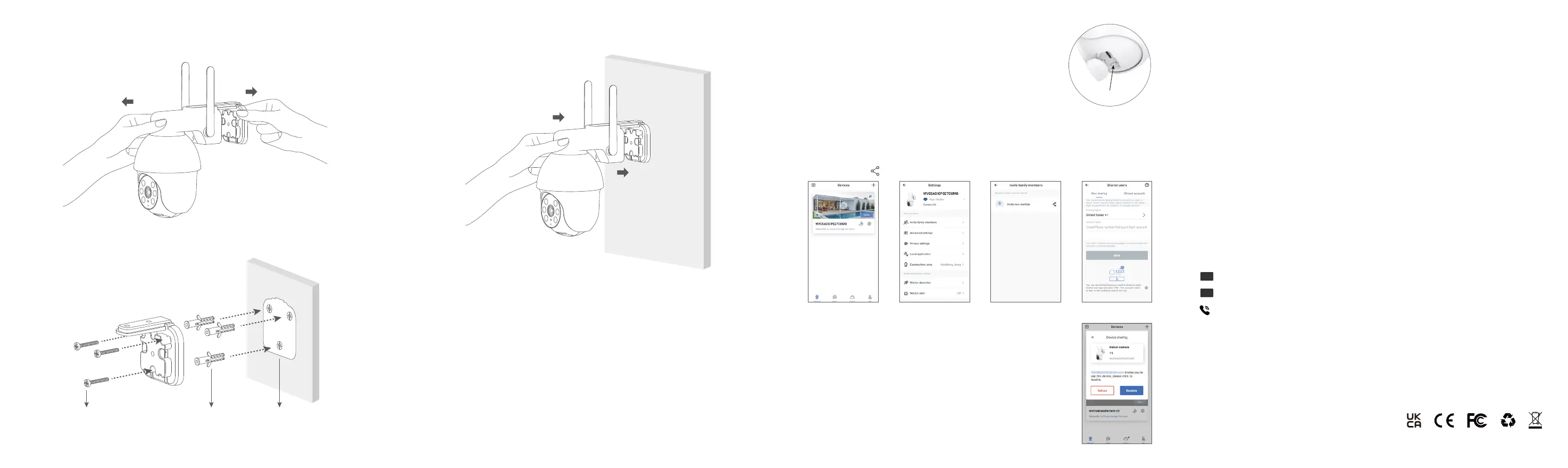
Mount the Camera
FAQ
Please press the reset button on the camera for 5 seconds until the
red light flashes quickly and the camera says "reset is successful",
Please wait for about one minute, then the camera will flash blue
and red light alternately and you can reconnect it now.
The camera can not connect to Wi-Fi?
1. The invited member should download the Wansview Cloud app, and register a new account first.
3. The invited member needs to open the Wansview cloud app and then click
"Receive". If he/she doesn't receive the invitation, please close the app and
then open it again.
2. The main account should open the Wansview cloud app, tap "Settings-invite family
members"--press --choose Country and then enter the invited member's account.
How to share the camera to another account?
Reset button
1. Remove the mounting bracket from the camera.
3. Install the camera to the mounting bracket and adjust it to the proper direction.
2. Drill holes in accordance with the mounting hole template and screw the mounting bracket to the
wall.
Screw Expansion Bolt Mounting Hole
Template


 To Previous Page
 Loading...