2K
Indicator Lights Status
User's Guide
① Click "Add device" or "+" ② Select Galayou--Model Y4 ③ Device Power On ④ Wi-Fi Setup
⑤ Scan the QR Code ⑥ Wait for Connection ⑦ Pair succeeds ⑧ The camera is online
⑨ Live Video
Light Status
Red light on
Red and blue light alternately flashing
Blue light flashing
Blue light solid
Red light quickly flashing
Warm note: Please make sure your router is connected to Internet.
Go to the App Store or Google Play to search and download the "Wansview Cloud" APP on your
smartphone. Or scan below QR code to get the APP.
Tips:
1. This outdoor security camera only works with 2.4GHz Wi-Fi, 5GHz Wi-Fi is
not supported!
2. Please put the camera near to the router during setting up the camera,
after connection succeeds, you can place the camera in another place.
Note: Put the camera close to the router(3 feet) during setting up the
camera.
1. Download and Install
Open the "Wansview Cloud" APP and register an account with your email and activate it.
Tips: Your password must be 8-16 characters, and contains at least the following three categories:
numbers, uppercase letters, lowercase letters, or special characters.
2. Register Account
3. Add Y4
Camera Status
Camera is powered on
Waiting to connect now
Connecting to Wi-Fi
WiFi connection succeeds
1. Reset camera to factory setting
2. Camera is upgrading firmware
Product Diagram
What's in the Box
Antenna
Indicator Light
White Lights & Infrared Lights
Lens
Photosensor
Microphone
Reset Button
TF Card Slot
Camera Micro USB Cable Mounting Hole
Template
Pack of ScrewsPower Adapter
Micro USB Port
Speaker
Quick Installation Guide
Wireless Outdoor Security Camera

 Need help?
 General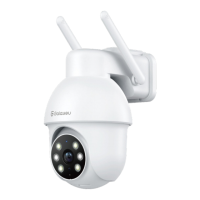

 To Next Page