Need help?
Do you have a question about the GameSir G7 and is the answer not in the manual?
Lists all items included in the package and system requirements for use.
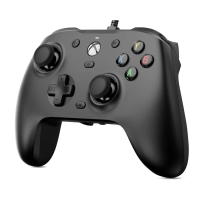
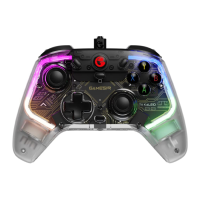
Details the physical layout of the controller's buttons, joysticks, and ports.
Instructions on how to connect the controller to a console or PC.
Explains how to control master, game, and voice chat volumes.
Describes how to activate and deactivate the microphone mute feature.
Details on setting and canceling values for the M1 and M2 back buttons.
Procedure for calibrating the controller's analog inputs for optimal performance.
Guide to using software for firmware upgrades and profile customization.
The GameSir-G7 is a wired gaming controller designed for use with Xbox One, Xbox Series X|S, and PC (Windows 10 or above). It offers a comprehensive set of features for an enhanced gaming experience, focusing on customization, precise control, and user convenience.
The GameSir-G7 serves as a primary input device for gaming, allowing users to interact with their games through a variety of buttons, joysticks, and triggers. Its core function is to translate physical inputs into digital commands recognized by the gaming platform. The controller is designed to provide a comfortable and ergonomic grip for extended play sessions, reducing fatigue. It features a standard Xbox-style layout, making it familiar to many gamers. The wired connection ensures minimal latency, which is crucial for competitive gaming.
The controller connects to your gaming platform via a 3-meter USB-C cable. A solid white indicator light signifies a successful connection. This wired connection eliminates the need for batteries and provides a stable, low-latency input.
One of the standout features of the GameSir-G7 is its extensive customization options. It comes with a swappable white faceplate, allowing users to change the aesthetic of their controller. Beyond aesthetics, the controller offers deep functional customization through both on-device settings and dedicated software.
The GameSir-G7 integrates convenient on-the-fly volume control. Users can adjust the master volume by holding the 'M' button and pressing the D-pad's Up/Down buttons. There are 10 levels of volume adjustment, with an audible beep indicating when the maximum or minimum level is reached. For communication-focused gaming, the controller also allows for independent adjustment of game volume and voice chat volume. By holding the 'M' button and pressing the D-pad's Left/Right buttons, users can increase game volume while decreasing voice chat volume, or vice versa. This feature ensures optimal audio balance for both immersion and communication. A beep will sound when the maximum, middle, or minimum level is reached for these adjustments.
A dedicated Microphone Mute button provides quick control over voice chat. Tapping this button will illuminate a solid red indicator, signifying that the microphone is muted. Tapping it again will turn off the indicator, unmuting the microphone. This is a default setting, offering immediate privacy or control over in-game communication.
The GameSir-G7 includes two mappable back buttons, M1 and M2, which offer additional input options without requiring users to lift their thumbs from the joysticks. These buttons have no preset values, allowing for complete user customization. To set a value for M1 or M2, users hold the 'M' button and the desired back button (M1 or M2) simultaneously for 3 seconds. The indicator light will blink slowly. While blinking, the user taps the button they wish to map to M1/M2 (e.g., A, B, X, Y, LB, RB, LT, RT, L3, R3, D-pad directions, Menu, Xbox, or View buttons). Once the desired button is tapped, the indicator light will turn solid, confirming that the M1/M2 button value has been set. To cancel an M1/M2 button value, the process is similar: hold the 'M' button and the M1/M2 button simultaneously for 3 seconds until the indicator blinks slowly. Then, tap the M1/M2 button itself. The indicator will turn solid, confirming that the M1/M2 button value has been canceled. This flexibility allows gamers to assign frequently used actions to these easily accessible buttons, improving reaction time and comfort.
To ensure optimal performance and accuracy, the GameSir-G7 provides a calibration process for its joysticks and triggers. This is particularly useful if users experience drift or inconsistent input. The calibration process begins by holding the View, Menu, and Xbox buttons simultaneously. While holding these buttons, the USB-C cable is inserted into the PC's USB port. The indicator light will then slowly blink white. Next, it's crucial to ensure that both the LT & RT triggers and the left & right joysticks are not touched. Once confirmed, the user presses the 'A' button, and the indicator light will go out. The final step involves moving the triggers and joysticks through their full range of motion. Users should press LT & RT to their maximum travel and rotate both joysticks at their maximum angles three times. After completing these movements, pressing the 'A' button again will cause the indicator to turn solid white, signifying that the calibration is complete. After calibration, it is necessary to unplug and replug the controller before use to apply the new settings.
For even deeper customization, the GameSir-G7 is compatible with the "GameSir Nexus" software, available for download from the Microsoft Store (for Xbox/PC) or gamesir.hk. This software allows users to upgrade the controller's firmware and create up to three custom profiles. Within the GameSir Nexus software, users can:
It's important to note that if an M1/M2 button value is set in the GameSir Nexus software, and it differs from a value previously set manually on the controller, the setting from the software will take precedence and directly overwrite the manual setting. This ensures that the software provides the ultimate control over the controller's configuration.
While the manual doesn't explicitly detail maintenance features, the design implies certain aspects:
 General
| Connection Type | Wired |
|---|---|
| Customization | Yes, via GameSir Nexus software |
| Back Buttons | 2 |
| Cable Length | 3 meters |
| Analog Sticks | 2 |
| Vibration | Yes |
| Platform Compatibility | Xbox Series X|S, Xbox One |
| Audio Jack | 3.5mm |
| Buttons | Menu, View |
| Weight | 256 grams |

 To Next Page