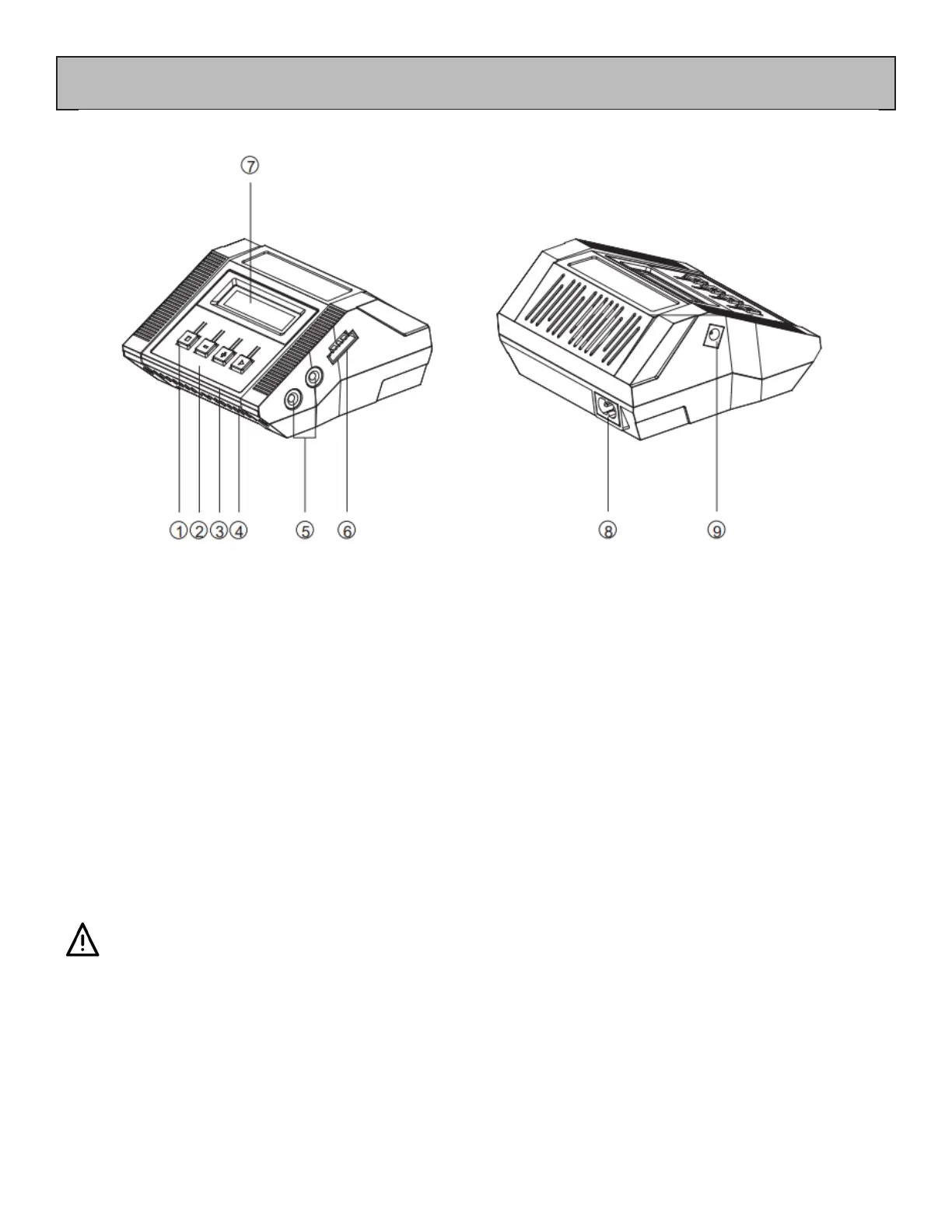
AC/DC Smart Balance Charger
1. Mode Switch
2. Decrease
3. Increase
4. Start/Conrm
5. Main Output
6. Balance Interface
7. LCD Screen
8. AC Input
9. DC Input (for connection to a car charging port)
Connection Instructions
1. e charger can be connected to an AC outlet (100~240V AC) or to a suitable high-current DC
source 11~18V such as a car charging port or cigarette lighter adapter.
2. Connect either a LiPo-2S battery or LiHV-4S (HIGH VOLTAGE).
NEVER CHARGE A HiLv-4S BATTERY WITH THIS CHARGER AS THE HIGH VOLTAGE WILL
DAMAGE THE BATTERY AND CAN BE A FIRE RISK
1. Before charging, check that the terminals and wires of the battery pack are not damaged.
2. When connecting the battery, always check that the positive (red) and negative (black) wires
are connected correctly and the connector plugs are connected to the same coloured ports on
the charger.
3. In order to avoid short circuits, connect the banana connector cable to the charger rst, then
connect the battery. When disconnecting, disconnect the battery rst, then disconnect the charger.
4. Only one battery can be charged at a time.


 To Next Page