ese operating instructions are designed to ensure that you quickly become familiar with its
functions. It is therefore important that you read right through the Operating instructions,
Warning and Safety Notes before you attempt to use your new charger for the rst time
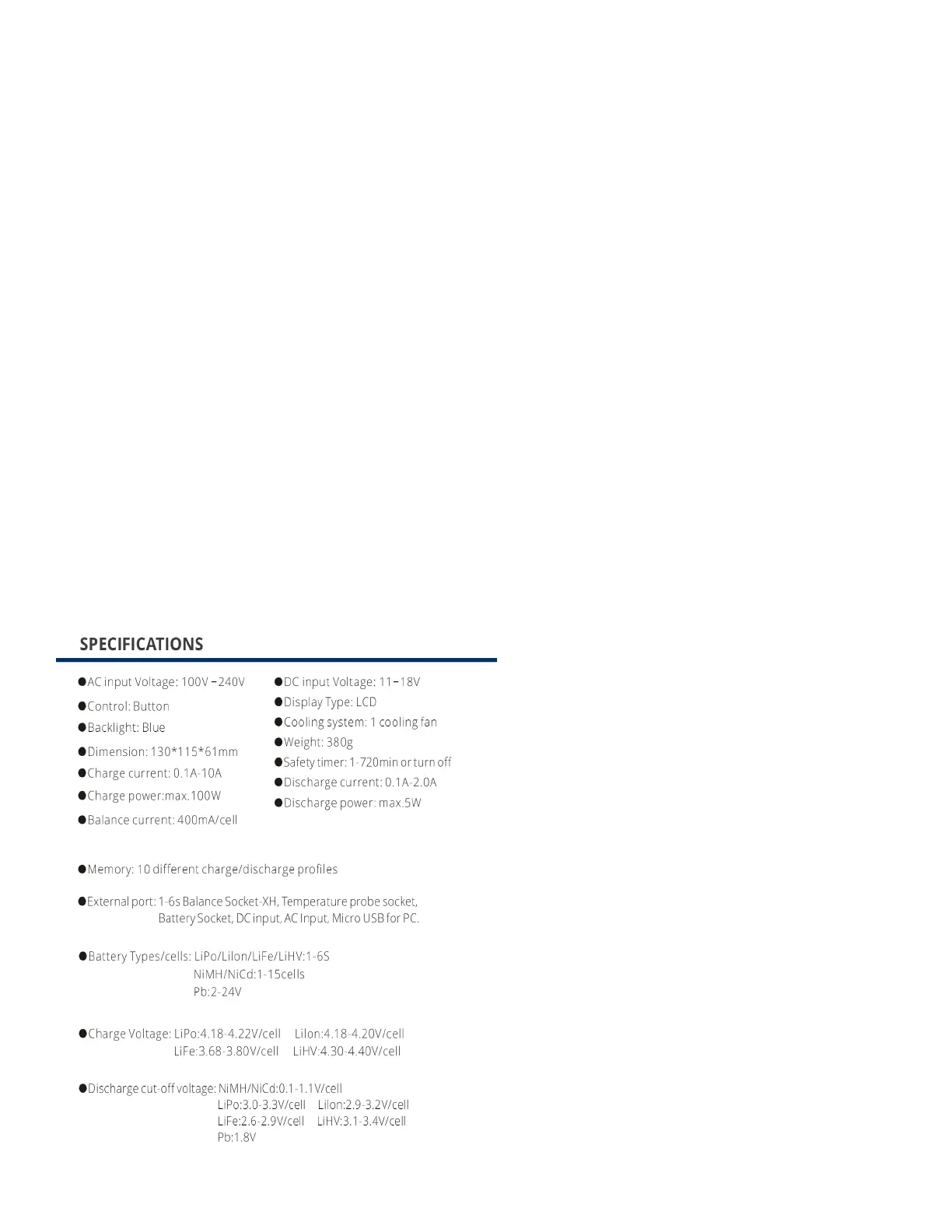
Gannet Charger integrates battery technology together with LCD screen.
It is equipped with 4 function buttons. Every operating procedure and status change can be
shown on LCD screen, making the operating procedures very intuitive. When the battery is
working, you can directly check the battery capacity, battery voltage, charging time and internal
resistance on the screen.
Gannet Charger comes with a memory module. Users can edit and save parameters of dierent
batteries. Once the battery parameters are edited, the shortcut for parameters will be generated
on the screen, which provides a simple one click interface for users.
Gannet Charger is built-in switching power supply. It can be powered up with 12V car battery or
100-240V AC input, suitable for use with LiPo / LiFe / LiHV / Li-lon / NiMH / NiCd / Pb
battery.
Please BE SURE to read these INSTRUCTIONS, WARNING and SAFETY NOTES before you
use the charger for the rst time It can be dangerous to mishandle batteries and battery chargers,
as there is always a risk of batteries catching re and exploding.
Please read this entire operating manual completely and attentively before using this product, as
it covers a wide range of information on operating and safety.


 To Next Page
 Loading...