
 Need help?
Do you have a question about the Garageio Blackbox and is the answer not in the manual?
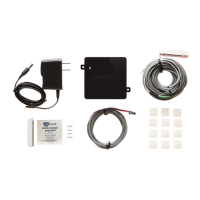
Identify and unpack all components included in the Garageio kit for single door installation.
Connect the power adapter to the Garageio Blackbox and a power outlet.
Use the Garageio app to connect the Blackbox to your home Wi-Fi network via BlinkUp.
Mount the Blackbox to the garage door opener or a nearby surface.
Connect the opener cable between the Blackbox and your garage door opener.
Attach the activator to the edge of the garage door for sensor alignment.
Mount the sensor on the wall to align vertically with the door-mounted activator.
Power cycle the Blackbox to complete network connection and setup.
Create a Garageio online account to finalize the installation and setup process.
The Garageio 1 Door Installation manual outlines the setup process for a smart garage door opener system designed to provide remote control and monitoring of a single garage door. This device aims to integrate your existing garage door opener with your wireless network, allowing you to manage your garage door from a smartphone or other internet-connected device. The installation is presented as a straightforward process, typically taking about 15 minutes per door, and does not require specialized tools, making it accessible for most users.
The Garageio system consists of a central "Blackbox" unit, an activator, and a sensor, all working in conjunction with your existing garage door opener. The Blackbox serves as the brain of the system, connecting to your home's wireless network and communicating with the Garageio app on your smartphone. This connectivity enables you to remotely open, close, and monitor the status of your garage door. The activator is a component that attaches to your garage door, while the sensor is mounted on the wall, ensuring that the system can accurately detect whether the garage door is open or closed. This feedback is crucial for both remote monitoring and for preventing accidental operations. The system is designed to be compatible with a wide range of existing garage door openers, extending their functionality into the realm of smart home automation. By leveraging your wireless network, Garageio provides a convenient way to manage garage access, whether you're at home or away, enhancing security and peace of mind.
The Garageio system offers several key usage features that enhance convenience and control over your garage door.
While the manual primarily focuses on installation, it implicitly suggests certain maintenance aspects through its design and troubleshooting guidance.
In summary, the Garageio system is designed for ease of use and installation, providing remote control and monitoring capabilities for a single garage door with minimal ongoing maintenance requirements, supported by online resources for troubleshooting.
 General
| Compatibility | iOS, Android |
|---|---|
| Mobile App | Garageio App |
| Voice Control | Amazon Alexa, Google Assistant |
| Number of Doors Supported | 1 |
| Remote Monitoring | Yes |
| Remote Control | Yes |
| Connectivity | Wi-Fi |
| Alerts | Door status |
| Installation | DIY |

 To Next Page