1
3
1. Application Overview
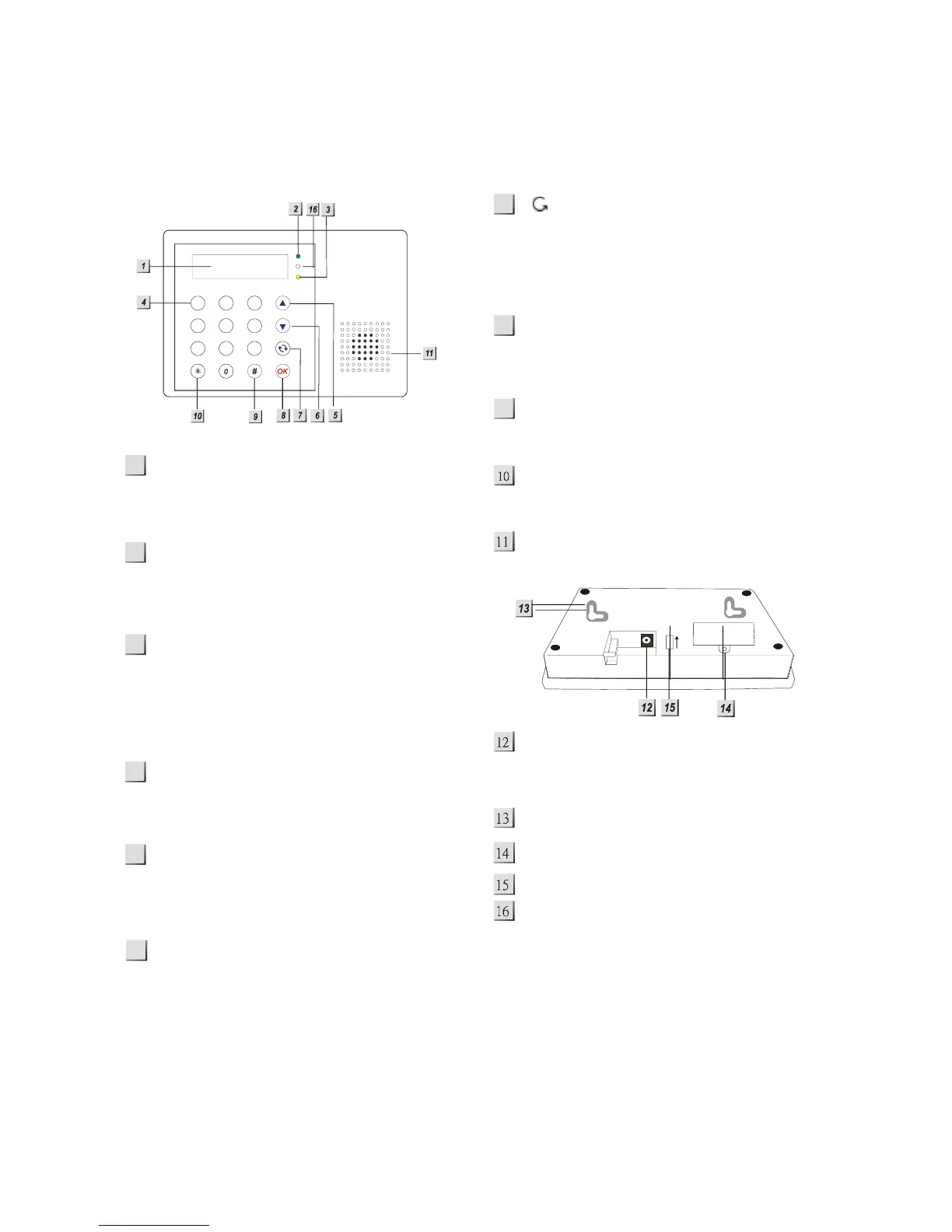
1.1. Identifying the parts
Backlit LCD Display
Indicates current mode and shows the
options available
Green LED
— ON: AC Power is On.
— OFF: AC Power failure.
Yellow LED
— ON: when any fault situation Fault is
detected.
— OFF: when all fault conditions are
restored. (The Unit is in Normal Mode).
Numeric Keys
This button are used to enter numerals
and characters
S Key
— Programming mode: press this key
to move the cursor and scroll the
display upwards.
T Key
— Programming mode: press this key to
move the cursor and scroll the
display downwards.
Key
— Programming mode: use this key to
delete a digit, cancel the selection,
abort the current screen, return to the
previous screen, etc.
OK Key
— To confirm the keyed-in data or
confirm the selection.
# Key
— To enter Programming menu
¿ Key
— To enter Installer menu.
Buzzer
DC Jack
— For connecting the DC 9V power
adapter.
2 Mounting Holes & Tamper
SIM card holder cover
Battery Switch
Microphone
1
2
7
8
5
9
6
4
ON
12 3
456
7
89
abc def
ghi jkl mno
pqrs
tuv wxyz



 To Next Page