
 Need help?
Do you have a question about the Garmin APPROACH S12 and is the answer not in the manual?
Connects the device to a smartphone via the Garmin Golf app for features like syncing and updates.
Instructions on how to charge the device fully to ensure sufficient power for use.
Displays the current hole information and automatically transitions to the next hole.
Provides a closer look at the green and allows pin movement for precise distance measurement.
Measures the distance to your ball during a round of golf.
Enter and adjust scores for the round, including putts and penalties.
Steps to resolve issues with the device failing to detect local golf courses.
Tips for resolving connection problems between the smartphone and the device.
Options to reset the device to factory defaults, with or without data deletion.
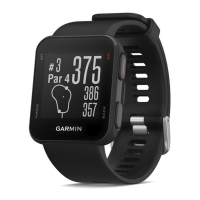
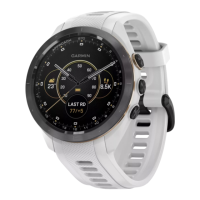
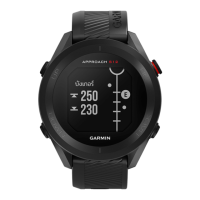
The Garmin Approach S12 is a GPS golf watch designed to enhance the golfing experience by providing essential course information and tracking capabilities. This owner's manual outlines its functions, usage, and maintenance to help users get the most out of their device.
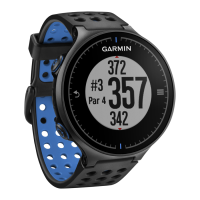
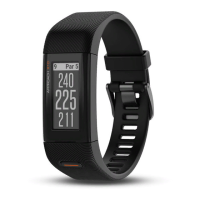
The primary function of the Approach S12 is to assist golfers during a round by providing accurate distances to the front, middle, and back of the green. It automatically transitions between holes as you move around the course. The device also offers a "Hole View in Big Numbers Mode" for improved readability of distances. Beyond basic distances, it can display distances to various course features such as hazards, layups, and doglegs on par 4 and 5 holes, helping golfers strategize their shots.
The Approach S12 includes scoring capabilities, allowing users to keep track of their strokes during a round. When enabled, it can also track detailed statistics, including putts and fairway accuracy, which can be reviewed later through the Garmin Golf app. For more advanced tracking, the device is compatible with Approach CT10 golf club sensors, which can automatically record shot location, distance, and club type when paired.
Connectivity is a key feature, as the Approach S12 pairs with a smartphone via the Garmin Golf app. This pairing enables several connected features, such as automatic scorecard uploads to the app, software updates for the device, and automatic course updates. The Garmin Golf app serves as a central hub for viewing detailed statistics, shot analyses, and participating in online leaderboards and tournaments. The device can also sync with Garmin Express on a computer for software updates and product registration.
Getting started with the Approach S12 involves a few simple steps. After turning on the device, users are prompted to select their preferred language and units of measure. The next crucial step is pairing the device with a smartphone using the Garmin Golf app. This pairing unlocks features like scorecard syncing, live scoring, and software/course updates. Before playing a round, it's recommended to fully charge the device.
To begin a round of golf, users press the OK button and select "Play Golf." The device then acquires satellite signals to determine the location and identify nearby courses. Once a course is selected, the hole view appears, showing current hole information and distances.
During a round, the device offers several in-round features accessible through the golf menu (by pressing OK). Users can manually change holes, move the flag on the green for more precise distance measurements, and measure the distance of their shots. The scorecard can be accessed to enter scores, and if statistics tracking is enabled, users can record putts and fairway information. The device also provides sunrise/sunset times for the current day.
Customization options are available through the system settings. Users can change the display language, adjust time settings (including 12-hour or 24-hour format and manual/automatic time setting), and select units of measure for golf distances. Other settings include gender (for course ratings and handicaps), USB mode, and options to reset user data or update software.
The "Hole View in Big Numbers Mode" can be activated through golf settings for enhanced visibility of distances. The background color of the display can also be changed to black or white. Scoring and stat tracking can be enabled or disabled, and penalty stroke tracking can be turned on.
Proper care and maintenance are essential to ensure the longevity and optimal performance of the Approach S12. The manual advises against exposing the device to extreme shock or harsh treatment, as this can degrade its life. It's also important to avoid pressing the keys underwater and using sharp objects for cleaning. Chemical cleaners, solvents, and insect repellents should not be used, as they can damage plastic components and finishes.
After exposure to chlorine, salt water, sunscreen, cosmetics, alcohol, or other harsh chemicals, the device should be thoroughly rinsed with fresh water and dried completely. Prolonged exposure to these substances can damage the case. Storing the device in areas with prolonged exposure to extreme temperatures should also be avoided, as it can cause permanent damage.
For cleaning the device, especially the electrical contacts, a cloth dampened with a mild detergent solution should be used, followed by wiping it dry. This prevents corrosion that can hinder charging and data transfer. If the device is not going to be used for several months, it should be charged to at least 50% before storage in a cool, dry place at typical household temperatures. Before subsequent use, a full recharge is recommended.
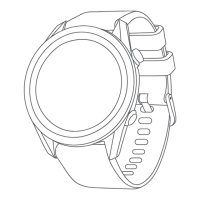
The device's bands are interchangeable, and the manual provides instructions for their removal and attachment using the quick-release pin on the spring bar.
Troubleshooting tips are provided for common issues, such as the device not finding nearby golf courses (suggesting a course update via Garmin Express), smartphone compatibility issues (referencing garmin.com/ble), and connectivity problems with the phone (recommending restarting devices, enabling Bluetooth, updating the Garmin Golf app, and re-pairing). Instructions are also given for correcting wrong language or units of measure settings, and for resolving incorrect time or date displays by acquiring GPS signals or syncing with the Garmin Golf app.
If issues persist, restarting the device by holding down the UP button until it turns off, then pressing it again to turn it on, can often resolve minor glitches. For more significant problems, users can restore all default settings, with options to either delete all user data and activity history or save it. Improving GPS satellite reception involves syncing the device frequently with a Garmin account via USB or the Garmin Golf app, taking the device outdoors to an open area, and remaining stationary for a few minutes.
 General
| GPS (satellite) | Yes |
|---|---|
| Mobile network connection | - |
| Display type | Digital |
| Display diagonal | - \ |
| Display resolution | 175 x 175 pixels |
| Display size (HxV) | 23 x 23 mm |
| Display technology | MIP |
| Shape | Round |
| Band size | One Size |
| Band material | Silicone |
| Watch case size | 43 mm |
| Watch case color | Black |
| Wrist size range | 125 - 202 mm |
| Market positioning | Smartwatch |
| Operating temperature (T-T) | -20 - 60 °C |
| Battery capacity | - mAh |
| Battery life (max) | - h |
| Battery life (GPS mode) | 30 h |
| FM radio | No |
| Flash memory | 0.125 GB |
| Mobile operating systems supported | Android, iOS |
 Weight and Dimensions
| Width | 43.7 mm |
|---|---|
| Weight | 34.1 g |
| Thickness | 11.5 mm |

 To Next Page