
 Need help?
Do you have a question about the Garmin DESCENT T1 and is the answer not in the manual?
Tips for optimal transmitter placement for reliable signal reception.
Instructions for attaching the transmitter to a tank regulator's high-pressure port.
Procedure for connecting the transmitter via a high-pressure hose extension.
Steps to wirelessly connect the transmitter to a Descent dive computer.
View connection status, identify transmitter by tone, and assign custom names.
Configure tank pressure units, working pressure, and air volume for calculations.
Set reserve pressure alerts and adjust transmitter power for optimal performance.
Include transmitter data in surface air consumption and air time estimates.
Remove paired transmitters and access transmitter ID, software, and battery status.
Step-by-step guide to replacing the transmitter's battery to maintain waterproofing.
Guidelines for cleaning, maintaining, and protecting the transmitter's condition.
Technical specifications including battery life, temperature range, and wireless frequency.
Procedure to update the transmitter's firmware using a compatible Descent dive computer.
Tips to improve or restore communication between the transmitter and dive computer underwater.
How to modify the transmitter's power output to enhance connection reliability.
Troubleshooting steps for situations where the transmitter battery depletes faster than expected.
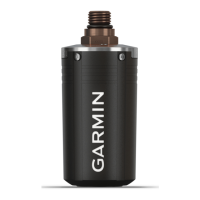
The Garmin Descent T1 is a wireless air integration transmitter designed for use with compatible Descent dive computers. It allows divers to monitor their tank pressure and other gas consumption data directly on their wrist-mounted dive computer, enhancing safety and convenience during dives. The device is built to withstand the rigors of underwater environments and is suitable for recreational diving.
The primary function of the Descent T1 is to transmit tank pressure data wirelessly to a compatible Garmin Descent dive computer. This is achieved through two communication technologies: ANT® technology on the surface and sonar signals underwater. When connected to a pressurized tank regulator, the transmitter wakes from a low-power mode and begins sending real-time pressure information. This data is then displayed on the dive computer's screen, allowing divers to keep track of their remaining air supply without needing to consult a separate submersible pressure gauge.
In addition to real-time pressure, the Descent T1 enables the dive computer to calculate various gas consumption metrics, such as volumetric surface air consumption (SAC), respiratory minute volume (RMV), and air time remaining (ATR). These calculations provide divers with crucial information to manage their gas supply effectively and plan their dives safely. The device also supports the pairing of multiple transmitters (up to five) with a single dive computer, which is beneficial for group diving or for divers using multiple tanks.
The transmitter is equipped with an internal flow restrictor, which is critical for safe operation when directly attached to a regulator. When used with a high-pressure hose extension, an included air spool must be installed to prevent pressurization failures. The device is designed to enter a low-power mode automatically after a dive when the regulator is depressurized, conserving battery life.
The Descent T1 is designed for straightforward installation and pairing. It connects to the high-pressure output port of a first-stage regulator. Users are advised to consider transmitter position tips to ensure optimal signal reception, particularly underwater where the diver's body or equipment can obstruct the sonar signal. For instance, installing the transmitter on the same side of the tank as the wrist wearing the dive computer can improve signal integrity.
Pairing the transmitter with a compatible Descent dive computer involves a simple process: pressurizing the tank, waking the transmitter, and then selecting the transmitter ID from a list on the dive computer. Once paired, the connection is automatic for subsequent dives.
Divers can customize various settings for their paired transmitters through the dive computer. These settings include:
The dive computer's data screens can be customized to display information from selected paired transmitters, allowing divers to view primary and secondary tank pressures at a glance. The device also provides various alerts, such as low reserve pressure, critically low pressure, low battery, and lost communication, which are indicated by flashing values, vibrations, and warning tones on the dive computer. Lost transmitter alerts can be enabled to notify the diver if communication is lost for an extended period.
Proper maintenance is crucial for the longevity and reliable performance of the Descent T1. After each dive, the transmitter should be thoroughly rinsed with fresh water to remove salt and debris, and cleaned with a soft cloth if necessary. It is important to avoid using chemical cleaners, solvents, or sharp objects, as these can damage the device's plastic components and finishes. Prolonged exposure to harsh chemicals, extreme shock, and high temperatures should also be avoided.
Battery replacement is a key maintenance task. The Descent T1 uses a 3 V CR123A lithium battery. When replacing the battery, it is essential to use a high-quality replacement battery and follow specific instructions to maintain the device's waterproofing. This involves carefully removing the battery cap, inspecting and applying silicone grease to the gaskets, and ensuring the new battery is inserted with the correct polarity. Garmin recommends purchasing a replacement battery cap kit, which includes a new cap, pre-installed gaskets, and silicone grease, to ensure proper sealing.
The device's software can be updated using a compatible Descent dive computer, either by syncing with the Garmin Dive™ app or by connecting the dive computer to a computer via USB and using the Garmin Express™ application. Regular software updates ensure optimal performance and access to the latest features.
For troubleshooting connection issues underwater, users can adjust the transmitter's power setting or consider installing the transmitter on a high-pressure hose extension to improve line of sight. If the transmitter battery is draining rapidly, users should ensure the regulator is depressurized after a dive to allow the transmitter to return to low-power mode.
 General
| Product type | Pressure transmitter |
|---|---|
| Suitable for | Scuba diving tank |
 Weight and Dimensions
| Depth | 36.52 mm |
|---|---|
| Width | 84.5 mm |

 To Next Page

