EasyManua.ls Logo

GARO ASTRO1KT3 - Device Description; Overview of Menu Selection; Display and Buttons; Operating Instructions

GARO ASTRO1KT3
7 pages
Print Icon
To Next Page IconTo Next Page
To Previous Page IconTo Previous Page
Loading...
2
4. Device description
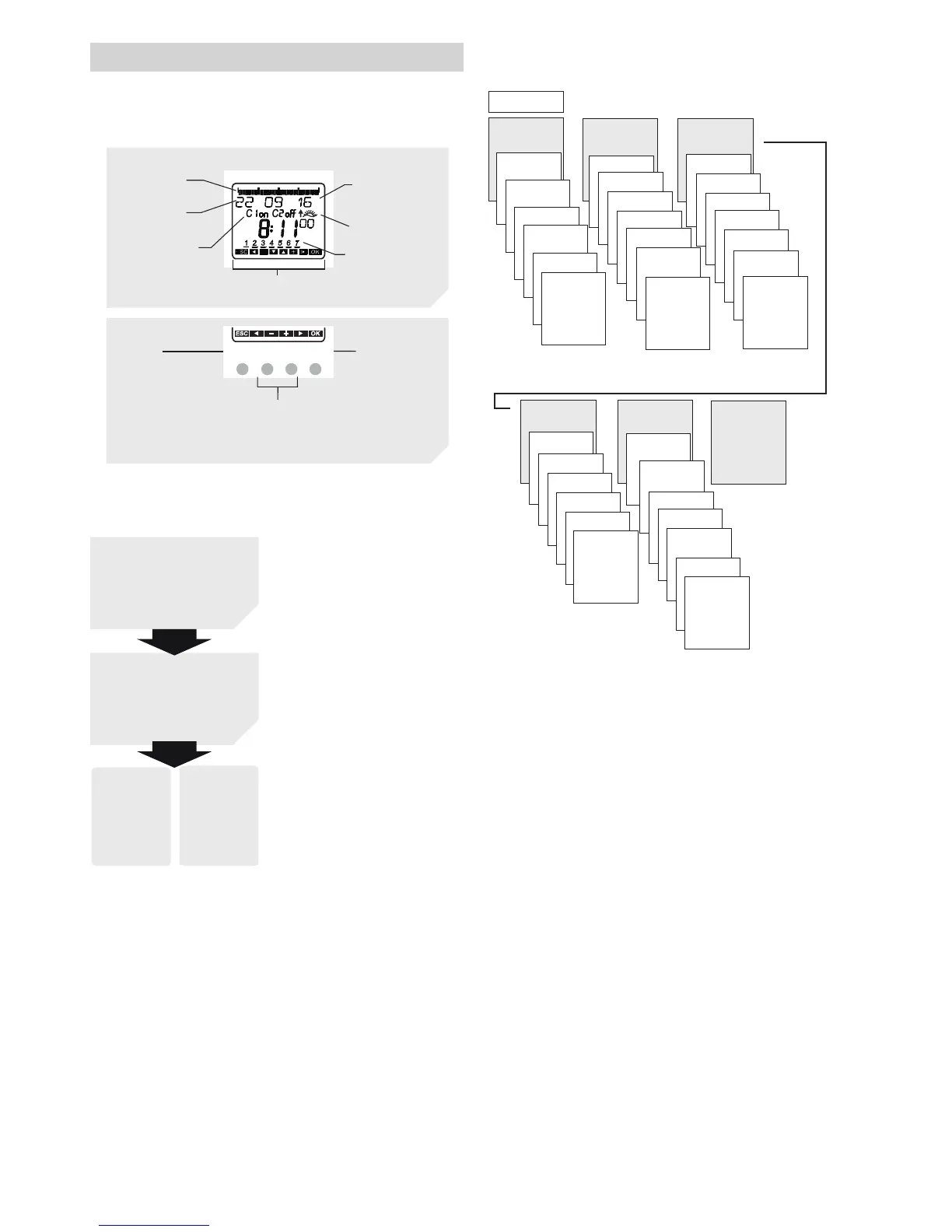
Display & buttons
06
12
18
24
MENU OK
OKMENU
Date display
Channel status
ON = On
OFF = Off
Programmed
ON times
Days of the week
from 1 to 7
Display of active buttons
with the respective functions
Activate screen
Open menu
Cancel menu
ESC
(leave menu)
–Store
selection
–Confirm
selection
Selection options
are displayed
Time display
Sunrise/sunset
display
Operating instructions
YES
Confirmation
press
OK
NO
Change/
select
press
t u
1. Read text lines
Flashing text/symbol
is a prompt
2. Make a decision
Overview of menu selection
ASTRO
MANUAL
PROGRAM
OPTIONS
TIME/DATE
END
MENU
u u u
ASTRO-
TIMES
TOTAL
SIMULATION
u
u
u
OFFSET
ASTRO-
MODE
LOCATION
END
CHANNEL C1
NEW
CHECK
MODIFY
DELETE
TOTAL
SIMULATION
END
CHANNEL C1
TIME
SET DATE
SU-WI
WEEK DAY
FORM DATE
FORM TIME
END
PERM ON
PERM OFF
OVERR ON
HOLIDAY
END
OPERATING
HOUR
LCD-ILLUMI-
NATION
LANGUAGE
PIN
FACTORY
SETTINGS
INFO
END