

EasyManua.ls Logo

Gaspar XICOY Telemetry5 - User Manual

Gaspar XICOY Telemetry5
19 pages
Print Icon
To Next Page IconTo Next Page
Loading...
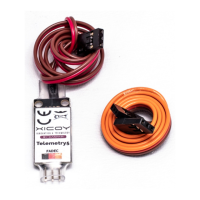
Telemetry adapter v5
V10 Fadec and Xicoy engines to JETI, Multiplex, Hott, Futaba, JR,
PowerBox, FrSky and Spektrum radios
Users Guide
Plaza Pere Llauger, 5; nau 18. 08630, Canet de Mar, Barcelona, Catalonia, Spain
E-mail: sales@xicoy.com. +34 93 794 27 74 web: www.xicoy.com
Xicoy WEEE register number: ES004749 & DE 36558999
© Copyright 2016, Xicoy Electrònica SL. All Rights Reserved
Manual contents & design: Gaspar Espiell. V1.4
Question and Answer IconNeed help?

Do you have a question about the Gaspar XICOY Telemetry5 and is the answer not in the manual?

Summary

Welcome and Key Features

Product Features and Supported Protocols

Overview of the telemetry adapter's capabilities and supported RC system protocols.

Installation and Configuration Guide

Electrical Connections

Details on how to physically connect the adapter to the engine and receiver.

Basic Setup

Step-by-step guide for initial setup and configuration of the adapter.

Advanced Setup

In-depth configuration options for the adapter using the data terminal.

Recommended Calibration Process

Calibrating Tank Capacity and Pump Factor

Procedure for calibrating fuel tank capacity and pump factor for accurate readings.

Radio System Specific Setup Instructions

JETI and Multiplex Telemetry Setup

Configuration for JETI alarms, Multiplex measures, and alarms.

Futaba Telemetry Configuration

Configuring data slots and measures for Futaba telemetry systems.

HoTT and JR Telemetry Setup

Setup for HoTT radios and limited options for JR radios.

Spektrum and PowerBOX Telemetry Setup

Connecting for Spektrum and configuring PowerBox systems.

FrSky Telemetry Setup

Detailed guide for FrSky radios with OpenTX and Lua scripts.

Disposal Information

Environmental Disposal Guidelines

Guidelines for environmentally responsible disposal of electronic waste.
Gaspar XICOY Telemetry5 Specifications

General IconGeneral
BrandGaspar
ModelXICOY Telemetry5
CategoryAdapter
LanguageEnglish