ENProduct operating instructions
7
Product operating instructions
Insert the plug into the power socket. You will hear a beep sound
and all indicators will flash once. After that both [On/Off] indicators
will continue flashing showing that the appliance is in connection
with power source and in “standby” mode.
Place suitable cookware in the center of the cooking zone and press
[On/Off] key once. The corresponding [On/Off] indicator will stop
flashing and remain on, showing that the appliance is in “select”
mode. Press one of function keys to start operation.
To stop operation and switch to “standby” mode press [On/Off] key
again.
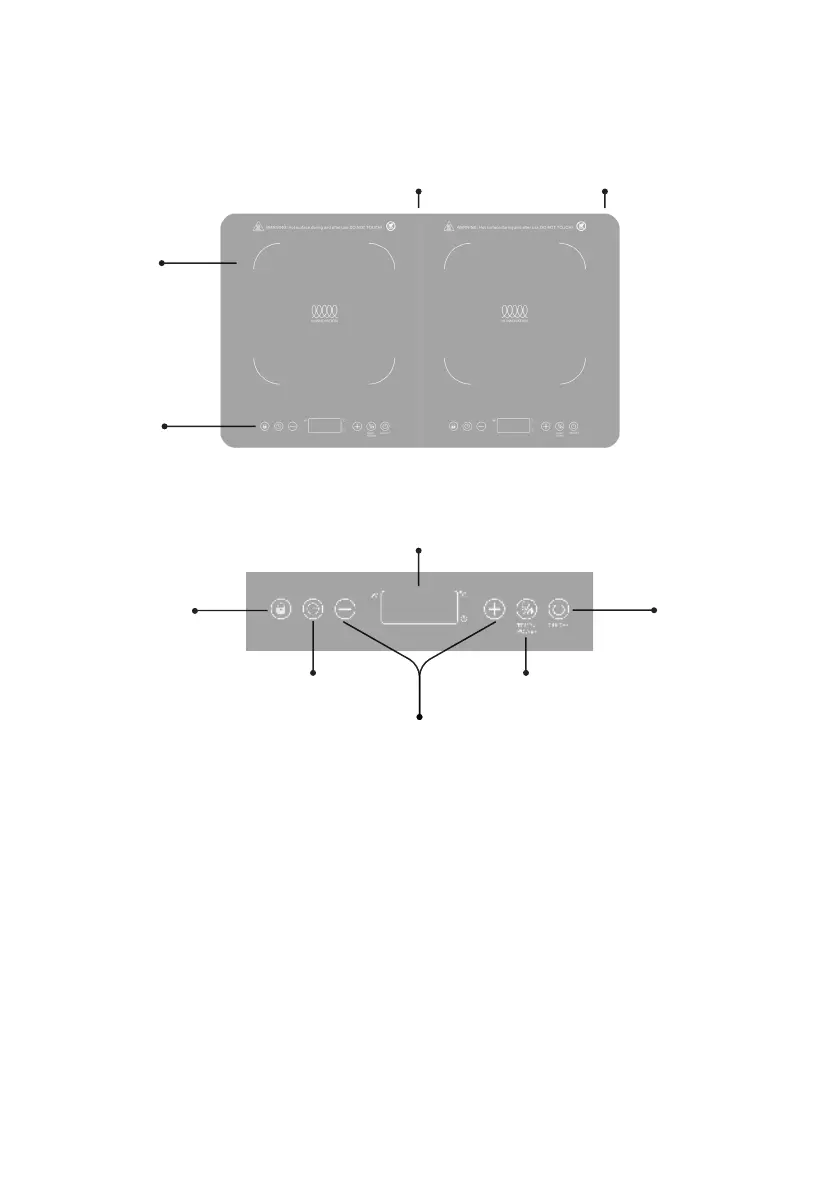
Exhaust Vent Power Cord
Glass
Plate
Control
panel
Up/Down Adjustment Icons
Temp./Power IconTimer Icon
CONTROL PANEL:
Lock
Icon
On/Off
Icon
LED Display


 To Next Page