EasyManua.ls Logo

Gator Frameworks GFWMICBCBM4000 - User Manual

Gator Frameworks GFWMICBCBM4000
2 pages
Print Icon
To Next Page IconTo Next Page
Loading...
2.5”
1” (25mm)
0.6 - 2”
(15 - 50mm)
5112 W. Linebaugh Ave. • Tampa, FL • Phone: (+1) 813.221.4191 • Fax (+1) 813.221.4181
Visit GatorCases.com for more service & product information • All rights reserved Gator Co.
COPYRIGHT GATOR CO.  ALL RIGHTS RESERVED  10.14.2020  REV:A
GFWMICBCBM4000
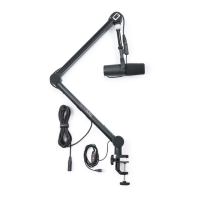
PROFESSIONAL BROADCAST/PODCAST MICROPHONE BOOM STAND
WITH ONAIR INDICATOR LIGHT
Instruction Manual
Unscrew the clamp so that the opening is large
enough to fit over the edge of your desk.
1
Push the clamp all the way onto the desk edge.
Then, fasten the clamp to the desk by turning the
knob tightening it in place.
2
Insert the arm into the hole at the top of the clamp.
Then, insert and tighten the mic holder on the top
of the boom.
3
Mounting with the Desk Clamp
Use a 1” hole cutter and drill out a hole at least 2.5”
from the edges of the desk.
1
Unscrew the nut from the desk insert and drop it
into the hole. Screw the nut onto the desk insert
from the underside until it is tight.
2
Insert the arm into the hole in the top of the
desk insert.
3
Mounting with the Desk Insert
GFWMICBM4000 oers two desk mounting options a desk clamp or desk insert.
Question and Answer IconNeed help?

Do you have a question about the Gator Frameworks GFWMICBCBM4000 and is the answer not in the manual?

Summary

Desk Clamp Mounting

Prepare Clamp for Desk

Unscrew the clamp to ensure it fits over the edge of your desk.

Secure Clamp to Desk

Push the clamp onto the desk edge and tighten the knob.

Attach Boom Arm

Insert the boom arm into the clamp and attach the mic holder.

Desk Insert Mounting

Prepare Desk for Insert

Drill a 1" hole at least 2.5" from desk edges.

Install Insert Nut

Insert nut into hole and screw onto desk insert from underside.

Insert Boom Arm

Insert the boom arm into the top hole of the desk insert.

USB Power Connection

Power Switch Controls

Adjusting Brightness and Color

Control LED brightness and change light color using the buttons.

Turning LED On;Off

Press the button to turn the indicator light on or off.

Tension Adjustment

Gator Frameworks GFWMICBCBM4000 Specifications

General IconGeneral
Product NameGator Frameworks GFWMICBCBM4000
CategoryRacks & Stands
MaterialSteel
ColorBlack
Base TypeTripod
Adjustable ShelvesNo