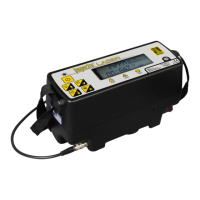
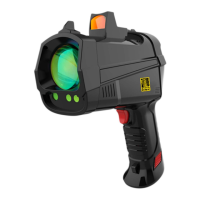
The GAZOSCAN™ is an ultra-light and highly sensitive handheld remote methane leak detector (RMLD) designed for rapidly inspecting difficult-to-access installations and equipment in industrial sites. It utilizes infrared lasers and Tunable Diode Laser Absorption Spectroscopy (TDLAS) technology to remotely detect methane leaks. The device is suited for situations where field technicians cannot operate close to the inspection zone, either due to inaccessibility (e.g., overhead installations) or for safety reasons. It is IECEx and ATEX certified, allowing its use in explosive atmospheres in both confined and unconfined areas.
The GAZOSCAN™ offers methane selectivity and excellent detection capabilities up to 100 meters (328 feet) with a sensitivity of 5 ppm per meter and a fast response time of 0.1 seconds. It is lightweight, weighing 0.76kg (1.68lbs) with the battery. The device provides visual and audio alarms with a configurable alarm threshold. It features a large color 2.8-inch LCD screen for clear display of information. For precise targeting, it includes a green guide laser light and a red dot sight, which is particularly useful in bright sunlight or ambient light. The red dot sight automatically lights up after powering on the device and is effective for aiming over 15m away. If the red dot and green indicator laser do not overlap at long distances, calibration can be performed by adjusting the knob on the sight.
The GAZOSCAN™ comes with Bluetooth capability, enabling real-time transfer of measurement data to a dedicated optional app running on iOS, Android, or Microsoft Windows mobile devices. Users can utilize the app to check, record, and export data. To enable Bluetooth connection, the Test button must be pressed, making the green indication laser visible.
The device's working principle involves emitting an infrared laser at 1.65 µm. This laser beam travels to the target, is partially absorbed by any gas plume, and then reflects back to the receiver. The reflected laser is collected and converted into an electrical signal, which provides information to deduce the relative methane concentration. The reading is expressed in methane column density (ppmm), representing the integral of methane concentration (ppm) and the distance (m) on the optical path. For instance, a 1-meter plume of methane at 5000 ppm would read as 5000 ppmm.
The GAZOSCAN™ is operated through a user-friendly interface with several buttons: a Power/Return button, Enter button, Up and Down buttons for navigation, and a Test button to start and stop measurements. The device also provides light instructions, including an infrared laser emitter, a green indication laser (Class 3R) that blinks during measurement, and a blue working light that turns on during self-test. The interface display shows Bluetooth status, alarm volume, measurement unit, maximum value detected, alarm threshold, light intensity, and a histogram of measured values. Light intensity is crucial for correct measurements and should be between 4 to 11 bars to avoid errors caused by too weak or too strong light.
The device includes setting menus to adjust parameters such as alarm threshold, offset, measurement unit (ppmm, %volm, %LEL*m), measuring speed (Fast, Medium, Slow), alarm volume, screen brightness, power save time, and language. Users can also access information about hardware and software versions.
Battery operation involves connecting the power adapter cord to the charging base, inserting the battery, and plugging the adapter into a power outlet. The charging base has a fault indicator light and a charging indicator light. The charging indicator lights up during charging and turns off when the battery is fully charged. If the fault indicator light is on, charging should be stopped immediately, and GAZOMAT™ should be contacted for maintenance. The battery should be removed once charging is complete. For insertion, the battery is aligned with the compartment and pushed gently until a click is heard. A 10-second wait is recommended before turning on the device after battery installation. To remove the battery, the battery compartment button is pressed, and the battery is gently pulled out until fully unplugged. It is crucial to keep surrounding environments safe during battery handling and to always store the instrument with the battery removed. Lithium batteries operate at a high level before dropping suddenly, so an optional second battery is recommended.
Upon powering on, the GAZOSCAN™ automatically performs a Self-Check, conducting internal diagnostics to verify the integrity and performance of the sensor and components. If any errors are detected, an error screen will appear, and the user should contact their local GAZOMAT™ service center. Error codes provide specific information about issues such as abnormal laser temperature control, weak laser intensity, or circuit board temperature exceeding limits. If an error occurs, restarting the device is recommended, especially after it has cooled down if temperature-related errors appear. Users are strictly forbidden from opening the detector or battery, particularly in hazardous atmospheres, or from changing, modifying, or adapting any parts of the detector. The instrument should not be used if the outer case is broken or wet, and the battery should be removed immediately if smoke, strange smells, short-circuit, or fire occurs. The device has an enclosure rating of IP54 and should not be immersed in liquid.
Regarding laser safety, the infrared measurement laser is Class 1 eye safe, while the green indication laser is Class 3R. Users must not stare into the beam or point the laser at humans, livestock, or other animals. The device should be stored in a cool, dry environment, away from extreme temperatures, and without the battery installed. It should be transported in its dedicated casing to prevent damage from shock or vibrations. If dust is on the lens or body, it should be wiped with a lint-free dry clean cloth or pre-moistened optical wipe, avoiding rough materials that could damage the lens surface.
When detecting through glass, the GAZOSCAN™ should be pointed at an angle to avoid receiving light reflected vertically from the glass, which can cause light intensity saturation or inaccurate measurements. The device should not be used to detect through materials with strong absorption or reflection effects on the infrared laser, such as PMMA, laminated glass, or anti-infrared glass, as this can prevent methane detection or lead to inaccurate results. When detecting towards a corner or similar situation, the infrared laser may reflect between walls, leading to high measurement concentrations. In such cases, the device should be pointed to avoid multiple reflections for accurate results.
The manufacturer is not liable for abnormal use or malicious tampering with the product. In case of malfunction, users should contact GAZOMAT™ North America, LLC. The warranty covers free maintenance for software or hardware problems, provided the equipment has been used, handled, and stored according to the manual's recommendations. The warranty does not cover missing purchase documents, misuse, unauthorized modification, intentional damages, theft, or damages from unauthorized accessories or natural disasters.


 To Next Page
 General