9
Connecting the Handset
1. Connect one end of the coiled handset cord to the jack on the side of the base unit.
2. Connect the other end of the cord to the jack at the bottom of the handset, then
place the handset in the cradle.
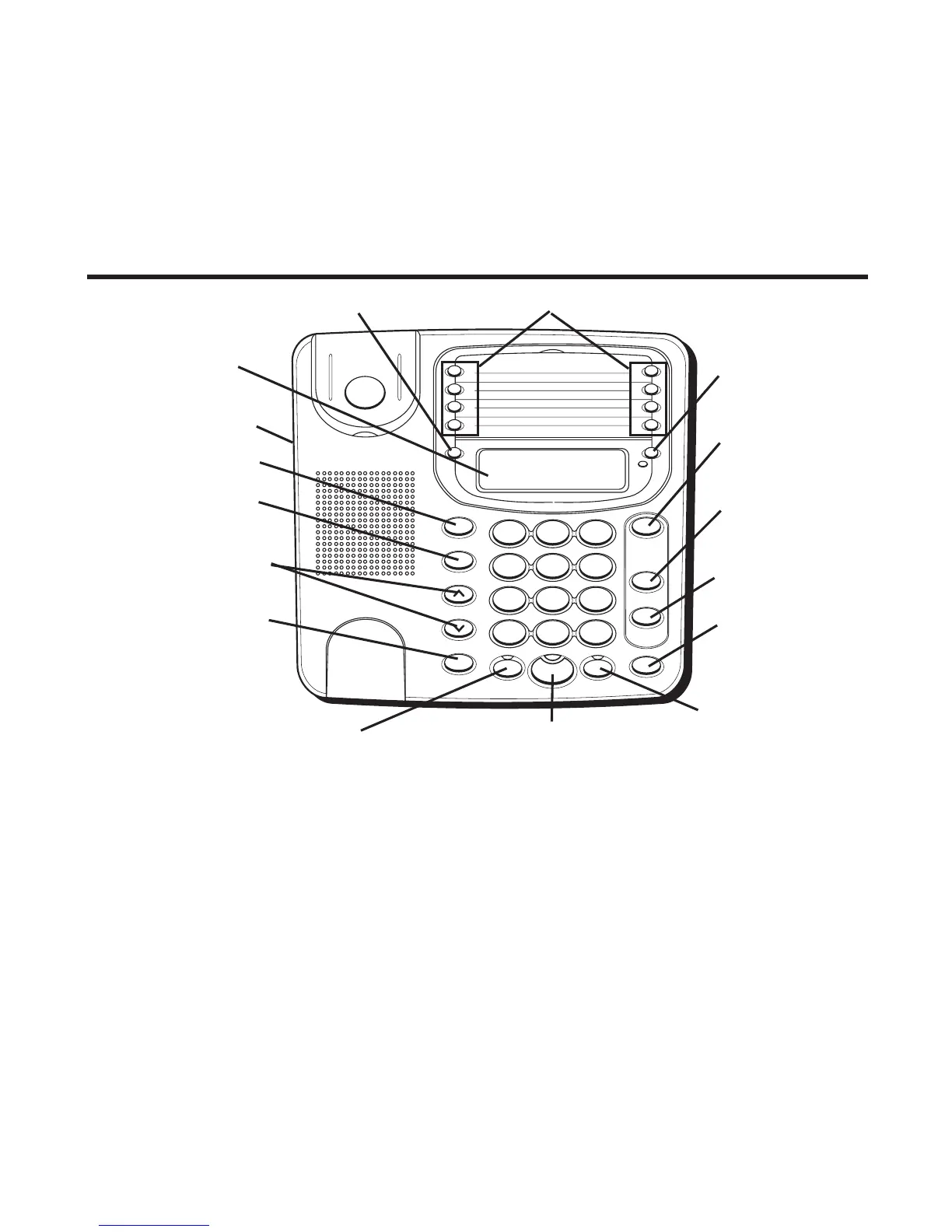
Basic Operation
SPEAKER (button)
HEADSET (button)
FLASH (button)
VOLUME ^/v
buttons
REDIAL/pause
(button)
STORE (button)
DISPLAY
SET button
LOWER (button)
CONF (conference
button)
LINE 2 (button)
LINE 1 (button)
HOLD (button)
MUTE (button)
MEMORY buttons
Headset jack
Setting Up the Clock
1. Press SET. The display shows - - : - -.
2. Enter the time in 12 hour format, using 4 digits-two for the hour and two for the
minutes. For example, 9:00 a.m. would be 0900.
3. Press the # key to select AM or PM.
4. Press SET to conrm.
Your phone provides the convenience of accessing 2 separate telephone lines, each
obtained from the telephone company and each having its own phone number. This
is generally applicable to small ofces.


 To Next Page