5
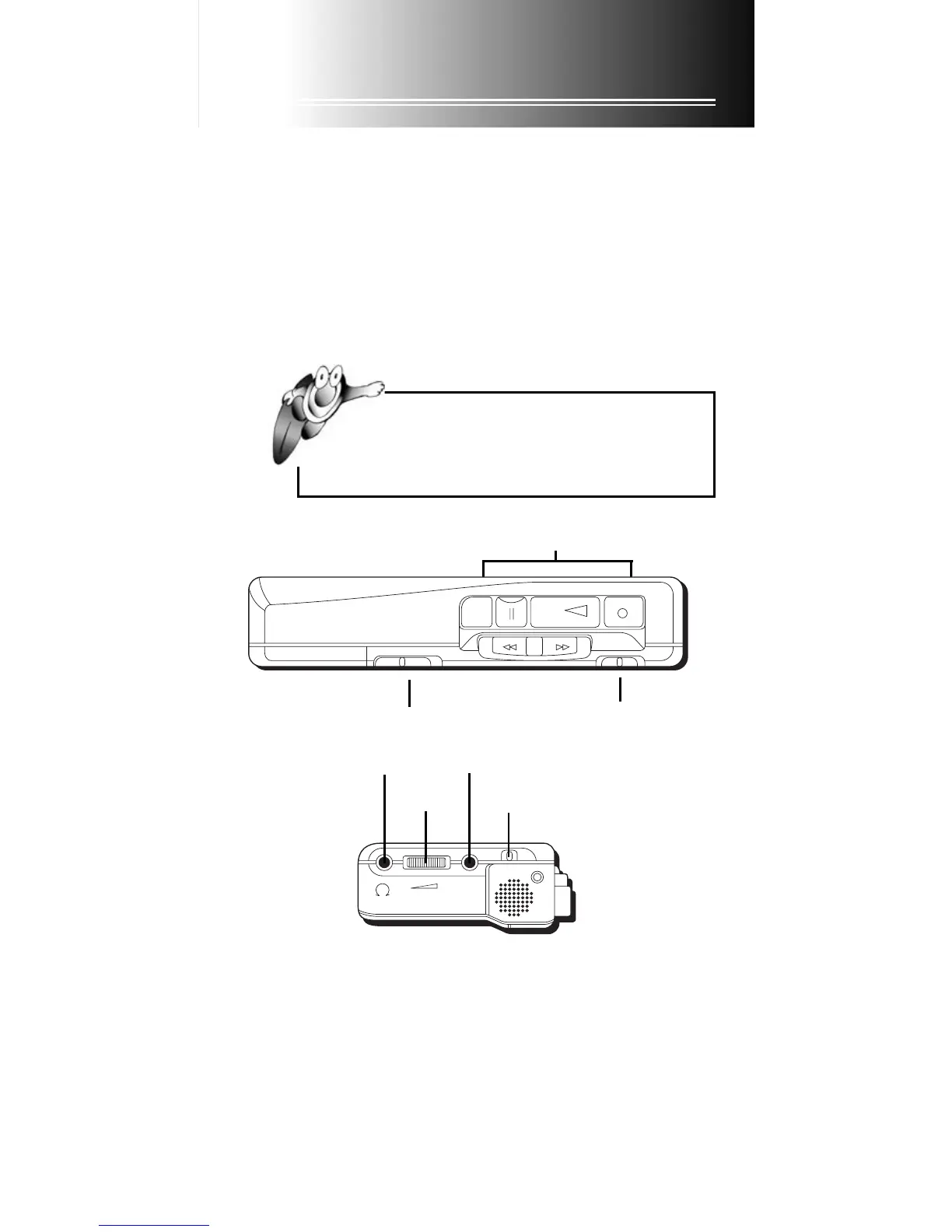
Volume Control
• Adjust the volume when in the PLAY mode to your preferred listening
level.
• Adjust the volume when in the RECORD mode to fine tune the
sensitivity of the built-in microphone for record operations.
Tape buttons
Tape speed switch
VOLUME
HI • • LO
MIC
REC/
BATT
Volume
Headphone jack
External MIC jack
Mic sensitivity switch
Using the Recorder
Insert or Remove a Microcassette
1. Press the STOP EJECT button to stop recorder or to open cassette carry
door and remove microcassette. Note that when in play or record
mode you must press STOP EJECT once to turn player off and again to
open the cassette carry door.
2. Insert microcassette into the cassette carry door with the side to be
used visible through cassette door window. Face exposed tape outward
and close door. Note that Rim drive and capstan drive tapes look alike,
but only CAPSTAN DRIVE MICROCASSETTE tapes will work in this
recorder.
TIP: Always push
STOP EJECTSTOP EJECT
STOP EJECTSTOP EJECT
STOP EJECT button before storing.
This will relieve pressure on certain parts in the
recorder that might deform after long periods of time.
STOP
EJECT
PAUSE
PLAY
REC
FFWD
CUE
REV
REW
OFF • • ON
1/2 • • NORMAL
AVR switch



 To Next Page