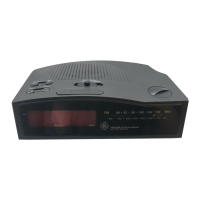
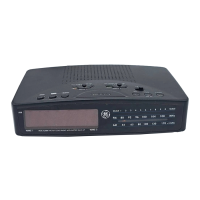
This document describes the General Electric Model 7-4870 Computeradio, a programmable clock radio designed for ease of use with digital timekeeping and AM/FM tuning.
Function Description:
The Computeradio is a programmable clock radio that offers a range of features for timekeeping, radio listening, and alarm functions. Its core functionality revolves around a digital display and a keyboard for programming.
Key Functions:
- Digital Timekeeping: Displays the current time in a digital format.
- AM/FM Radio Tuning: Allows tuning to both AM and FM radio stations with digital frequency readout.
- Programmable Alarms: Features two independent wake-up systems, referred to as "HIS'N HERS," allowing users to set two different wake-up times.
- Sleep to Music: Enables users to fall asleep to music, with the radio automatically turning off after a set period.
- Snooz-Alarm® Clock Operation: Provides a snooze function that temporarily silences the alarm or radio for a programmed duration.
- Station Memory: Can store up to four favorite AM or FM radio stations for instant recall with a single button press.
- Power Failure Protection (Optional): Equipped with a microcomputer memory holding system that can be powered by two customer-installed 9-volt batteries to maintain time, alarm settings, and stored radio stations during power interruptions.
Usage Features:
The Computeradio is designed for user-friendliness, incorporating a keyboard for most operations, eliminating the need for traditional tuning knobs.
- Keyboard Time Set and Radio Tuning: Time and radio stations are set by pressing keys, rather than turning knobs.
- Digital Readout: Displays AM/FM radio call numbers and time digitally.
- Display Brightness Control: Allows adjustment of the digital display's brightness for day or night viewing.
- Visual Power Failure Indicator: The digital display blinks to indicate that a power interruption has occurred, prompting the user to reprogram time, alarm, and station memory if batteries were not installed or have run down.
- "One Button Recall" for Stations: Stored radio stations can be instantly recalled by pressing their corresponding memory number (1-4).
- "Scan the Band" Tuning: Users can quickly scan through radio frequencies using the REV/▼ and FWD/▲ keys, with a FAST control for accelerated scanning.
- Programmable Sleep Cycle: The sleep timer can be set for up to 90 minutes in 5-minute increments, allowing the radio to play for a chosen duration before automatically turning off.
- Programmable Snooz-Alarm®: The snooze duration can be adjusted from 5 to 60 minutes in 5-minute increments.
- AM Channel Spacing Switch: A switch located on the cabinet bottom allows adjustment between 9 KHz and 10 KHz AM channel spacing, accommodating different broadcast standards.
Setting Up the Device:
- Power Connection: Plug the AC line cord into a standard 120 Volt AC household outlet. The digital display will blink, indicating power has been restored.
- Wake Selectors: Slide both WAKE 1 & 2 SELECTORS (14) to the OFF position initially.
- Set the Time of Day:
- Press and hold the DISPLAY selector key (5) until the DISPLAY POSITION INDICATOR (4) reaches "TIME SET."
- Use the REV/▼ and FWD/▲ (8) keys to adjust the DIGITAL DISPLAY (2) to the correct AM or PM time. The FAST control can be used in conjunction with these keys for quicker adjustment.
- Press the DISPLAY key (5) again to return the DISPLAY INDICATOR (4) to "TIME LOCK" position.
- Turning the Radio On: Press either the AM or FM key, or one of the 1-4 Recall keys. The radio will tune to the last played or stored station.
- Tuning the Radio:
- Press the DISPLAY key (5) until the DISPLAY INDICATOR (4) reaches "RADIO."
- Use REV/▼ and FWD/▲ (8) keys to scan the band. The FAST control can be used for faster tuning.
- Press the DISPLAY key (5) to return to "TIME LOCK" position, or the OFF key (7) to turn the radio off.
- Storing a Station in Memory:
- Press the DISPLAY key (5) to set the DISPLAY INDICATOR (4) to "RADIO."
- Tune to the desired AM or FM station.
- Press and release the STORE key (9), then press a memory number (1-4) within 5 seconds.
- Repeat for other stations.
- Press the DISPLAY key (5) to return to "TIME LOCK" position.
- Recalling a Station: Simply press any of the 1-4 memory keys.
- Selecting Wake Up Time(s):
- Press the DISPLAY key (5) to set the DISPLAY INDICATOR (4) to "WAKE 1" or "WAKE 2" position.
- Slide the corresponding WAKE SELECTOR (14) to MUSIC or MUSIC/ALARM.
- Enter the desired AM or PM wake-up time using REV/▼ or FWD/▲ keys (with FAST for quick adjustment).
- Press the DISPLAY key (5) to return to "TIME LOCK" position.
- Programming Snooz-Alarm® Clock Time:
- Press and release the SNOOZ key. The display will show the current snooze time.
- Use REV/▼ or FWD/▲ keys to choose the desired snooze time (5 to 60 minutes in 5-minute increments). The FAST key has no effect here.
- Press and release the SNOOZ key again to save the new snooze time.
- Setting Sleep to Music Time:
- Press and release the SLEEP key.
- Use REV/▼ or FWD/▲ keys to choose the desired sleep time (up to 90 minutes in 5-minute increments). The FAST key has no effect here.
- The radio will play for the chosen length of time, then turn itself off. To turn the radio off sooner, press OFF.
Technical Specifications:
- Power: 120 Volt AC household outlet.
- Battery Backup (Optional): Requires two 9-volt batteries (NEDA 1604A alkaline recommended) for memory retention during power outages. Fresh alkaline batteries provide up to 8 hours of memory holding time.
- AM Frequency Range: 530 - 1610 KHz (with 10 KHz intervals, or 9 KHz intervals via switch).
- FM Frequency Range: 88.1 - 107.9 MHz (with 0.2 MHz intervals).
- Antennas:
- AM: Built-in ferrite rod antenna.
- FM: Power cord acts as the FM antenna. External FM antenna terminals are provided for improved reception.
- Display: Digital display with AM/PM indicators, alarm set indicator, and display position indicator.
- Finish: Wood grain finish on polystyrene.
Maintenance Features:
- Power Failure Protection: The optional 9-volt batteries ensure that time, alarm settings, and stored radio stations are retained during power interruptions. The digital display will blink upon power restoration to indicate a power interruption occurred.
- Battery Replacement: Batteries should be removed if the radio is unplugged for lengthy periods and replaced periodically to ensure memory holding capability.
- Cleaning: The cabinet should be cleaned with a soft cloth dampened with water only. The power cord must be unplugged before cleaning. Avoid polishes or strong cleaning agents that could damage the finish.
- Service: The unit contains no customer-serviceable components. All repairs should be performed by a qualified serviceman. General Electric authorized service facilities are available for warranty and out-of-warranty service.
- Important Safety Information: Do not disassemble the cabinet. Avoid immersing the product in water or using it in bathing areas. Protect the unit from extreme temperatures (e.g., near radiators or stoves). Ensure sufficient ventilation around the unit.
- Station Memory Log: A chart is provided in the manual to record the frequency, call letters, and location of stored AM/FM stations.
- AM Channel Spacing: The manual includes instructions on how to adjust the AM channel spacing switch (9/10 KHz) located on the cabinet bottom, using a pen or small screwdriver.
- Accessory Order Form: The manual includes an order form for various accessories such as FM dipole antennas, pillow speakers, headphones, remote speakers, and an AM external antenna kit.
- Warranty: General Electric Company provides a full ninety-day warranty against manufacturing defects from the date of purchase or receipt as a gift.

 Need help?
 General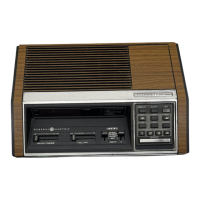

 To Next Page