COMPUTERADIO
PROGRAMMABLE
CLOCK
RADIO
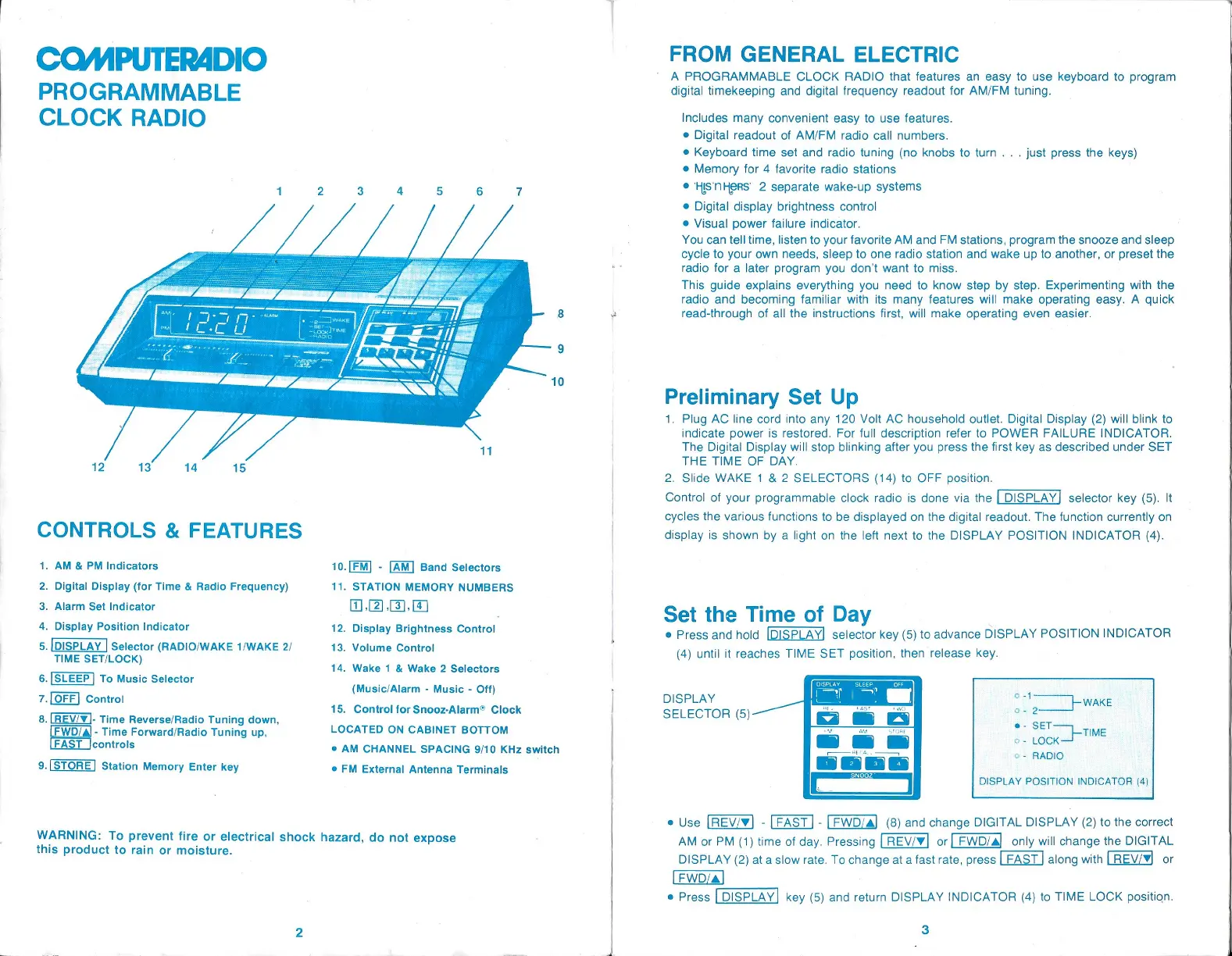
CONTROLS &
FEATURES
1. AM
&
PM
Indicators
2.
Digital Display (for
Time & Radio
Frequency)
3. Alarm Set
Indicator
4.
Display
Position Indicator
5.
[DISPLAY
|
Selector
(RADIO/WAKE
1/WAKE
2/
TIME
SET/LOCK)
6.|SLEEP/
To Music
Selector
7.
[OFF]Control
8.
[REV/¥]-
Time
Reverse/Radio
Tuning
down,
-
Time
Forward/Radio
Tuning up,
[FAST |controls
9.
Station
Memory
Enter
key
10.[FM]
-
Band
Selectors
11.
STATION
MEMORY
NUMBERS
Too.
12.
Display Brightness
Control
13.
Volume Control
14.
Wake 1 &
Wake 2
Selectors
(Music/Alarm
-
Music
-
Off)
15.
Control for
Snooz-Alarm® Clock
LOCATED ON
CABINET
BOTTOM
©
AM
CHANNEL
SPACING
9/10
KHz
switch
©
FM
External
Antenna
Terminals
WARNING: To
prevent
fire or
electrical
shock
hazard,
do not
expose
this
product
to
rain or
moisture.
FROM GENERAL
ELECTRIC
A
PROGRAMMABLE CLOCK RADIO that features an
easy
to use
keyboard
to
program
digital
timekeeping
and
digital
frequency
readout for
AM/FM
tuning.
includes
many
convenient
easy
to use
features.
@
Digital
readout of
AM/FM
radio call
numbers.
Keyboard
time set and radio
tuning (no
knobs to turn.
. .
just press
the
keys)
©
Memory
for
4
favorite radio stations
®
HISNHERS
2
separate wake-up
systems
©
Digital display brightness
control
©
Visual
power
failure indicator.
You can tell
time,
listen
to
your
favorite AM and FM
stations,
program
the snooze and
sleep
cycle
to
your
own
needs,
sleep
to one radio station and wake
up
to
another,
or
preset
the
radio for
a
later
program you
don’t want to miss.
This
guide
explains
everything you
need to know
step by step. Experimenting
with the
radio and
becoming
familiar with its
many
features will make
operating
easy.
A
quick
read-through
of all
the instructions
first,
will make
operating
even
easier.
Preliminary
Set
Up
1.
Plug
AC line cord into
any
120 Voit AC household outlet.
Digital Display (2)
will
blink to
indicate
power
is restored. For
full
description
refer to POWER FAILURE INDICATOR.
The
Digital Display
will
stop blinking
after
you press
the
first
key
as described
under
SET
THE TIME OF DAY.
2.
Slide WAKE
1
& 2 SELECTORS
(14)
to OFF
position.
Control of
your programmable
clock radio
is done via the
LDISPLAY]
selector
key (5).
It
cycles
the
various functions to be
displayed
on the
digital
readout. The function
currently
on
display
is shown
by
a
light
on the left
next to the DISPLAY POSITION
INDICATOR
(4).
Set the Time of
Day
@
Press
and hold selector
key (5)
to advance
DISPLAY
POSITION
INDICATOR
(4)
until it reaches
TIME
SET
position,
then release
key.
DISPLAY
SELECTOR
(5)
®
Use
-
[FAST]
-
(8)
and
change
DIGITAL DISPLAY
(2)
to the correct
AM
or
PM
(1)
time of
day. Pressing
LREV/¥|
or
|
FWD/a!
only
will
change
the
DIGITAL
DISPLAY
(2)
at a slow rate. To
change
at a fast
rate,
press
along
with
LREVz¥
or
@
Press [DISPLAY
key (5)
and return DISPLAY
INDICATOR
(4)
to
TIME LOCK
position.
3


 To Next Page
 Loading...