A B C
A B C
15
:LWKWKHFRQWURORႇ
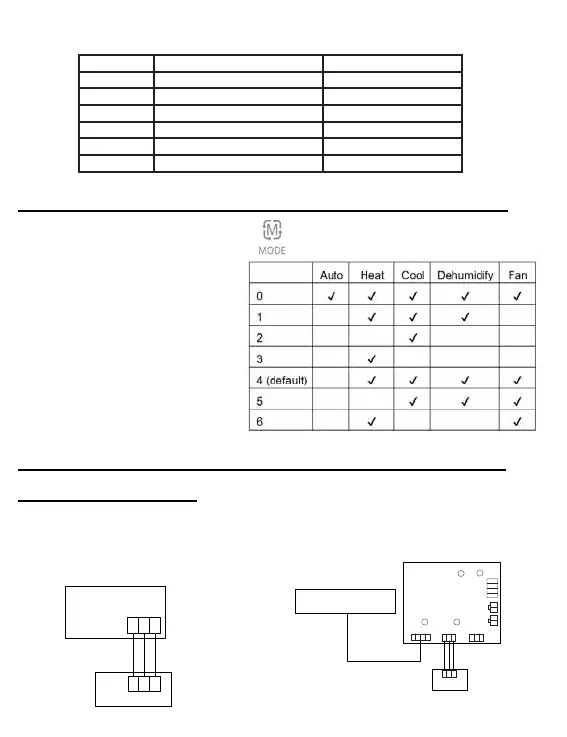
press and hold the MODE
button for 10 seconds.
Use the FAN button to
change available modes of
operation. 4 is default.
Mode Combination Setting
A: One control on one indoor
Indoor 1
Wired controller
Polar wire
Wired controller
Wired Controller Wiring Instruction
Wiring Connections
1.&DVVHWWH$%«$/«09$%«09$/«
'XFWHG$'«$0«09$'«09$+«
059:DOO0RXQW09$:«
2 Non-MRV Wall mount (AW...)
Indoor PCB board
Wired controller
LED3/R
SW1
CN4
CN3
CN5
CN1
A BC
AB
C
CN2
1 2 3 4
LED1/R
LED2/G
WK-B
LED4/G
A B C
Display Description Value
A Indoor sensor - Ambient (Tai) Temperature °F (°C)
b Indoor sensor - Vapor (Tc1) Temperature °F (°C)
C Indoor sensor - Liquid (Tc2 Temperature °F (°C)
d Indoor EEV position Half of actual position
E Indoor unit address Shown in hexadecimal
F Indoor unit central address Shown in hexadecimal
Parameter Inquiry:
Mode Combination Setting:



 To Next Page