----Oven ‘thermostat
‘- Adjmtlnent
hetemperatureccmtroiinyour
NWovenhasbeencarefullyadjusted
toprovideaccuratetemperatures.
However,ifthisovenhasreplaced
oneyouhaveusedforseveralyems,
YOUmaynoticeadifferenceinthe
degreeofbrowningor thelengthof
timerequiredwhenusingyour
favoriterecipes.Oventemperature
controlshaveatendencyto “drift”
overa periodofyearsandsince
thisdriftisverygradual,itisnot
readilynoticed.Therefore,you
mayhavebecomeaccustomedto
yourpreviousovenwhichmay
haveprovidedahigheror lower
temperaturethanyouselected.
Beforeattemptingtohavethe
temperatureofyournewoven
changed,be sureyouhavefollowed
thebakingtimeandtemperatureof
therecipecarefully.Then,after
youhaveusedtheovena fewtimes
—
andyoufeeltheovenistoohot
ortoocool,thereisasimple
– adjustmentyoucanmake-yourself
n-the OVE-NTEMPknob.
uI1theknoboffthecontrolshall
andlookatthebackside.Thereis
adiscinthecenteroftheknobskirt
with a series ofmarks opposite a
pointer.
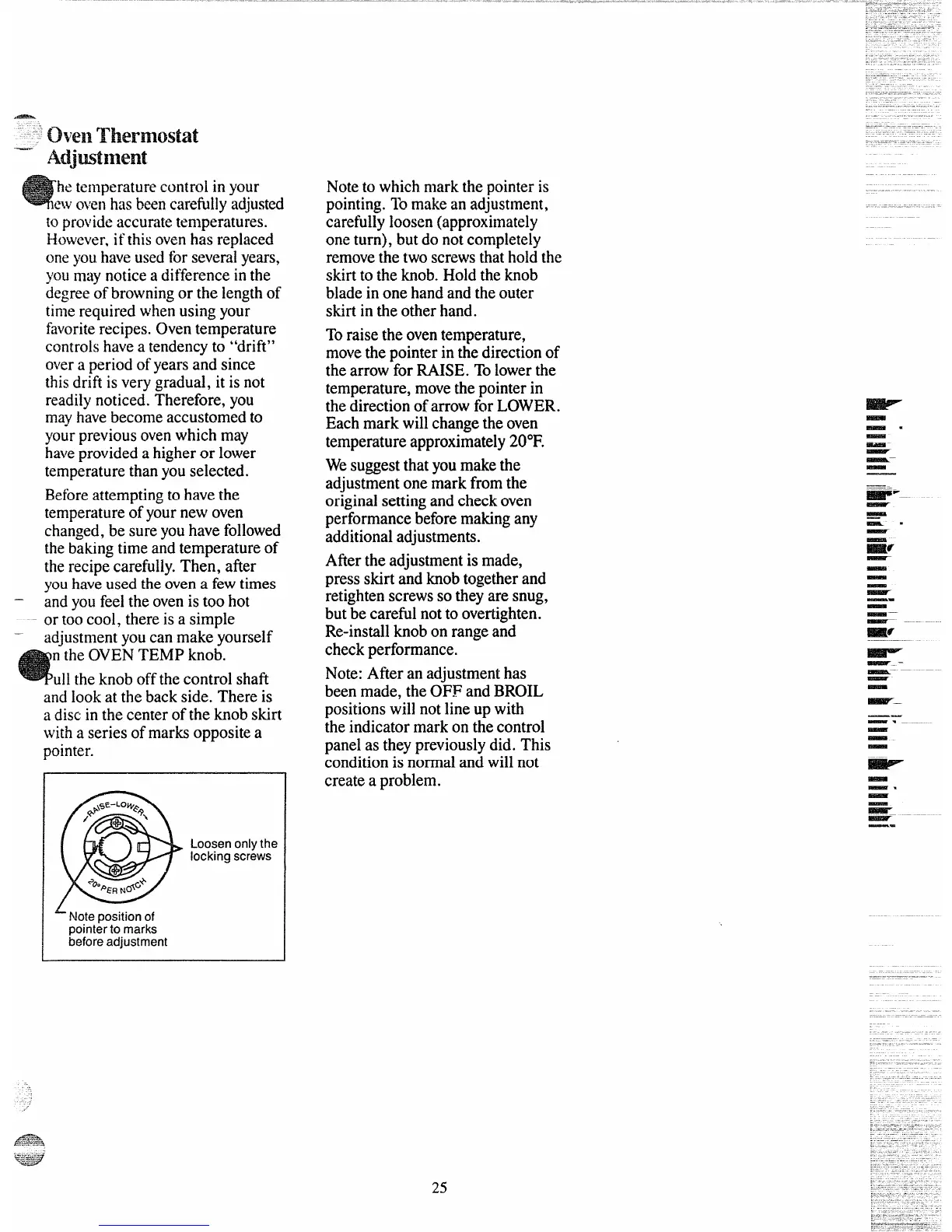
Loosen onlythe
locking screws
Notetowhichmarkthepointeris
pointing.Tomakeanadjustment,
carefullyloosen(approximately
oneturn),butdonotcompletely
removethetwoscrewsthatholdthe
sldrttotheknob.Holdtheknob
bladeinonehandandtheouter
skirtintheotherhand.
Toraisetheoventemperature,
movethepointerinthedirectionof
thearrowforRAISE.Tolowerthe
temperature,movethepointerin
thedirectionofarrowforLOWER.
Eachmarkwillchangetheoven
temperatureapproximately20”F.
Wesuggestthatyoumakethe
adjustmentonemarkfromthe
originalsettingandcheckoven
performancebeforemakingany
additionaladjustments.
Afiertheadjustmentismade,
pressskirtandknobtogetherand
retightenscrewssotheyaresnug,
butbecarefulnottoovertighten.
Re-installknobonrangeand
checkperformance.
Note:Afteranadjustmenthas
beenmade,theOFFandBROIL
positionswillnotlineupwith
theindicatormarkonthecontrol
panelastheypreviouslydid.This
conditionisnormalandwillnot
createa problem.
~
-.
-
_-
—
~—
-
lis$FJ--
—
—
--
—
=6
—
-
-
-
~
—.
-
_—
—-
mr
k–
—.—
~— ‘– ‘-
—
-
mm?r.
——
— . . .
-
-
-
*
R3faa
—.
-
-
~.–-
—.
L Note position of
pointer to marks
before adjustment
25



 To Next Page