Page 4
\
1). Connecting receiver to PC
• How to Remove the Nano Receiver
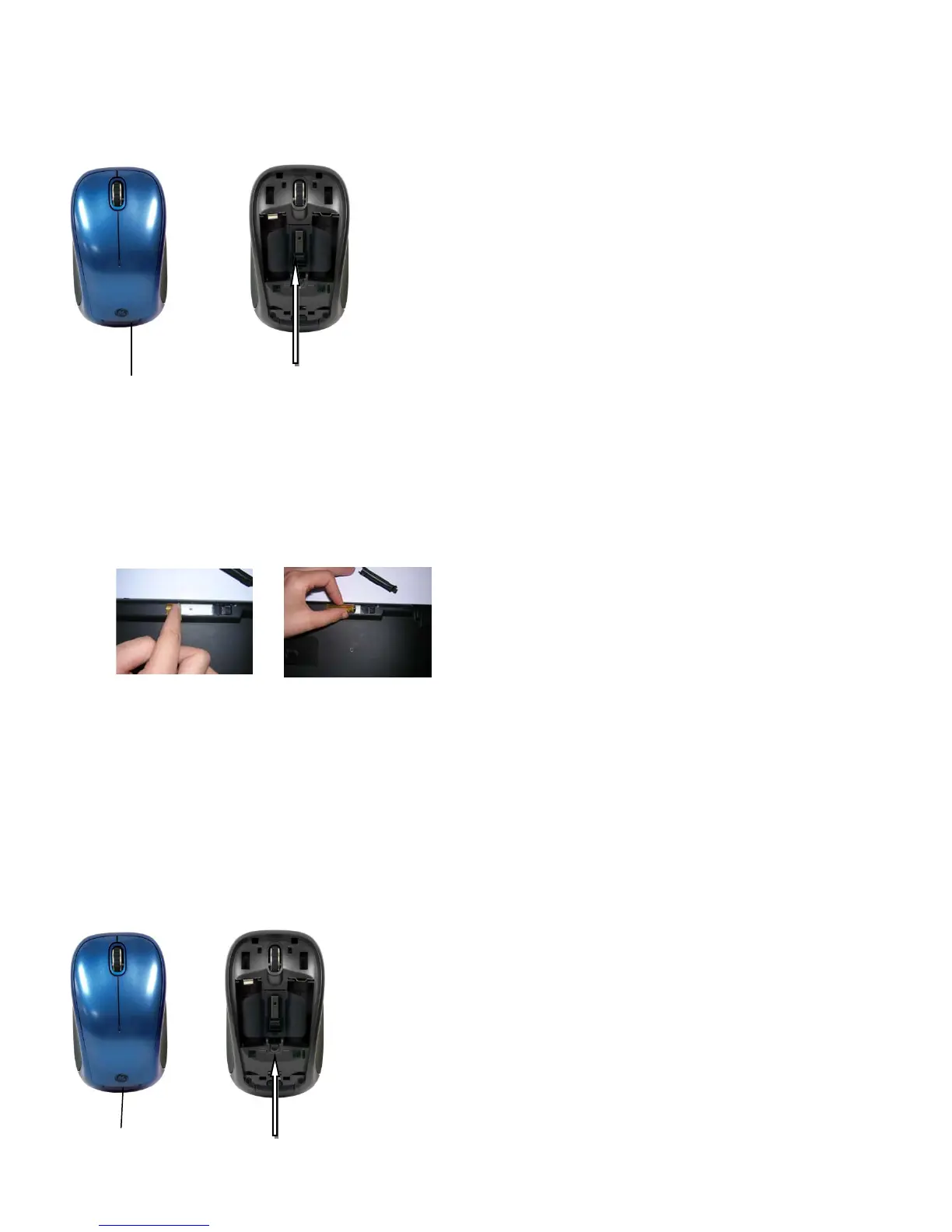
1. Press the tab (as shown) to remove the top of the mouse.
2. Remove the Nano Receiver from its location in the center of the mouse.
3. Plug the USB receiver into an available USB port of your PC.
2). Insert the batteries with correct orientation into the battery compartments of both keyboard and mouse
respectively.
• Installing the batteries in the Mouse
1. Turn off the power switch
2. Press the tab (as shown) to remove the top of the mouse.
3. Remove the battery restraint by pressing the tab (as shown) that is located below the Nano receiver.
4. Insert the batteries as depicted by the battery compartments.
5. Replace the battery restraint and the top of the mouse.
6. Turn on power switch.
Press to remove
top of mouse
Press to remove
battery restraint
+
Positive
- Negative
+
Press to remove
top of mouse
Remove the Nano receiver stored in
the Center between the batteries.


 To Next Page