Home
GE
Computer Accessories
WIRELESS THIN-PROFILE
Page 6 (Special Function Hot Keys)
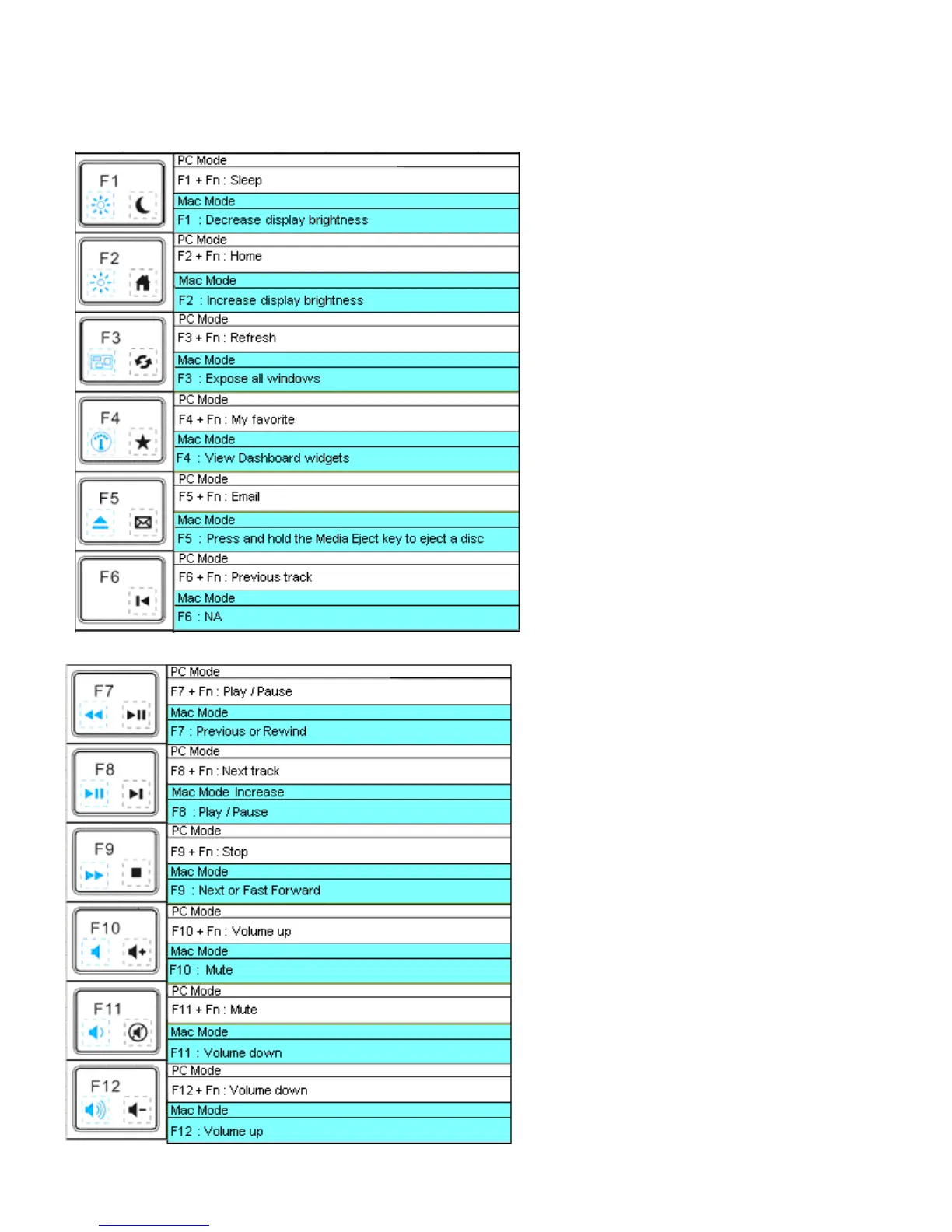
GE WIRELESS THIN-PROFILE - Special Function Hot Keys
8 pages
Manual
Save Page as PDF
To Next Page
To Next Page
To Previous Page
To Previous Page
Loading...
Page
6
5. Special Functio
n Ho
t Keys
The Wi
reless T
hin
-
Profile Ke
yboa
rd will
come preset
with
these fu
ncti
on ke
ys and
shortcu
ts.
In order to to
ggle b
etween
the
function key and the Multimedia
hotkeys, FN needs to be selected or
deselect
ed
5
7
Table of Contents
Main Page
Table of Contents
2
Introduction
3
Package Contents
3
System Requirement
3
Installation Instructions
3
Special Function Hot Keys
6
Special Mouse Functions
7
Troubleshooting
7
Two Year Limited Warranty
7
Fcc Statement
8
Related product manuals
GE 98552
7 pages


 To Next Page