1User Manual | HouseParty DAB | GEAR4
Please read before use. HouseParty DAB
Product features:
■ Charges iPod / iPhone
■ DAB radio with 10 programmable presets
■ FM radio with 10 programmable presets
■ 12 / 24 hour clock with 2 alarms
■ Snooze control
■ Line-in port for use with other music players
■ Remote control
Getting started:
■ Plug the power supply into the back of the
unit and then into the mains supply.
■ To activate the speaker, slide the power
switch at the back of the unit to ON.
■ To take the speaker out of standby, press the
button on the unit or the button on the
remote control.
■ To select the mode, press MODE on the
speaker to scroll between the options (DAB,
FM, iPod, AUX).
■ To put the speaker into standby, press and
hold the
button on the unit or the button
on the remote.
For use with
iPod / iPhone:
■ Press the MODE button to select iPod mode.
■ Select and insert the correct docking adapter
to suit your iPod / iPhone.
N.B. Please ensure that you use the correct dock
adapter for your iPod / iPhone to avoid damage
to the dock connector. If the specific adapter is
not included, please use the adapter that was
provided by Apple with your iPod / iPhone.
GEAR4 will not be responsible for any damage
resulting in not using a dock adapter.
■ Carefully insert your iPod / iPhone into the
dock, playback will start automatically.
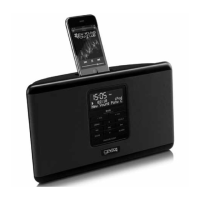
■ The HouseParty DAB can display the track
information on its screen. Press the INFO
button on the remote control to choose
between track name, artist, album or OFF.
■ Press VOL + / - on the speaker or remote
control to adjust the volume.
■ Press
on the speaker or remote control to
play or pause a track.
■ To navigate your iPod / iPhone menus, use
the MENU,
/ and SELECT buttons.
■ Press
on the speaker or remote
control to change track.


 To Next Page