Need help?
Do you have a question about the Gear4music MK-5000 and is the answer not in the manual?
Highlights the main functionalities and capabilities of the MK-5000 keyboard.
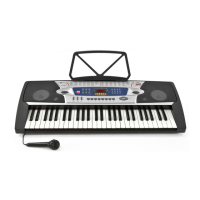
Diagram and labels for all controls on the keyboard.
Explanation of indicators and information displayed on the LCD screen.
Instructions for powering the device and adjusting master/rhythm volumes.
Guide to playing demo songs and selecting instrument tones.
Details on chord timbres, chord mat, rhythm selection, and tempo adjustment.
Information on Touch Response, Pitch Bend, Dual, Split, Sustain, and Vibrato effects.
Explanation of Rhythm Programming, Recording & Playback, One-Key Play, and Guide.
How to play single key chords with automatic bass accompaniment.
Instructions for playing fingered chords with automatic bass accompaniment.
Details on shifting the keyboard's key and using percussion sounds.
Saving settings and creating custom rhythms.
Lists the technical details and specifications of the MK-5000 keyboard.
 General
| Keys | 61 |
|---|---|
| Display | LCD |
| Polyphony | 32 |
| Built-in Speakers | Yes |
| Display Type | LCD |
| Power Supply | AC adapter or batteries |
| Touch Sensitivity | Yes |
| Power Source | AC adapter or batteries |

 To Next Page