
 Need help?
Do you have a question about the Gear4music ORBIT-70 and is the answer not in the manual?
Advises against placing the product near heat sources, in direct sunlight, or exposing it to liquids or open flames.
Stresses that installation must be performed by qualified personnel to prevent injury and damage.
Requires experience for overhead rigging, respecting load limits, using certified materials, and clearing the area below.
Details the functions assigned to each channel (CH1-CH9) in the 9-channel DMX mode.
Details the functions assigned to each channel (CH1-CH13) in the 13-channel DMX mode.
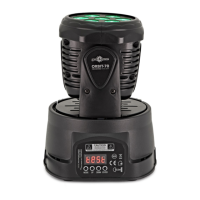
The Gear4music ORBIT-70 is a 7 x 10W Mini LED Moving Head Light, designed for various lighting applications. This user manual provides comprehensive instructions for its setup, operation, and maintenance, ensuring users can maximize its potential.
The ORBIT-70 is a versatile moving head light capable of producing a range of dynamic lighting effects. It features 7 x 10W RGBW LEDs, allowing for a broad spectrum of colors and dimming capabilities from 0-100%. The device supports both 9-channel and 13-channel DMX modes, offering extensive control over its pan and tilt positions, strobe effects (slow to fast), and various LED quick start and slow close functions. In 9-channel mode, users can control pan and tilt positions, different strobe speeds, LED open/close, individual RGBW dimming, and specific pan/tilt operation modes where LEDs can be switched on or off. The 13-channel mode expands on this by adding X and Y axis fine adjustments, X/Y rotation speed control, and static LED color selection, providing more precise and complex lighting designs.
Beyond DMX control, the ORBIT-70 also offers master/slave functionality, allowing multiple units to be connected and synchronized. In master/slave mode, one light acts as the master, dictating the light show for all connected slave units. Slave 1 mode replicates the master light's functions, while Slave 2 mode enables additional DMX functions to run against the master light, offering more creative possibilities. The device also includes a sound-active mode, where the lights respond to ambient sound, with adjustable sensitivity. This feature is particularly useful for dynamic performances without the need for complex programming.
The ORBIT-70's menu system is navigated using MODE, UP, DOWN, and ENTER buttons. The LED display shows current settings, and a flashing dot next to 'A' indicates DMX operation. The menu allows users to set the DMX address, select channel mode, adjust sound active settings, control LED display on/off, and even invert the LED display. Other menu options include pan and tilt axis reverse positions, a test mode, a working time display, and a version number. An auto-reset function is also available for convenience.
The ORBIT-70 is designed for ease of use and versatility. The menu system is intuitive, allowing for quick adjustments to various parameters. Users can scroll through menu items using the MODE button and modify values with the UP/DOWN buttons. The ENTER button confirms selections and displays current values. The device automatically exits the menu after a few seconds of inactivity, resuming normal operation.
For DMX control, users must select either 9 or 13 channel mode from the menu. Once selected, DMX operation begins automatically after a short period of no button presses, indicated by a flashing dot next to the 'A' on the display. The DMX channel tables provide detailed information on controlling pan, tilt, strobe, dimming, and color mixing.
The master/slave mode simplifies multi-unit setups, allowing for synchronized light shows without individual programming. The sound-active mode offers an alternative for dynamic, music-driven effects, with adjustable sensitivity to suit different audio environments. The compact dimensions and relatively light weight of 4.2kg make the ORBIT-70 suitable for various installation scenarios, including overhead rigging.
The manual emphasizes several critical safety and maintenance guidelines to ensure the longevity and safe operation of the ORBIT-70. Users are explicitly warned not to open the cover, as there are no user-serviceable parts inside, and all servicing should be referred to qualified personnel.
Environmental considerations are crucial: the product should not be placed near heat sources, in direct sunlight, or in areas with excessive dust, mechanical vibration, or shock. It must not be exposed to dripping or splashing liquids, and no objects filled with liquids or open flame sources (like candles) should be placed on it. Adequate air circulation is vital to prevent internal heat build-up, and vents must not be obstructed by items such as newspapers, table-cloths, or curtains.
The appliance incorporates a replaceable fuse, which can be accessed without opening the cover. Users must disconnect the mains supply before replacing the fuse and ensure the replacement fuse is of the same type and rating. The appliance must also be earthed. The mains plug serves as the disconnect device, and users should ensure the mains outlet is easily accessible and remove the plug if any abnormality is noticed.
For rigging, the manual stresses that installation must be carried out by qualified personnel due to the risk of serious injury and property damage. Overhead rigging requires extensive experience, adherence to working load limits, and the use of certified installation materials. The installation should be regularly inspected for safety, and the area below the installation must be clear of personnel during rigging, de-rigging, and servicing. The device should be located in a well-ventilated area, at least 50cm from surrounding walls, and out of reach of people. It must be securely and rigidly fixed, and a steel safety cable should be used for overhead mounting. Professional staff should inspect the installation before use and regularly thereafter.
 General
| Brand | Gear4music |
|---|---|
| Model | ORBIT-70 |
| Category | Light Fixture |
| Language | English |

 To Next Page