
 Need help?
Do you have a question about the GEARDON GD-DM824 and is the answer not in the manual?
Guidance on using the wireless microphone for optimal sound effects and troubleshooting squeaking.
Advisories regarding low battery performance and avoiding use during thunderstorms.
Notes on low battery impact and long-term storage for the remote control.
Instructions for connecting the satellite (left) speaker to the main speaker.
How to connect external audio devices like TV, DVD, PC, or MP3 players.
Steps for powering on, adjusting volume, treble, and bass for optimal sound.
Guidance on plugging in microphones and adjusting controls for karaoke.
Details on microphone input, volume, echo, TF/USB interface, and display.
Explanation of track navigation, play/pause, mode selection, and LED light control.
Information on AUX input, charging interface, and power switch/volume.
Description of the standby power and mute buttons on the remote control.
Details on repeat, mode switching, and LED light control via remote.
Explanation of numeric track selection, EQ modes, record, and volume adjustments.
Information on previous/next track, play/pause, and auto channel search.
Details on device compliance with Part 15 of FCC Rules and conditions for operation.
Guidelines for preventing harmful interference and user actions to correct it.
Statement regarding the device's evaluation for general RF exposure requirements.
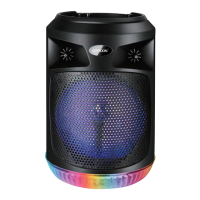
This document describes the GEARDON GD-DM824 Portable Rechargeable Speaker, a versatile audio device designed for various uses including music playback and karaoke performance. The manual provides detailed instructions for its operation, maintenance, and remote control functions, ensuring an optimal user experience.
The GEARDON GD-DM824 speaker serves as a portable audio system capable of playing music from multiple sources and supporting karaoke. It features a built-in wireless microphone system, allowing for untethered vocal performances. The device can connect to external audio sources such as TVs, DVDs, PCs, and MP3 players via an RCA cord, expanding its utility. For music playback, it supports TF cards, USB drives, and Bluetooth connectivity, offering a wide range of options for accessing audio content. The speaker also includes an FM radio function, enabling users to tune into their favorite stations.
The control panel on the speaker provides intuitive access to various functions. It includes dedicated knobs for microphone volume (MIC.VOL) and echo effect (ECHO), allowing users to fine-tune their vocal performance. A master volume knob (OFF ON/VOLUME) controls the overall sound output and also serves as the power switch. Input selection is managed via the MODE button, which cycles through Bluetooth, FM, AUX, USB, and SD card modes. Navigation buttons (previous track/channel, play/pause, next track/channel) facilitate easy control over media playback. The display screen provides visual feedback on the current mode and track information.
For enhanced audio experience, the speaker offers EQ modes, accessible via the remote control, allowing users to adjust the sound profile to their preference. The device also has a recording function, enabling users to capture their performances or other audio. A charging indicator (CHARGE) keeps users informed about the battery status.
The GEARDON GD-DM824 is designed for ease of use. To begin, users simply plug in the power cord and adjust the master volume. For external audio sources, an RCA cord connects the source device to the speaker's audio input terminal. When using the wireless microphone, users should turn on its switch and adjust the distance from their mouth to optimize the sound quality. The microphone volume and echo can be fine-tuned using the dedicated knobs on the control panel.
For karaoke, after plugging in the microphone, users can adjust the microphone volume and reverberation to achieve the desired effect. Models with wireless microphones only require battery installation and switching on. It is recommended to turn down the volume and switch off the power before unplugging the device after use.
The remote control offers convenient access to all major functions from a distance. It includes buttons for power, mute, repeat, mode selection, number buttons for track/channel selection, sound (EQ modes), record, play/pause, and volume control (VOL - and VOL +). The remote also has dedicated buttons for navigating previous and next tracks/channels.
The speaker supports tandem Bluetooth pairing, allowing two GEARDON GD-DM824 speakers to connect wirelessly for a stereo sound experience. This feature is activated by long-pressing the play/pause button in Bluetooth mode. The FM radio function includes an auto channel search, initiated by long-pressing the play/pause button in FM mode. The LED lights on the speaker can be turned on or off by long-pressing the MODE button on the remote control.
Proper maintenance is crucial for the longevity and optimal performance of the GEARDON GD-DM824 speaker and its accessories. The manual highlights several important points regarding battery care for both the wireless microphone and the remote control.
For the wireless microphone, low battery can lead to a reduced receive distance, noise, distortion, or even complete sound loss. Users are advised to replace the battery promptly when these symptoms occur. If the microphone is not going to be used for an extended period, it is essential to remove the battery to prevent leakage, which could damage the device. Additionally, users are cautioned against using the wireless microphone during thunderstorms to avoid accidents or damage.
Similarly, for the remote control, a low battery can result in a shortened receive distance, poor reception, or no response. Replacing the battery is recommended in such cases. As with the microphone, if the remote control will not be used for a long time, the battery should be removed to prevent leakage damage.
The FCC statement included in the manual provides important information regarding compliance and user responsibility. It advises against unauthorized changes or modifications to the equipment, as this could void the user's authority to operate it. In case of harmful interference, the manual suggests measures such as reorienting or relocating the receiving antenna, increasing the separation between the equipment and receiver, connecting the equipment to a different circuit, or consulting a dealer or experienced radio/TV technician for assistance. The device has been evaluated for general RF exposure and can be used in portable exposure conditions without restriction.
 General
| Brand | GEARDON |
|---|---|
| Model | GD-DM824 |
| Category | Portable Speakers |
| Bluetooth Version | 5.0 |
| Charging Time | 3 hours |
| Bluetooth Range | 10 meters |
| Frequency Response | 20kHz |
| Weight | 500g |
| Input Voltage | 5V |

 To Next Page