EasyManua.ls Logo

Gecko TSC-4 - User Manual

Gecko TSC-4
2 pages
Print Icon
To Next Page IconTo Next Page
Loading...
The Quick Reference Card provides a quick overview of your spa's
main functions and the operations accessible with your digital control pad.
Quick Reference Card
Automatic water heater start:
When water temperature is F (0.5˚C)
lower than the Set Point, the heater will
automatically turn on until water tempera-
ture reaches Set Point plus F (0.C).
The "Heater" icon lights up when
the heater is on. It flashes when
there is a request for more heat
but the heater has not yet started.
Real-time clock (K-4-10K):
Use Clock to set real-time clock. The display
toggles every 5 seconds alternately showing
the hourly time and the current water tem-
perature.
The system automatically performs two filter cycles per day, at 12-hour intervals. During a filter cycle,
Pumps 2 & 3 and blower run at high speed for one minute, then Pump 1 runs at low speed for a
programmed number of hours and the ozonator is activated.
To set filter cycle duration and frequency:
Troubleshooting
Programming filter cycles (K-4-10K)
Pumps have started up for
one minute on several oc-
casions and "Filter Cycle"
icon is flashing.
Not a bug but a feature!
Our Smart Winter
Mode protects your spa
from the cold by automati-
cally turning pumps on for
one minute several times a
day to prevent water from
freezing in pipes.
Water temperature is
flashing.
Water temperature in the
spa has reached 11F
(4C).
Do not enter the water!
Allow water to cool down.
The system will reset auto-
matically when water tem-
perature reaches 109˚F
(4C).
Call your dealer or service
supplier if problem persists.
3 flashing dots are dis-
played.
A problem has been
detected.
Do not enter the water!
Check and open water
valves. Clean filter if neces-
sary. Check water level.
Add water if necessary.
Shut power off and power
your spa up again to reset
the system.
Call your dealer or service
supplier if problem persists.
The display is flashing.
A power failure has occurred.
Press any key to reset the
system.
Press Filter key. The
display will show Fdxx
,
with "xx" representing
the currently set filter
cycle duration in hours.
When the desired setting
is displayed, press Filter
again. The display will
show FFxx, with "xx"
representing the filter
cycle frequency per day.
Use Up or Down arrow
key to change setting.
0 = no filtration
12 = continuous
filtration
Use Up or Down arrow
key to change setting
(from 1 to 4, depending
on selected duration).
When the desired set-
ting is displayed, press
Filter to confirm. The
"Filter Cycle" icon lights
up when a filter cycle
is on.
Dual-Pump & Blower System With K-4-8K
Three-Pump & Blower System With K-4-10K
Setting water temperature:
Use Up or Down arrow key to increase or
decrease water temperature. The tempera-
ture setting will be displayed for 5 seconds
to confirm your new selection.
The "Set Point" symbol indicates
the desired temperature, NOT
the current water temperature!
Water temperature can be adjusted by 1˚ in-
crements from 59 to 10F (15 to 4C).
Starting Pump 1:
Press Pump 1 to turn pump on at low speed
(for dual-speed pump). Pressing a second
time turns pump to high speed. A third time
turns pump off. A built-in timer automatically
turns pump off after a predetermined period
of time, unless manually deactivated first.
The "Pump 1" icon lights up when
pump is on at high speed. It flashes
when pump is on at low speed.
1
Starting Pump 2:
Press Pump 2 to turn pump on at low speed
(for dual-speed pump). Pressing a second
time turns pump to high speed. A third time
turns pump off. A built-in timer automatically
turns pump off after a predetermined period
of time, unless manually deactivated first.
The "Pump 2" icon lights up when
pump is on at high speed. It flashes
when pump is on at low speed.
2
Starting Pump 3 (K-4-10K):
Press Pump 3 to turn pump on. Press a
second time to turn pump off. A built-in
timer automatically turns pump off after a
predetermined period of time, unless it has
been manually deactivated.
The "Pump 2" icon lights up when
pump is on.
2
Turning the light on:
Press Light to turn light on at high intensity.
Press a second time to turn light to medium
intensity and a third time to turn light to low
intensity. A fourth time turns light off. A built-in
timer automatically turns light off after 2 hours,
unless it has been manually deactivated.
The "Light" icon lights up when light
is on at high intensity. It flashes when
light is on at medium or low intensity.
Fiber Box Option: If your spa is equipped with
an optional fiber box, press Light key to turn
fiber box (motor & light) on. Press a second
time to turn fiber box motor off and leave light
on. A third time turns both motor and light off.
The "Light" icon is displayed when fiber box
light is on. It flashes when motor and light are
on at the same time. A built-in timer automati-
cally turns fiber box off after 2 hours, unless
manually deactivated first.
Starting the blower:
Press Blower to turn blower on at high
speed. Press a second time to turn blower
to low speed. Pressing a third time turns
blower off. A built-in timer automatically
turns blower off after a predetermined
period of time, unless it has been manually
deactivated.
The "Blower" icon lights up when
blower is on at high speed. It flashes
when blower is on at low speed.
MC-MP SPA PACK
Gecko Alliance
Question and Answer IconNeed help?

Do you have a question about the Gecko TSC-4 and is the answer not in the manual?

Summary

Spa Operation Controls

Starting Pumps and Light

Instructions for operating spa pumps and the light at various speeds and intensities.

Starting the Blower

How to turn the spa blower on and off at different speed settings.

Real-time Clock Operation

Setting and viewing the spa's real-time clock and water temperature.

Water Temperature and Heating

Setting Water Temperature

Adjusting the desired water temperature for your spa.

Automatic Water Heater Start

Understanding how the heater automatically engages to maintain set temperature.

Filter Cycle Programming

Setting Filter Cycle Duration & Frequency

Configuring the timing and length of automatic spa filtration cycles.

Troubleshooting Common Issues

Filter Cycle Icon Flashing

Explanation for the flashing 'Filter Cycle' icon and Smart Winter Mode.

Display Flashing and Errors

Resolving issues when the display flashes or shows error indicators.

Spa Programming Sequence

Setting Time of Day

Procedure to set the current time on the spa control panel.

Filter Cycle Configuration

Setting the start time and duration for spa filter cycles.

Temperature Unit Selection

Choosing between Fahrenheit (°F) and Celsius (°C) for temperature display.

Keypad Lockout

Enabling or disabling control panel functions to prevent unauthorized changes.

Storing Settings and Returning to Normal Mode

Saving programmed settings and exiting the programming sequence.

Advanced Spa Features

Purge Cycles

Setting the number of daily purge cycles for system maintenance.

Inverted Display Mode

Activating or deactivating the inverted display for easier viewing.

Digital Control Pad Lockout

Securing the control panel with full or partial lockout modes.

Economy Mode Operation

Switching to energy-saving mode, which lowers the set point temperature.

Summary

Spa Operation Controls

Starting Pumps and Light

Instructions for operating spa pumps and the light at various speeds and intensities.

Starting the Blower

How to turn the spa blower on and off at different speed settings.

Real-time Clock Operation

Setting and viewing the spa's real-time clock and water temperature.

Water Temperature and Heating

Setting Water Temperature

Adjusting the desired water temperature for your spa.

Automatic Water Heater Start

Understanding how the heater automatically engages to maintain set temperature.

Filter Cycle Programming

Setting Filter Cycle Duration & Frequency

Configuring the timing and length of automatic spa filtration cycles.

Troubleshooting Common Issues

Filter Cycle Icon Flashing

Explanation for the flashing 'Filter Cycle' icon and Smart Winter Mode.

Display Flashing and Errors

Resolving issues when the display flashes or shows error indicators.

Spa Programming Sequence

Setting Time of Day

Procedure to set the current time on the spa control panel.

Filter Cycle Configuration

Setting the start time and duration for spa filter cycles.

Temperature Unit Selection

Choosing between Fahrenheit (°F) and Celsius (°C) for temperature display.

Keypad Lockout

Enabling or disabling control panel functions to prevent unauthorized changes.

Storing Settings and Returning to Normal Mode

Saving programmed settings and exiting the programming sequence.

Advanced Spa Features

Purge Cycles

Setting the number of daily purge cycles for system maintenance.

Inverted Display Mode

Activating or deactivating the inverted display for easier viewing.

Digital Control Pad Lockout

Securing the control panel with full or partial lockout modes.

Economy Mode Operation

Switching to energy-saving mode, which lowers the set point temperature.

Overview

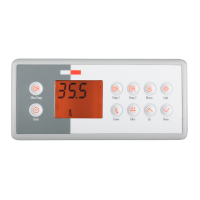
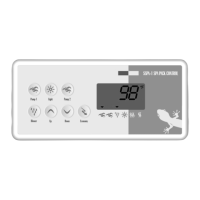
The Gecko Alliance MC-MP SPA PACK is a digital control system for spas, available in two main configurations: a Three-Pump & Blower System with K-4-10K control pad and a Dual-Pump & Blower System with K-4-8K control pad. This system provides comprehensive control over various spa functions, including pumps, blower, lighting, heating, and filtration.

Function Description:

The spa pack manages the operation of up to three pumps and a blower, depending on the model. It includes a real-time clock (K-4-10K only) and allows for precise control of water temperature, filtration cycles, and lighting. The system also features a "Smart Winter Mode" to protect the spa from freezing.

Important Technical Specifications:

  • Temperature Control: Water temperature can be adjusted in 1° increments from 59°F to 104°F (15°C to 40°C). The heater automatically activates when the water temperature is 1°F (0.5°C) below the Set Point and turns off when it reaches 1°F (0.5°C) above the Set Point.
  • Filtration Cycles (K-4-10K): The system performs two filter cycles per day at 12-hour intervals. During a filter cycle, Pumps 2 & 3 and the blower run at high speed for one minute, followed by Pump 1 running at low speed for a programmed duration. The ozonator is also activated during this time. Filter cycle duration can be set from 0 (no filtration) to 12 (continuous filtration) hours. Filter cycle frequency can be set from 1 to 4 times per day.
  • Purge Cycles (K-4-10K): During a purge cycle, pumps and the blower run for two minutes. The number of daily purge cycles can be set.
  • Light Timer: The light automatically turns off after 2 hours unless manually deactivated.
  • Fiber Box Option: If equipped, the fiber box (motor & light) automatically turns off after 2 hours unless manually deactivated.

Usage Features:

  • Pump Control:
    • Pump 1 & 2: Pressing the button once turns the pump on at low speed. A second press switches to high speed. A third press turns the pump off. A built-in timer automatically turns the pump off after a predetermined period. The "Pump 1" or "Pump 2" icon flashes for low speed and lights up for high speed.
    • Pump 3 (K-4-10K): Pressing the button once turns the pump on. A second press turns it off. A built-in timer automatically turns the pump off after a predetermined period. The "Pump 2" icon lights up when Pump 3 is on.
  • Blower Control: Pressing the Blower button once turns it on at high speed. A second press switches to low speed. A third press turns it off. A built-in timer automatically turns the blower off after a predetermined period. The "Blower" icon flashes for low speed and lights up for high speed.
  • Light Control: Pressing the Light button cycles through high, medium, low intensity, and off. A built-in timer automatically turns the light off after 2 hours. The "Light" icon lights up for high intensity and flashes for medium or low intensity.
  • Fiber Box Option: For spas with a fiber box, the Light key controls the fiber box (motor & light). Pressing it once turns both on. A second press turns the motor off, leaving the light on. A third press turns both off. The "Light" icon is displayed when the fiber box light is on and flashes when both motor and light are on.
  • Temperature Setting: Use the Up or Down arrow keys to adjust the desired water temperature. The "Set Point" symbol indicates the desired temperature.
  • Real-time Clock (K-4-10K): Use the Clock button to set the real-time clock. The display alternates between the hourly time and the current water temperature every 5 seconds.
  • Programming Mode: Accessed by holding the Prog. key for 2 seconds. This mode allows setting:
    • Time of day (10:25 am / 11:43 pm)
    • Filter cycle start time (FSxx)
    • Filter cycle duration (Fdxx)
    • Temperature unit (TU C / TU F)
    • Keypad lockout (ULoc / Loc)
    • Storing settings in memory.
  • Temperature Unit Toggle: Press and hold the Light key for 5 seconds to switch between °F and °C.
  • Inverted Display (K-4-10K): Press and hold the Filter key for 5 seconds to invert the display. The display defaults to normal mode after a power-up.
  • Digital Control Pad Lockout (K-4-10K & 8K): This feature prevents unauthorized parameter changes.
    • Partial Lock (LocP): Locks all functions except basic spa functions (pumps, blower, light). Activated by pressing and holding Pump 1 for 5 seconds.
    • Full Lock (LocF): Locks all keypad functions. Activated by holding Pump 1 for more than 10 seconds.
    • To unlock, press and hold Pump 1 again for 5 seconds.
  • Economy Mode (K-4-10K & 8K): Press the Econo key (or Mode key for K-4-8K) to switch to Economy mode. In this mode, the Set Point is 20°F (11°C) below the Normal mode Set Point to save energy. The display alternates between "Econ" and the current temperature. The "Economy Mode" icon lights up when active.

Maintenance Features:

  • Troubleshooting Codes:
    • Pumps started for one minute, "Filter Cycle" icon flashing: This is "Smart Winter Mode" protecting the spa from freezing by running pumps periodically.
    • Display flashing: Indicates a power failure. Press any key to reset.
    • Water temperature flashing (112): Water temperature has reached 112°F (44°C). Do not enter the water. Allow it to cool down; the system will reset automatically at 109°F (43°C). If the problem persists, contact a dealer.
    • 3 flashing dots (98..): A problem has been detected. Do not enter the water. Check and open water valves, clean the filter, check water level, and add water if necessary. Shut off and power on the spa again to reset. If the problem persists, contact a dealer.

Gecko TSC-4 Specifications

General IconGeneral
BrandGecko
ModelTSC-4
CategoryControl Panel
LanguageEnglish

Related product manuals