EasyManua.ls Logo

Gedore CL10 - User Manual

Gedore CL10
4 pages
Print Icon
To Next Page IconTo Next Page
Loading...
Operating Instructions
Important Safety Information
You must read and understand these operating instructions before using the product. Incorrect use
could result in SEVERE INJURIES or even DEATH.
This product should only be used by a trained operator who has been instructed in the safe
handling and conduct of the tool. Operation without training can cause SERIOUS INJURY or DEATH.
This Instruction Manual is part of the product. It must be kept in a safe place for the life of the product
and must be passed on to any subsequent holder if it is sold, loaned, or otherwise transferred.
Safety Messages and Warnings
Indicates a hazardous situation which, if not prevented, could result in DEATH or
SERIOUS INJURY.
Indicates a hazardous situation which, if not prevented, could result in minor or moderate
injuries.
Indicates a hazardous situation which, if not prevented, could result in property damage or in
damage to the product.
This is a warning sign. It is used to alert you to potential personal injury hazards. Observe all safety
messages that follow this symbol to avoid possible injury or death. Note that this symbol is incorporated
into the warning and caution indicators above.
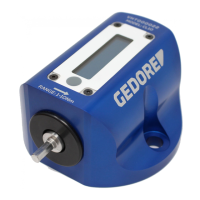
Types CL10 / CL400
Capture Lite Digital Torque Tester
This product corresponds to the recognised
engineering standards and the relevant safety
regulations.
ONLY apply the product according to its intended
use.
This product is not intended to be used by
persons with limited physical, sensory or mental
aptitude or lack of experience and/or knowledge
of how to operate the product.
NEVER allow children to use or play with the
product.
NEVER perform modifications on the product
without the consent of the manufacturer.
Safety devices may not be bypassed, changed
or removed.
DO observe the accident prevention
regulations for commercial use.
NEVER use this tool if you think it could be
damaged or faulty in any way

Question and Answer IconNeed help?

Do you have a question about the Gedore CL10 and is the answer not in the manual?

Overview

The GEDORE Capture Lite Digital Torque Tester, available in Types CL10 and CL400, is a precision instrument designed for testing and analyzing torque. It is intended for use by trained operators who have been instructed in its safe handling and operation.

Function Description:

The Capture Lite Digital Torque Tester measures and displays torque values. It can operate in several modes:

  • Peak: Displays the highest torque value reached during a measurement.
  • 1st-Peak: Displays the first peak torque value.
  • Track: Progressively tracks and displays the applied torque in real-time. The device automatically powers on when the USB cable is plugged in or when a tool is placed into its drive. It powers down automatically when left idle. The tester features a button for mode selection, zeroing the device, and changing units of measurement.

Important Technical Specifications:

The device is equipped with N·m, lbf·ft, and lbf·in units of measurement.

  • CL10 Model: Range of 1-10 N·m.
  • CL400 Model: Range of 10-400 N·m. The mounting hole centers are designed for an M12 tightening torque of 47 N·m (using an 8mm hex key size), with a 90mm spacing between centers. The Capture Lite system is compatible with a range of Capture Sensors (CS) for various torque ranges:
  • CS 1.5 Capture Sensor: 0.1-1.5 N·m
  • CS 2 Capture Sensor: 0.2-2 N·m
  • CS 5 Capture Sensor: 0.5-5 N·m
  • CS 10 Capture Sensor: 1-10 N·m
  • CS 25 Capture Sensor: 2.5-25 N·m
  • CS 50 Capture Sensor: 5-50 N·m
  • CS 100 Capture Sensor: 10-100 N·m
  • CS 250 Capture Sensor: 25-250 N·m
  • CS 500 Capture Sensor: 50-500 N·m
  • CS 1500 Capture Sensor: 150-1500 N·m The system also supports various cables and accessories, including:
  • CAPTURE Display (038700)
  • CAPTURE Manager- PC Software (038710)
  • CAPTURE Cable- CAPTURE Display to custom Sensor (036226)
  • CAPTURE Cable- CAPTURE Display to Capture Sensor (036246)
  • CAPTURE Cable- CAPTURE Display to SDX Screwdriver (036251)
  • CAPTURE Cable- CAPTURE Display to ETX Wrench (036256)
  • CAPTURE Sensor ISO 1500/90 Adaptor (038771)
  • CAPTURE Sensor ISO-A Mount (D18205)
  • CAPTURE Sensor Quick Change Plate (038772) Additionally, there are CH series sensors:
  • CH 1: 0.1-1 N·m
  • CH 2: 0.2-2 N·m
  • CH 5: 0.5-5 N·m
  • CH 25: 2.5-25 N·m

Usage Features:

  • Power On/Off: The device powers on automatically when connected via USB or when a tool is inserted into the drive. It powers down automatically when idle.
  • Mode Selection: Hold down the button until the mode starts flashing, then single-click to cycle through Peak, 1st-Peak, and Track modes. The selected mode is automatically confirmed after 2 seconds.
  • Zeroing: A single click of the button zeros the device.
  • Unit Selection: Hold down the button until the mode flashes, then press and hold again until the units start to flash. Single-click to cycle through N·m, lbf·in, and lbf·ft. The selected unit is automatically confirmed after 2 seconds.
  • Environmental Conditions: The tool should be used within a temperature range of 18°C to 28°C and atmospheric humidity below 90%. It should never be exposed to wet or damp environments.
  • Safety Precautions: Always use personal protective gear, including eye protection, safety gloves, and safety shoes with slip-resistant soles and steel toe caps. Ensure the work area is clean and well-lit.
  • Overload Prevention: Never apply excessive force. Always use original accessory parts. Check the torque checker for damage before every use and never use it if it has been dropped or damaged. Always ensure the correct unit and scale are selected to prevent faulty screw connections.
  • Handling: Always check the condition of the torque checker and accessories for visible damage. Ensure the device is free from oil, grease, and water. Never modify the torque checker or its accessories. Apply torque only in the specified direction of rotation. If dropped, the device must be tested before further use.

Maintenance Features:

  • Cleaning: After every use, clean all parts carefully with a dry, soft, clean cloth. Never use cleansing agents, immerse the torque checker in water, solvents, or any cleaning fluids, as this can damage the screen and components.
  • Storage: After use, store the torque checker in its original packing material or storage case in a clean and dry location to protect against damage and corrosion.
  • Calibration: Calibration should ONLY be performed by authorized specialists, an accredited calibration laboratory, or the manufacturer. Never attempt to adjust or repair the torque tool yourself. A full repair and calibration service is available upon request.
  • Calibration Intervals: According to DIN EN ISO 6789, the minimum calibration interval for a torque tool is 12 months or 5000 load cycles, whichever occurs first. Specific company or quality requirements may necessitate shorter calibration intervals.
  • Testing: Always test the accuracy of the torque tool with an approved torque tester before use. A calibration certificate (DIN EN ISO 6789) with a traceable serial number is provided with the torque tools and the calibration certificate.
  • Disposal: Dispose of the tool, accessories, and packaging materials in accordance with appropriate provisions of law. Consult local authorities for environmentally friendly disposal options.

Gedore CL10 Specifications

General IconGeneral
BrandGedore
ModelCL10
CategoryTest Equipment
LanguageEnglish

Related product manuals