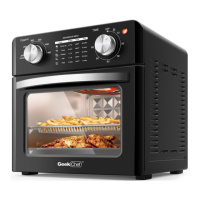
The Geek Chef Air Fryer Oven, model GTO26, is a versatile countertop appliance designed for various cooking functions, including air frying, baking, broiling, toasting, and warming. It offers a 26-quart capacity and operates at 120V~60Hz with a rated power of 1700W. Its dimensions are 16.1 x 15.2 x 13.8 inches.
Function Description:
This appliance combines multiple cooking methods into one unit, allowing users to prepare a wide range of dishes.
- Air Fry: Utilizes a grated basket and circulating hot air for even cooking, ideal for crispy results.
- Bake: Standard baking function for items like pizzas, cakes, and casseroles. Convection baking is also available for faster and more even cooking.
- Broil: High-heat cooking from the top elements, suitable for browning and searing. Convection broiling is also an option.
- Toast: Specifically designed for toasting bread, with adjustable darkness levels.
- Warm: Maintains food at a warm temperature without further cooking.
Important Technical Specifications:
- Model No.: GTO26
- Rated Voltage: 120V~60Hz
- Rated Power: 1700W
- Oven Capacity: 26QT
- Product Dimension: 16.1 x 15.2 x 13.8 inches
Usage Features:
The oven features a user-friendly control panel with four dials and one button:
- Timer Dial: Sets the cooking time for all functions except Toast. Powers the unit on and off. Maximum 60 minutes.
- Temperature Dial: Adjusts the desired temperature from 200°F to 450°F, including a specific setting for Toast/Broil.
- Function Dial: Selects the cooking mode: Warm, Broil, Broil (Convection), Toast, Bake, Bake (Convection), Air Fry.
- Toast Darkness Function: Sets the desired toast shade from light to dark, powering the unit on for toasting.
- Oven Light Button: Activates the interior oven light for visibility during cooking.
Accessories:
The oven comes with several accessories to support its various functions:
- Air Fryer Basket (7): Grated basket for optimal air circulation during air frying. Recommended for the middle rack position.
- Oven Rack (8): A standard rack that can be placed in three positions (bottom, middle, top) depending on the cooking needs.
- Baking Pan (9): Used for baking and collecting drips. Can be placed in any rack position.
- Crumb Tray (10): Removable tray located at the bottom to catch crumbs and oil, essential for cleanliness and preventing smoking.
Rack Positions:
The oven offers three rack positions:
- Position 1 (bottom): Generally used for Warm and Bake functions, or for larger items during baking.
- Position 2 (middle): Recommended for Air Fry and Toast, and often for general baking.
- Position 3 (top): Primarily used for Broil.
Operation Instructions:
- Before First Use: Remove all packaging, clean accessories with hot water and a non-abrasive sponge, and wipe the appliance inside and out with a damp cloth.
- Crumb Tray: Always ensure the crumb tray is in place underneath the bottom heating elements.
- Placement: Place the oven on a flat, heat-resistant surface, at least 4 inches away from walls or other objects to ensure proper ventilation.
- Power: Unwind the power cord and plug it into a wall outlet.
- Cooking Cycle: For most functions (except Toast), turn the Function Dial, then the Temperature Dial, and finally the Timer Dial to start. The power light will illuminate. The oven powers off when the timer expires.
- Toasting Cycle: Turn the Function Dial to Toast, set the Temperature Dial to Toast/Broil, and then turn the Toast Darkness Dial to the desired shade. The oven powers off when the cycle is complete.
- Preheating: For baking, it is recommended to preheat the oven for 5 minutes.
Safety Instructions:
- Read all instructions before use.
- Unplug the unit when not in use and before cleaning.
- Do not touch hot surfaces; use handles or knobs.
- Do not immerse any part of the oven in water.
- Not for use by or near children or individuals with certain disabilities.
- Do not operate with a damaged cord or plug.
- Use caution with accessory attachments not recommended by the manufacturer.
- Do not use outdoors.
- Keep the cord away from hot surfaces and edges.
- Do not place on or near hot gas or electric burners or in a heated oven.
- Do not use for purposes other than intended.
- Exercise caution with containers made of materials other than metal or glass.
- Use extreme caution when removing hot accessories or disposing of hot grease.
- Do not store materials other than recommended ovenproof accessories in the oven.
- Do not place paper, cardboard, plastic, or similar products in the oven.
- Do not cover the Crumb Tray or any part of the oven with metal foil to prevent overheating.
- Avoid inserting oversized foods, metal foil packages, or utensils that may cause fire or electric shock.
- Do not cover or place flammable materials near the oven during operation.
- Do not clean with metal scouring pads.
- Do not attempt to dislodge food while the oven is plugged in.
- Never leave the oven unattended during use.
- Do not rest cooking utensils or baking dishes on the glass door.
- Do not operate or store in an appliance garage or under a wall cabinet.
- Turn control knobs to "OFF" and unplug to disconnect.
- The appliance has a polarized plug; do not defeat this safety feature.
- For household use only, not intended for commercial use.
Maintenance Features:
- Cleaning: Unplug and allow the oven to cool completely before cleaning.
- Exterior: Wipe with a clean, damp cloth and dry thoroughly. Avoid abrasive cleaners.
- Interior Walls and Bottom: Use a damp soapy cloth or sponge. Do not use harsh abrasives, corrosive products, or oven cleaner sprays.
- Accessories: Oven Rack, Baking/Drip Pan, Air Fryer Basket, and Crumb Tray should be hand-washed in hot, sudsy water with a nylon scouring pad or brush. These parts are not dishwasher safe.
- Crumb Tray: Clean after each use to prevent smoking and difficulty removing baked-on particles. Soak in hot, sudsy water or use nonabrasive cleaners for stubborn grease.
- Top Interior: Clean to remove excess grease, preventing smoking in future uses.
Troubleshooting:
The manual provides a troubleshooting guide for common issues:
- Oven not turning on: Check if plugged in, turn the TIMER DIAL.
- Foods not completely cooked: Increase cooking TEMP or time.
- Foods overcooked or burned: Decrease cooking TEMP or time, ensure foods are not touching heating elements.
- Foods cooked unevenly: Preheat the oven, ensure foods are not too closely placed.
- White smoke: Normal during first use, or due to excess oil/fatty foods; ensure the oven is clean.
- Black smoke: Immediately turn off and unplug the oven. Allow to cool and smoke to clear before opening.
Limited Warranty:
Geek Technology Co., Ltd. offers a one-year limited warranty from the date of purchase, covering defects in material or workmanship. The warranty is valid for the original purchaser in the United States. For service, contact 1-844-801-8880 or care@geektechnology.com. The warranty does not cover failures due to power issues, transportation damage, acts of God, misuse, unauthorized repairs, non-approved parts, abnormal cleaning, or incompatible accessories.

 Need help?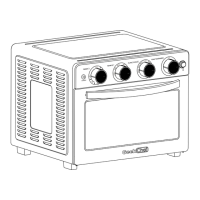

 To Next Page
 General