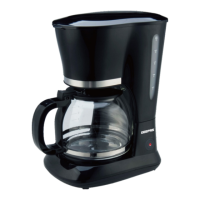
This document describes the Geepas Digital Coffee Maker, Model No.: GCM41504UK, a household appliance designed for brewing coffee.
Function Description:
The Geepas Digital Coffee Maker is primarily designed to brew coffee from ground coffee powder. It features a water tank for holding drinking water, a funnel for the coffee powder, and a carafe for collecting the brewed coffee. The appliance includes a warming plate to keep the coffee warm after brewing. It also offers a "DELAY FUNCTION" allowing users to set a specific time for the coffee maker to automatically start brewing. The device can brew both normal and thick coffee, with an adjustable strength setting.
Important Technical Specifications:
While specific power ratings (voltage, wattage) are not explicitly detailed in the provided pages, the manual emphasizes checking that the outlet voltage matches the appliance's rating label. The water tank has a MAX level indicator, and the time cycle for the delay function is 24 hours. The appliance automatically shuts off after 40 minutes from the ON/OFF button activation if not manually disconnected.
Usage Features:
- Preparation: Before first use, all accessories should be checked for completeness and damage. The unit should be filled to the MAX water level and water brewed several times without coffee powder, then discarded. All detachable parts must be thoroughly cleaned and dried.
- Filling Water: Open the top lid and fill the water tank with drinking water, ensuring the water level does not exceed the MAX indicator on the water gauge.
- Adding Coffee: Place the funnel into its support, ensuring correct assembly for the top lid to close. Insert the permanent filter into the funnel. Add coffee powder to the permanent filter; a level spoon per cup is a general guideline, but users can adjust according to personal taste. Close the top lid completely.
- Carafe Placement: Insert the carafe with its handle closed onto the warming plate horizontally.
- Power Connection: Plug the power cord into the outlet.
- Coffee Strength Adjustment: To adjust coffee strength, press the "STRENGTH" button once. The corresponding indicator will illuminate in orange, and the appliance will brew thick coffee. For normal coffee, this step can be skipped.
- Brewing Process: Press the ON/OFF button. Its indicator will illuminate in red, the LED display will show "12:00", and brewing will begin. The brewing process can be interrupted at any time by pressing the ON/OFF button, which will extinguish its indicator, powering off the coffee maker. During brewing, the "PROGRAM", "DELAY BREW", "HOUR", and "MINUTE" buttons are inactive. If the ON/OFF button is pressed again after interruption, brewing will resume.
- Serving: The carafe can be removed to pour and serve at any time, and the appliance will automatically stop dripping for up to 30 seconds. It is recommended to serve the coffee about one minute after dripping stops for optimum taste. Note that the volume of brewed coffee will be less than the added water due to absorption by coffee grounds.
- Keep Warm Function: After brewing, if not served immediately, the coffee maker can keep the coffee warm on the warming plate. The appliance will automatically shut off after 40 minutes from ON/OFF button activation.
- Delay Function: This feature allows users to set a delayed start time for brewing.
- Set the current time using the HOUR and MINUTE buttons.
- Press the PROGRAM button once; the ON/OFF indicator will illuminate in green and flash, indicating entry into the presetting time state.
- Set the desired delayed starting time using the HOUR and MINUTE buttons.
- Press the DELAY BREW button; the ON/OFF indicator will illuminate in green, and the LED will display the current clock. The automatic start time can be viewed by pressing DELAY BREW.
- The automatic start function can be canceled by pressing ON/OFF. To change the automatic start time, steps 2-4 of the delay function setup must be repeated.
- When the set time is due, the ON/OFF indicator will illuminate in red, and brewing will commence.
Maintenance Features:
- Safety Precaution: Always unplug the appliance before cleaning to prevent electrical shock. Do not immerse the cord, plug, or unit in water or liquid.
- Detachable Parts Cleaning: All detachable parts should be cleaned in hot sudsy water after each use.
- Exterior Cleaning: Wipe the exterior surface of the unit with a soft, damp cloth to remove stains.
- Drip Control: Water droplets may accumulate above the funnel and drip onto the product base during brewing. This area should be wiped with a clean, dry cloth after each use.
- Warming Plate Cleaning: Gently wipe the warming plate with a damp cloth. Never use abrasive cleaners.
- Mineral Deposit Removal (Descaling): To maintain efficient operation, mineral deposits should be periodically cleaned.
- Fill the water tank to the MAX level with a descaler solution (4:1 ratio of water to descaler, or 100 parts water to 3 parts citric acid).
- Place a serving cup under the brew basket.
- Ensure the funnel is assembled in place.
- Switch on the appliance to "brew" the de-scaling solution.
- After brewing one cup of solution, switch off the appliance.
- Let the solution sit for 15 minutes, then repeat the brewing and sitting steps (3-5).
- Switch on the appliance and run off the solution until the water tank is completely empty.
- Rinse the appliance by operating it with water at least 3 times.
- Coffee Taste Tips:
- A clean coffee maker and fresh, cold water are essential for great-tasting coffee.
- Store unused coffee powder in a cool, dry place, resealing tightly and refrigerating after opening.
- For optimum taste, buy whole coffee beans and grind them finely just before brewing.
- Do not reuse coffee powder, as it reduces flavor. Reheating coffee is not recommended.
- Clean the coffee maker if over-extraction causes oiliness (small oil droplets on brewed coffee surface due to oil extraction from powder).
- Oiliness may be more frequent with heavily roasted coffees.

 Need help?
 General

 To Next Page