manual addendum
genesys s
how to program a play list
Page9
H
F
8
G
F
7
F
F
6
E
F
5
D F
4
C
F
3
B
F
2
A
F
1
H
F
8
G
F
7
F
F
6
E
F
5
D F
4
C
F
3
B
F
2
A
F
1
H
F
8
G
F
7
F
F
6
E
F
5
D F
4
C
F
3
B
F
2
A
F
1
H
F
8
G
F
7
F
F
6
E
F
5
D F
4
C
F
3
B
F
2
A
F
1
H
F
8
G
F
7
F
F
6
E
F
5
D F
4
C
F
3
B
F
2
A
F
1
H
F
8
G
F
7
F
F
6
E
F
5
D F
4
C
F
3
B
F
2
A
F
1
H
F
8
G
F
7
F
F
6
E
F
5
D F
4
C
F
3
B
F
2
A
F
1
H
F
8
G
F
7
F
F
6
E
F
5
D F
4
C
F
3
B
F
2
A
F
1
selection
data
confirm
The PLAY LIST function permits to program a special selection from your music repertoire. For example, in case you
have to perform in a wedding party, then in a disco and next in a karaoke bar. Using the Play list you can easily
arrange the proper music selection for each type of performance, then store and recall it according to your needs.
How to program a PLAY LIST
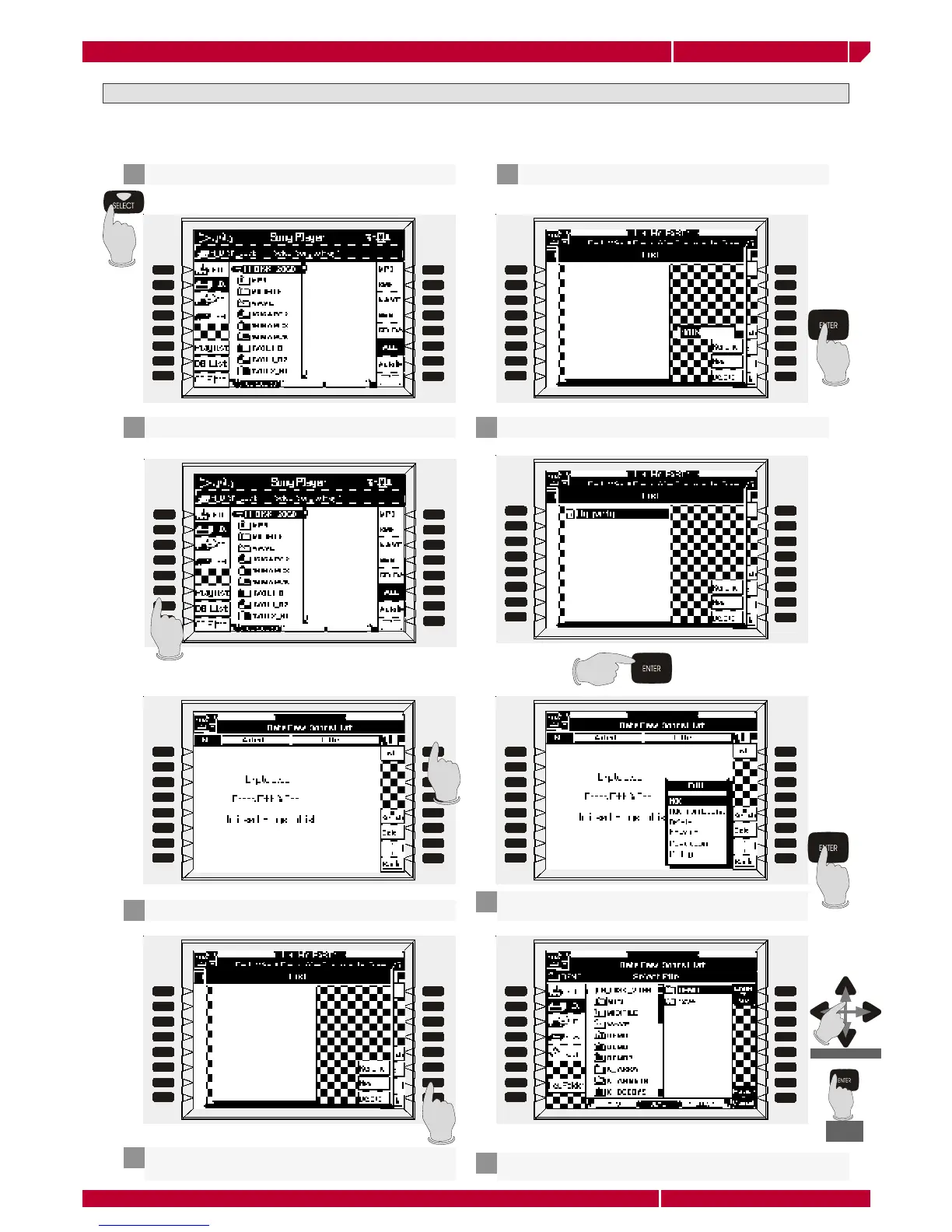
Enter the SONG PLAYER pressing SELECT on the panel
1
Select PLAY LIST by pressing the function button [F]
2
The very first time you enable the function, the display
shows a screen like this
The new play list title appears in the screen, now press ENTER
6
Select any fi le from the hard disk using the CURSOR, then
press ENTER
8
Press the function button F1 [LIST]
3
Press the function button F7 NEW to create a new
play list
4
Type a name for the new play list, then press ENTER
5
Press the function button F7 EDIT, then select ADD. Press
ENTER to start adding fi les to the PLAY list
7


 To Next Page
 Loading...