3
GETTING STARTED
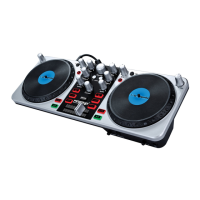
Welcome to the FIRSTMIX I/O Computer DJ system - a great way to be-
gin DJing with your computer. To get started DJing with the FIRSTMIX I/O,
install the included MixVibes’ CrossDJ LE software with the included CD
and plug the FIRSTMIX I/O into an available USB port. You can immedi-
ately begin mixing, scratching, cutting, reversing, and other slick DJ moves!
FIRSTMIX I/O works with MP3s and other audio files on your MAC or PC. The
FIRSTMIX I/O makes it easy to get your feet wet and begin DJing!
BEFORE connecting the FIRSTMIX I/O, install the Mixvibes Cross
software:
1. Insert the included CD into your CD/DVD drive.
2.
Open
the CD and select the .exe file for PC or the .dmg file for MAC.
3.
F
ollow the on-screen instructions.
To start using the FIRSTMIX I/O:
1. Connect the FIRSTMIX I/O’s attached USB cable to an available
USB port on your MAC/PC.
2.
C
onnect an RCA cable from the FIRSTMIX I/O’s RCA Master Output
(A) to a set of speakers, receiver, or anything with a RCA Line out-
put, such as a mixer.
3. Connect a set of headphones to the Headphone Output (B)
4.
If y
ou would like to use a microphone, connect your microphone to
the FIRSTMIX I/O’s mic input (C).
5.
A
fter you have connected the FIRSTMIX I/O, open the CrossDJ LE
software.


 To Next Page