5
Responsible Party Name:
Innovative Concepts & Designs
Company address:
458 Florida Grove Road
Perth Amboy, NJ, 08861 USA
FCC Compliance Statement
This device complies with Part 15 of the FCC Rules. The operation is subject to the following two conditions:
(1) This device may not cause harmful interference, and
(2( This device must accept any interference received, including interference that may cause undesired operation.
Note: This equipment has been tested and found to comply with the limits for a class B digital device, pursuant
to Part 15 of the FCC Rules. These equipment generates uses and can radiate radio frequency energy and if not
installed and used in accordance with the instructions, may cause harmful interference to radio communications.
However, there is no guarantee that interference will not occur in a particular installation. If this equipment does
cause interference to radio or television reception, which can be determined by turning the equipment o and then
on, the user is encouraged to try to correct the interference by one or more of the following measures:
• Reorient or relocate the receiving antenna.
• Increase the separation between the equipment and receiver.
• Connect the equipment to a dierent outlet so that the equipment and receiver are on dierent branch circuits.
• Consult the dealer or an experienced radio/TV technician for help.
FCC ID: 2AE6GALP-L208BTB
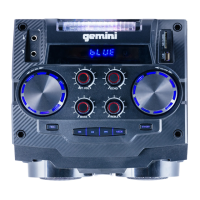
1. Interruptor de encendido: presione para encender o
apagar.
2. Luz de esta: use esto para encender o apagar las luces de
esta.
3. Volumen maestro: gírelo para congurar el volumen del
altavoz.
4. Entrada auxiliar / Entrada de tarjeta USB / TF:
conecte cualquier dispositivo de audio externo al AUX o use
una tarjeta USB o TF.
5. Treble: Gírelo para ajustar los agudos de la salida.
6. Graves: gírelo para ajustar los graves de la salida.
7. Eco del micrófono: gírelo para establecer la cantidad de eco
en el micrófono.
8. Volumen del micrófono: gírelo para congurar el volumen
del micrófono con cable.
9. Entrada de CC: conecte el adaptador de corriente CC
incluido.
10. Entrada de micrófono: conecte aquí el micrófono con cable
incluido.
11. Entrada de guitarra: conecte una guitarra a esta entrada.
12. Reproductor de medios: use este conjunto de botones para
controlar la tarjeta USB o TF y para cambiar a Bluetooth.


 To Next Page
 Loading...