CDCD
FMFM
4、 Speaker
Under the state system, presses the panel or remote panel key first to open radio
function, the LCD screen shows the current frequency of radio, under radio mode; click
FUN Key of the panel or a remote panel, opening FM automatic search broadcasting, click
p or q Key of panel or remote panel to carry out manual broadcasting; press p or q Key
of panel or remote panel for half second, can upward or downward automatically search
broadcasting; When received the broadcasting, presses M Key for 2 seconds that could save
the current station frequency on the broadcasting, the FM channel switching system into the
state when click FUN Key twice, click p or q key to turn upward or downward for manual
switching channels; channel range of 1-8. Click FUN Key Third time, the state entered
thermostats regulate temperature. Click this key again, adjust the volume state.
Click the panel or a remote panel second time, the system switch CD input states, the
LCD screens shows the words of CD, click this Key again to turn off the speaker function.
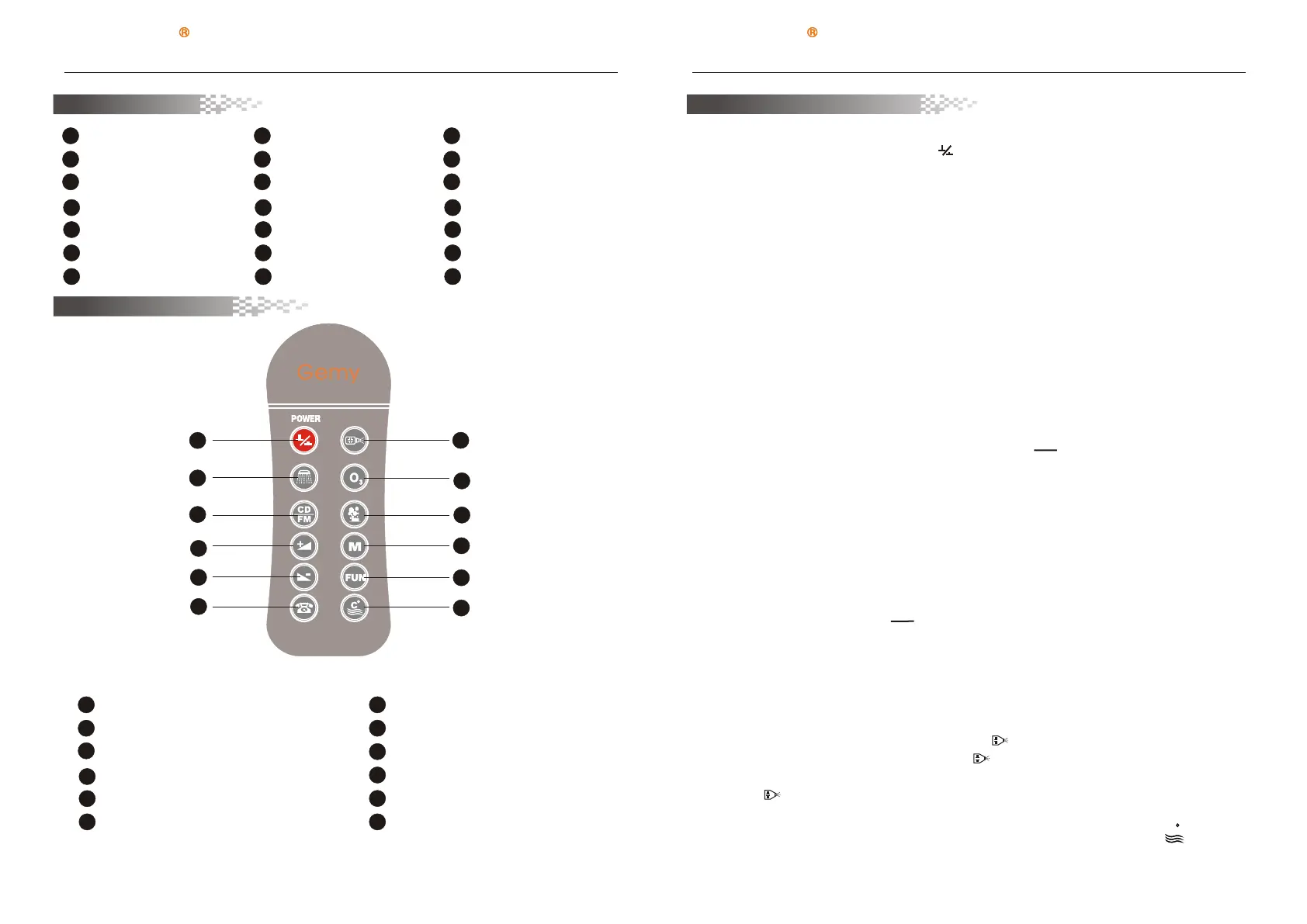
3S S W W
Fu nc ti on S wi tc h
Wa te rf al l Co nt ro l
1
2
Wa te r Pu mp O n/ Of f
3
Wa te r Th er mo st at O n/ Of f
4
5
FM C ha nn el S wi tc h & St or e
6
7
8
LC D Sc re en
13
A
On / O ff
FM /CD
Vo lu me / F un ct io n Ad ju st
Do wn K ey
Vo lu me / F un ct io n Ad ju st
Up K ey
B
C
D
Fu nc ti on V al ue D is pl ay
Vo lu me V al ue D is pl ay
F
Wa te r Pu mp S ta tu s
9
12
Ai r pu mp o n/ of f
10
E
Re mo te C on tr ol R ec ei ve
Wi nd ow
Ozone on/ off
11
H
Wa te r Th er mo st at S ta tu s
G
SSWW
Remote Controller
SSWW
Control Panel
Te le ph on e
Ai r Pu mp S ta tu s
light status
Oz on e St at us
1
2
3
4
5
6
7
8
9
12
10
11
1
2
3
4
5
6
7
8
9
12
10
11
On / O ff
Wa t e rfall C o ntrol
CD /FM
Vo l u me / Func t ion Adju s t Up key
Vo l u me / Func t ion Adju s t Down Ke y
Te l e phone
Wa t e r Pump On / Off
Oz o n e on/of f
Ai r p u mp on/o f f
FM C h a nnel Sw i tch & Stor e
Fu n c tion Sw i tch
Wa t e r Therm o stat On/ O ff
Manual Operation
2、underwater lamp/backlight lamp
In the state of running, Switch on any function of motor and air bubble bath to start the
underwater lamp / back light lamp. When surfing and motor function and air bubble bath are
both closed, underwater lamp / backlight lamp is closed. When being lack of water, air pumps
works for 15 minutes, during this time, underwater lamp / back light lamp can not be turned
on.
1、Turn on/off:
In the state of electricity being on, press Key of the panel or remote panel, the system
start, and 1- hour later shutdown function, open all functional operations, the screen shows
room temperature with yellow green light. Click here to re-key or time executing shutdown
operations to close all open functions.
3、Telephone
Under the of running, when a phone is called in, the phone rings and temporarily close the
audio functions. Press ( button of the panel or remote panel ring to stop, listen to the state
by telephone, LCD screen shows TEL words, and temporarily close the pumps, air pumps,
and other functions. After the phone call , press this Key to hung up, and automatically
restore the original functions.
CDCD
FMFM
5、 Volume adjustmen
6、Motor massage function(water motor)
Under the state system open and water full, press Key of panel or remote panel, which
opened pump function, the LCD screen shows icons, and press again to close pump
function.(Note : the water pump can not be opened under the system leak water and the LCD
screen icon shining. )
Under CD or Radio states, the state FUN Key not be clicked or in state to adjust the
volume, presses panel or remote panel or key to decrease or increase sound volume
7、 Thermostat
Under water full and opening of water pumps, press the panel or remote panel Key
C
Page 7 Page 8
http://www.gemy.cn http://www.gemy.cn


 To Next Page
 Loading...