
 Need help?
Do you have a question about the Generic ABM100 and is the answer not in the manual?
Essential warnings regarding power cord safety, device placement, and preventing suffocation hazards for baby's well-being.
Guidelines for optimal camera placement and secure installation to ensure effective monitoring of children.
Information on factors affecting wireless signal strength, including environmental conditions and object interference.
Recommendations for positioning the camera and handheld unit, including avoiding interference and preventing howling.
Explanation of icons displayed on the handheld unit's status bar, indicating signal level, camera status, and notifications.
Description of icons used within the handheld display's menu system for various settings and functions.
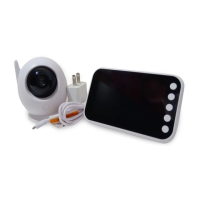
Diagram and identification of key components and features of the baby monitor camera unit.
Instructions for connecting and powering the camera unit, including automatic turn-on and indicator light behavior.
Procedures for turning the camera on and off using its power switch.
Steps for charging and turning on the handheld display unit.
Guidance on how to view the camera's image on the handheld display, including switching between paired cameras.
Detailed steps for pairing the camera and handheld display units using code mode.
Instructions on positioning the camera for optimal monitoring and adjusting the angle for a clear view.
How to use the two-way audio communication feature between the camera and handheld display.
Explanation of how the camera automatically switches to night vision in low light conditions.
Instructions for activating and using the intercom feature on the handheld display.
How to adjust the audio volume for the camera's transmission on the handheld display.
Steps to adjust the brightness level of the handheld display screen.
Setting up timed alerts for feeding intervals.
Selecting and playing lullabies from the handheld display.
How to set the current time on the handheld display unit.
Configuring temperature units (°C/°F) and understanding temperature readings.
Switching between different camera views or lenses on the handheld display.
Enabling and configuring the Voice Activated transmission (VOX) mode.
Guidelines for cleaning the device using a damp cloth and avoiding solvents or abrasives.
Advice against exposing the product to extreme temperatures, humidity, or direct sunlight.
Troubleshooting common problems related to insufficient signal range and interference.
Explanation and solutions for persistent background noise or howling between devices.
Reasons for potential inaccuracies in the temperature reading and factors influencing it.
Detailed technical specifications for the baby monitor, including model, chip, camera sensor, and view angle.
Specifications related to power dissipation, battery capacity, operating temperature, and transmission distance.
Information on the materials used and the physical dimensions of the display and camera units.
 General
| Brand | Generic |
|---|---|
| Model | ABM100 |
| Category | Baby Monitor |
| Language | English |

 To Next Page