Remote Start with Climate Control*
This feature enables you to remotely start your vehicle and set an engine timer
(1-10 minutes) from virtually anywhere. You can also set the climate control
temperature, activate heated / ventilated seats (if equipped) and turn on the
front-window defroster, ensuring a warm or cool car is ready to go when you are.
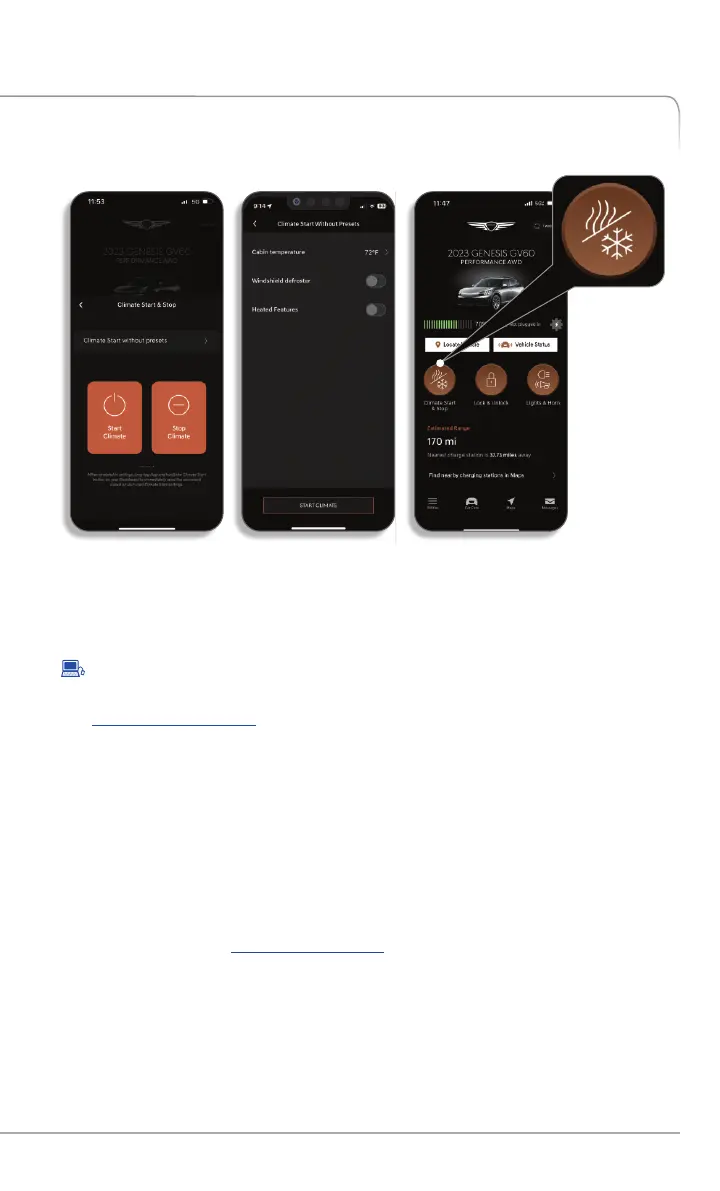
To Activate Remote Start with Climate Control
•
In the Remote Commands section of the home screen select 'Start':
• Enter your Genesis Connected Services PIN or authenticate via your
smartphone s biometric capabilities, if setup.'
• Select climate preset or 'Climate Start Without Preset' and set you
desired climate settings
• The engine and/or climate command will be sent to your vehicle.
•
B t Log on to , select Genesis Connected Services’:y websi e: owners.genesis.com ‘
• Select ‘Remote Start’.
• Select ‘Remote Start’, set a desired engine duration for remote start and
temperature control settings, then input your Genesis Connected Services
PIN or authenticate via your smartphone s biometric capabilities, if setup.'
* Remote Start with Climate Control is only available for Push Button Start-equipped
vehicles with an Automatic Transmission or Dual Clutch Transmission (DCT) and Fully
Automatic Temperature Control.
•
To use this feature, you must have a Genesis Connected Services Personal
Identification Number (PIN). To create or change your PIN, log on to
owners.genesis.com. 8 See page of this manual for more information.
FEATURES ACCESSIBLE VIA THE GENESIS MOBILE APP
GENESIS CONNECTED SERVICES FEATURE DESCRIPTIONS
Other Features
23
Genesis Connected Services User’s Manual I


 To Next Page
 Loading...